When to Run an Air Purifier: Timing Guide 2026
Learn practical timings for running your air purifier to improve indoor air quality. This step-by-step guide covers indicators, room dynamics, seasonal triggers, and maintenance to help homeowners and renters optimize fresh air at home.


According to Air Purifier Info, you should run your air purifier whenever pollutants are present or odors are noticeable. Start by checking your indoor air quality and daily activities that stir up dust. For most homes, consistent, moderate operation yields the best balance of air freshness and energy use. If outdoor smoke or wildfire events occur, begin purifying as soon as you return indoors.
Understanding why timing matters for air purifiers
Air purifiers remove particles by drawing air through filters. The timing of operation matters because it determines how consistently airborne pollutants are reduced and how quickly you reach a comfortable indoor climate. The Air Purifier Info team emphasizes that running a purifier only during sporadic moments can leave gaps in protection, especially in rooms with frequent activity or outdoor exposure. In real homes, the best practice is to establish baseline operation that aligns with daily patterns: cooking times, cleaning routines, and times when you sleep or work from home. If you start with a steady schedule, you can measure impact using simple indicators such as a visible change in dust, fewer odors after cooking, and perceived freshness. Over weeks, you should adjust the schedule to match shifts in season, activity level, and occupant sensitivity. Consistent operation tends to yield more noticeable improvements in overall air quality than sporadic runs.
What to monitor: air quality indicators
To decide when to on air purifier, watch for concrete signals that air quality is slipping. Primary indicators include PM2.5 levels and VOCs, which you can track with an in-room monitor or your purifier's built-in sensors. Odors from cooking, cleaning products, or outdoor smoke are also important alerts. Humidity and mold growth can influence perceived air freshness; if humidity remains high, you may notice musty smells and dampness. When any of these signs rise, run the purifier on a higher setting or keep it on longer. Use a simple weekly check: note dust settling, sniff for odors, and compare morning and evening air quality readings. This routine makes it easier to decide whether to extend runtimes or adjust placement.
CADR, room size, and placement: timing influence
CADR (clean air delivery rate) should match the room size for effective timing. A purifier with a higher CADR than needed may reach target air quality quickly but uses more energy; a too-small unit struggles and you end up running longer. Start with the manufacturer’s recommended room size and observe how quickly the air clears after a disturbance (cooking, vacuuming, or outdoor smoke). Place the unit in a central location away from walls and furniture, which helps air circulate evenly and reduces blind spots. If you move to a larger room or add allies like more occupants, re-evaluate your run schedule. The goal is to keep the room at a comfortable baseline most of the day rather than chasing spikes after every activity.
Kitchen dynamics: odors and smoke—when to run
Cooking releases fats, steam, and fine grease that can linger in the air. In many homes, it is practical to run the purifier during cooking and for 15–30 minutes afterward to capture grease particles and neutralize odors. If meals generate strong scents or if you are frying, extend the post-cook run to 45 minutes. When you leave the kitchen, ensure the purifier continues to operate for a bit to maintain residual air freshness as the kitchen air mixes with adjacent spaces. If you own an open floor plan, you may want to keep the purifier on a lower, steady setting in the living area during cooking to maintain consistent air quality across the home.
Bedrooms and sleep: reducing allergens during the night
Nighttime is when many people notice allergies and asthma symptoms, so timing your purifier for sleep can improve comfort. Run the purifier before bedtime and keep it on a quiet, energy-efficient setting through the night, especially in allergy-prone seasons or near a bedroom with pets. If you wake with nasal congestion or itchy eyes, try a short adjustment to a higher fan speed for a few hours and then revert to a lower continuous setting. Maintaining air freshness in the bedroom supports better sleep quality and can reduce the need for other remedies. Remember to check that the noise level is tolerable for light sleepers.
Living rooms and high-traffic times: when to on air purifier
Living rooms see the most daily activity: kids playing, guests arriving, pets roaming, and dust kicked up from movement. Use a proactive approach by running the purifier on a medium or high setting during busy periods and for 30–60 minutes after activity peaks, especially if windows were opened or a thorough cleaning occurred. Consistent operation throughout the day can prevent spikes in particle counts, particularly in homes with multiple occupants or near busy streets. If you notice lingering dust on surfaces, you may need to run longer or adjust placement to cover the main seating zone. Pairing with a second unit in a large open plan can improve overall air distribution.
Seasonal triggers: pollen, mold, and wildfire smoke
Seasonal pollen can dramatically affect indoor air. Run the purifier during peak pollen weeks and longer on windy days when pollen ingress rises. For mold-prone spaces, time purifier use after rain or humidity spikes; this reduces mold spores and damp odors. In wildfire season, use higher settings and run continuously if possible, especially in areas with poor outdoor air exchange. Keep windows closed and monitor outdoor air quality reports. Regular filter changes during these seasons help sustain performance and prevent mold growth within the unit.
How long to run: practical duration guidelines
There is no one-size-fits-all rule for run times, but you can use practical guidelines to shape your schedule. In most homes, starting with 8–12 hours of daily operation split across morning and evening windows yields noticeable improvements in air freshness. If you live with smokers, pets, or a thick dust load, you may need 12–18 hours per day. In smaller spaces or with purifiers that cover larger rooms, shorter sessions at higher settings can achieve similar results. The key is to observe air quality indicators and adjust runtime to maintain a comfortable baseline most of the day. Always ensure the purifier runs long enough after activities that generate particulates.
Creating a practical schedule for everyday life
A simple approach is to align purifier use with daily routines: run during morning cleanup and again in the late afternoon when dust accumulates from human activity. During sleep, you can lower the setting or use a night mode to maintain air quality without disturbing rest. If your home has connected devices or a smart purifier, set automations to respond to air quality sensors, opening windows, or times when occupants are away. A basic schedule can be piloted for two weeks, then refined based on perceived freshness and measurable changes in dust or odors. Consistency matters more than perfection; a steady, moderate pace often beats sporadic bursts.
Maintenance timing: filters, seals, and air leaks
Maintenance timing is part of effective running schedules. Replace filters per the manufacturer’s guidance and check seals for leaks around doors and windows that undermine purifier performance. A clogged filter reduces efficiency and may extend run times; a clean filter helps you achieve desired air quality faster. Inspect gaskets, hoses, and power cords for wear. If you detect unusual noise or reduced airflow, pause usage and perform a quick check. Keeping the purifier clean and well-sealed reduces energy use and prolongs device life. Tag a seasonal maintenance calendar to remind you of filter changes and performance checks.
Real-world scenarios: quick case studies
Case A: A family cooks frequently and has a pet dog. They operate a mid-sized purifier on medium daily, increasing to high during meals and cleaning. They notice less lingering odors and fewer dust flecks on surfaces within a week. Case B: A renter in a city apartment experiences seasonal pollen and smoke events. They rely on a purifier’s built-in sensors to adjust runtimes and keep windows closed during peak episodes. Both cases illustrate that timing, not just presence, matters for indoor air quality.
Quick-start checklist: your first steps
- Check the purifier’s CADR and room size compatibility.
- Establish a baseline schedule: morning and evening runs, plus post-activity boosts.
- Use a simple air-quality cue (odors, dust, or a monitor) to adjust runtimes.
- Ensure filters are clean and seals are intact.
- Keep windows closed during high outdoor pollution events.
Tools & Materials
- Air quality monitor or reliable air quality app(Prefer PM2.5 sensing; use purifier's built-in indicators if not available)
- Purifier with adjustable CADR and multiple speeds(Choose a unit appropriate for room size; aim for CADR that matches the room area)
- Measuring tape or room size calculator(Estimate the floor area and ceiling height to gauge required purifier coverage)
- Access to outdoor air quality data(Useful for planning around pollen, smoke, or pollution events)
- Clean replacement filters(Keep spares on hand and replace as recommended by the manufacturer)
- Notebook or digital log for runtimes(Track runtimes and observed air changes)
Steps
Estimated time: 60-90 minutes
- 1
Assess current air quality signals
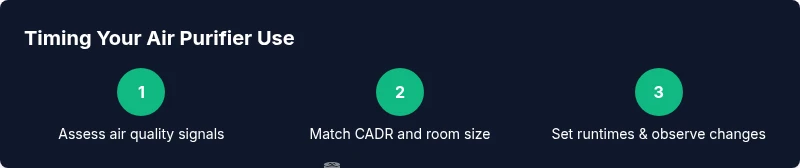
Begin by checking visible indicators (dust on surfaces) and any odors. If you have a PM2.5 reader or purifier sensors, note the baseline reading. This initial snapshot helps tailor runtimes.
Tip: Document the baseline reading and odor strength for future comparison. - 2
Verify purifier specs for your room
Confirm the purifier's CADR matches the room size. A mismatch can lead to under- or over-performance and inconsistent results.
Tip: If in doubt, contact the manufacturer or compare with a CADR calculator. - 3
Set initial run duration and speed
Choose a moderate setting and an initial daily runtime (e.g., 8–12 hours) to establish a baseline. Avoid extreme high-speed runs unless needed.
Tip: Starting with a moderate plan makes it easier to adjust later. - 4
Run and observe changes after disturbances
Operate during common disturbances (cooking, cleaning) and monitor changes in odors and dust settling. Note the time to notice improvement.
Tip: Use a simple checklist to track changes over the first week. - 5
Adjust runtime based on results
If air qualité remains poor after disturbances, gradually extend runtimes or raise the speed on busy days.
Tip: Increase in 1–2 hour increments and reassess after 3–5 days. - 6
Create a daily and weekly schedule
Formalize a routine that covers morning cleanup, daytime activity, and evening wind-down. Use automation if available.
Tip: A consistent pattern beats ad-hoc usage for long-term results. - 7
Maintenance and re-evaluation
Check filters, seals, and overall performance every 1–3 months or per product guidelines. Re-evaluate shelf life after significant environmental changes.
Tip: Replace filters on schedule to maintain efficiency.
Questions & Answers
How often should I run an air purifier?
Run during periods of poor air quality or after activities that generate pollutants. If the air quality remains low, extend runtimes or use a higher setting. Consistency matters more than intensity.
Run it whenever air quality is poor or after activities that kick up dust. Keep a steady schedule for best results.
Is it safe to sleep with an air purifier on?
Yes. Choose a model with a quiet night mode and energy-efficient settings. If noise bothers you, switch to a lower setting or timer.
Yes—many purifiers are designed for overnight use; pick a quiet mode to minimize disturbance.
What if I still smell odors after running?
Check filter condition and consider extending runtimes. Strong odors may require longer operation or higher speeds and improved room circulation.
If odors linger, clean or replace filters and run longer until smells dissipate.
How do I know if my purifier is too small for a room?
If there’s little to no change after 15–30 minutes in a typical cycle, the unit likely isn’t sized for the space.
If you don’t sense a change quickly, your purifier may be undersized for the room.
Do purifiers remove mold spores effectively?
Purifiers reduce airborne spores and help with air quality, but humidity control and cleaning are also important to prevent mold growth.
Purifiers help reduce spores, but you still need humidity control and cleaning.
What should I do during wildfire smoke events?
Run the purifier on higher settings if possible, keep windows closed, and monitor outdoor air quality. Replace filters more frequently during heavy smoke periods.
During wildfires, run at a higher setting and watch outdoor air reports.
Watch Video
Main Points
- Monitor air quality signals to time operation
- Match purifier CADR to room size for effective timing
- Run during cooking and cleaning to curb odors
- Maintain filters and seals to sustain performance
- Create a simple daily schedule for consistency