How Long Should You Run an Air Purifier: A Practical Guide
Discover how long to run an air purifier for optimal indoor air quality. Practical guidelines, scenarios, and energy tips to balance effectiveness with costs.


For most homes, run an air purifier continuously in occupied spaces to maintain clean air. If continuous operation isn’t possible, aim for at least 4-6 hours per day in the main living areas and bedrooms, and use auto mode to let the purifier adjust CADR based on detected air quality. Reassess weekly based on air quality readings.
Why run time matters for indoor air quality
Air quality in a home is dynamic, changing with activities, occupancy, and outdoor pollution. The answer to how long should you run an air purifier isn’t a single number; it depends on room size, pollutant sources, and the purifier’s CADR. According to Air Purifier Info, running time directly affects how many air changes per hour you achieve, which determines how quickly dust, odors, and allergens are removed. In practice, continuous operation in living rooms and bedrooms often yields the most stable IAQ, especially during pollen seasons or after cooking where smoke and odors spike. If you can’t run continuously, aim for the bulk of waking hours in the main living areas and bedrooms, and use auto mode to let the purifier adjust CADR based on detected air quality. When selecting a model, ensure the CADR matches the room volume (target roughly 3-5 air changes per hour for general use) and consider noise and filter life. Aligning run time with these factors improves comfort, health outcomes, and overall satisfaction with your indoor environment.
How to estimate the right daily run time
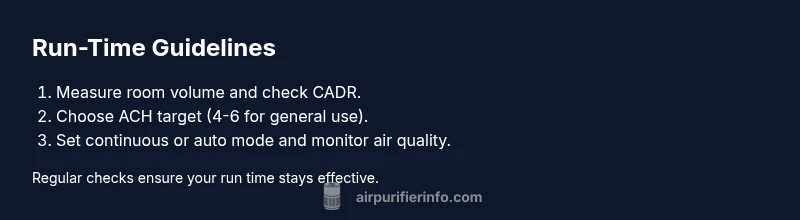
Estimating the best daily run time starts with understanding three pieces of data: room size, purifier CADR, and your target air changes per hour (ACH). To begin, measure the room: length × width × height to get the volume in cubic feet (ft³). Next, locate the purifier’s CADR (cubic feet per minute). A common rule of thumb for general spaces is to aim for about 4-6 ACH, which translates into needing a CADR that can move the room’s air 4-6 times per hour. Using the formula CADR_needed ≈ ACH × roomVolume ÷ 60 helps you translate ACH into a CADR value to compare against the device’s spec. If your purifier’s CADR meets or exceeds CADR_needed, you can comfortably run it in auto or continuous mode; if not, you may need to run longer or consider a larger unit. Once you know the CADR alignment, set expectations for daily run time: in many homes, running a compliant purifier for the bulk of the day yields the most consistent air quality. Reassess weekly using real-time PM2.5 or AQI data to fine-tune the schedule. Air Purifier Info analysis shows that most households benefit from near-continuous operation in active spaces.
Continuous vs. timed operation: pros and cons
There are clear trade-offs between running an air purifier continuously and using a timed or automatic schedule. Continuous operation maximizes pollutant removal and stabilizes IAQ but increases energy use and may raise noise levels, particularly on higher fan speeds. Timed operation reduces energy draw and noise but risks air quality dipping during off periods, especially in homes with persistent sources like cooking smells or pets. Auto mode offers a balance by adjusting CADR in response to detected pollutants, helping you achieve a target ACH with less hands-on management. If your purifier has a dedicated night mode, you may be able to run at a lower level through the night with minimal disruption. In all cases, consider the device’s energy efficiency rating and the room’s typical activity level. The goal is steady, comfortable air quality without energy waste or unnecessary noise.
Run time by common scenarios
Different scenarios call for different approaches to run time. For pollen-heavy seasons, keep the purifier on high or auto mode in main living areas and bedrooms to reduce airborne particles quickly. In kitchens or homes with frequent cooking, running during and after meals helps suppress odors and smoke. For households with pets or allergies, longer daily run times in primary living spaces can lessen dander exposure. If you’re concerned about VOCs from cleaning products or paints, consider models with activated carbon or dedicated VOC modes and extend run time in affected areas. In all cases, pair run time with regular filter maintenance and do not rely on a single device to deodorize or sanitize air. Consistency matters more than occasional bursts of high speed.
Reading air quality and adjusting run time
Modern air purifiers with PM sensors and AQI readouts simplify decision-making. Start with auto mode to allow the device to adapt CADR to the current air quality. If the AQI or PM2.5 levels stay elevated after 60–90 minutes of operation, extend run time or increase the unit’s speed. Conversely, once readings fall into the good range, you can reduce runtime or switch to a lower speed to save energy. Use a dedicated air quality monitor in the same room for cross-checking and adjust your schedule accordingly. Regularly review filter life indicators; a clogged filter reduces effective CADR and may necessitate longer run times to achieve the same air changes per hour. Air Purifier Info analysis shows that relying on actual air quality data improves run-time decisions as pollutants fluctuate day to day.
Energy efficiency tips to balance run time
Balancing run time with energy use is essential for budget-conscious households. Choose models with energy-efficient motors and an accessible auto mode that maintains IAQ without constant high speeds. Schedule operation during peak activity times, and consider using a smart outlet or timer to align purifier use with occupancy patterns. If you use a carbon filter, note that odor removal can be more energy-intensive than particle removal, so you may need slightly longer run times in rooms with frequent cooking or strong smells. Finally, aim for the lowest fan setting that still achieves your target ACH; small adjustments can yield meaningful energy savings over weeks and months. The goal is steady air quality with restraint on energy and noise.
Maintenance and when to change filters
A purifier loses efficiency as filters clog. Running time affects filter life: higher run times accelerate filter wear but improve pollutant removal, while infrequent changes may lead to reduced CADR and wasted energy. Check the manufacturer’s recommended replacement intervals and track usage days. Clean pre-filters regularly to maximize life. If you notice reduced airflow, louder operation, or musters of odors despite long run times, it’s a signal to replace or clean filters. A well-maintained device sustains performance and helps you keep run times predictable and effective.
Practical room-by-room guidelines
- Bedroom: prioritize continuous or long auto-mode operation for allergen reduction and better sleep quality. Allow a low but steady airflow to avoid cold drafts.
- Living room: run during waking hours with auto mode to handle daily activities, dust, and pet dander.
- Kitchen and dining area: run during and after cooking to suppress smoke and odors; carbon or VOC-focused modes help here.
- Home office or study: maintain steady operation for improved concentration and fewer irritants.
- Hallways and open spaces: position purifier centrally and run on auto mode to maximize overall air changes.
- General tip: place purifiers away from walls with at least 6 inches of clearance to maintain proper intake and exhaust flow.
The Air Purifier Info approach
The Air Purifier Info team recommends starting with a clear run-time target based on room size and CADR, then refining it with real-world air quality data. Begin with continuous operation if possible, especially in bedrooms and main living areas. Reassess weekly and adjust run time as pollutants fluctuate or as seasons change. By combining solid math with ongoing observation, you’ll achieve reliable IAQ without wasted energy. Air Purifier Info analysis shows that practical, data-informed run times outperform static schedules, and the guidance above is designed for homeowners and renters seeking better air quality with predictable costs.
Tools & Materials
- Air purifier unit(Choose model sized for your room (CADR appropriate for space).)
- Power outlet and surge protector(Ensure outlet is near the purifier and not overloaded.)
- Measuring tape or room dimensions(Measure length, width, and height to compute room volume.)
- Air quality monitor or AQI app(Optional for tracking and fine-tuning run time.)
- Smartphone or remote control(Helpful for adjusting settings without bending down.)
Steps
Estimated time: Total time: 30-60 minutes to set up and test
- 1
Assess room dimensions
Measure the room’s length, width, and height to calculate total volume in ft³ or m³. This informs the target air changes per hour (ACH) and helps you pick a purifier with adequate CADR. Keep notes for reference when comparing models.
Tip: Use a measuring tape and write down measurements in both feet and meters. - 2
Check CADR and match to room size
Locate the purifier’s CADR rating and compare it to your room volume to estimate ACH. If CADR ≈ roomVolume × ACH ÷ 60, you’re on a good path. Adjust by choosing auto mode or a higher CADR device if needed.
Tip: Choose a CADR that yields at least 4 ACH for typical living spaces. - 3
Choose run-time strategy
Decide between continuous operation or scheduled/auto mode based on air quality, noise tolerance, and energy budget. Auto mode can simplify decision-making by adapting CADR to real-time conditions.
Tip: If traffic or cooking is frequent, lean toward continuous or higher auto-mode activity. - 4
Set purifier to auto or schedule
Enable auto mode if available, or program a daily schedule that prioritizes high-activity periods. Ensure the unit is not blocked and has adequate clearance for intake and exhaust.
Tip: Avoid placing the purifier behind furniture or near walls. - 5
Monitor air quality and adjust
Observe PM2.5/AQI readings and odor levels. If pollutants remain high after a set period (60–90 minutes), extend run time or increase speed. When readings are good, reduce runtime to save energy.
Tip: Use a dedicated monitor in the same room for reliable comparisons. - 6
Reassess weekly
Pollutants fluctuate with seasons and activities. Re-check run-time settings weekly and adjust based on AQI, odor, and occupancy changes.
Tip: A simple log of readings helps you spot trends over time.
Questions & Answers
How long should you run an air purifier each day?
There isn’t a universal number; start with continuous operation in occupied spaces. If that isn’t possible, target 4-6 hours daily in main rooms and bedrooms, then adjust based on air quality readings.
There isn’t a universal number; start with continuous operation when possible, or aim for 4-6 hours daily and adjust using air quality data.
Can I run an air purifier all day and night?
Yes, but consider energy use and noise. If you need overnight operation, choose a model with a quiet night mode and auto speed control.
Yes, but watch energy use and noise; use night mode when possible.
What factors affect run time recommendations?
Room size, pollutant sources, purifier CADR, and the desired air changes per hour all influence the recommended run time.
Room size, pollutant sources, CADR, and target air changes per hour affect run time.
Is continuous operation necessary in bedrooms?
Continuous operation in bedrooms can help with allergens and sleep quality, but a well-tuned auto mode can also work if noise is a concern.
In bedrooms, continuous operation is helpful for allergens, but auto mode works too if noise is a concern.
How do I know if I need more run time?
If PM2.5 or odor readings stay elevated, or AQI remains in the moderate to poor range, consider extending run time or upgrading to a purifier with higher CADR.
Elevated PM2.5 or odors suggest more run time or a more capable purifier.
Watch Video
Main Points
- Run continuously when possible for best IAQ.
- Match CADR to room size for reliable air changes.
- Balance run time with energy and noise considerations.
- Monitor air quality and adjust run time accordingly.
- Reassess weekly as seasons and sources change.