How Often to Run an Air Purifier in 2026: A Home Guide
Discover practical guidance on how often to run an air purifier for optimal indoor air quality. Learn about room size, occupancy, energy use, and actionable schedules tailored to homes and apartments.


How to interpret the running frequency question
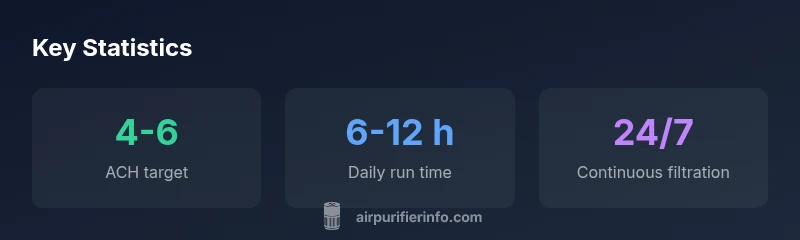
Choosing how often to run an air purifier hinges on multiple factors, not a one-size-fits-all answer. Most homeowners and renters want a simple rule: will this improve air quality without wasting energy? The key concept to understand is air changes per hour (ACH), which measures how many times the purifier cleans the entire room air in an hour. In practice, you’ll tailor runtimes based on room size, purifier capacity, occupancy, cooking activity, pet dander, and local air quality. According to Air Purifier Info, continuous operation is often the most effective starting point for improving indoor air quality. If you can’t run it nonstop, a structured schedule based on room usage still yields meaningful benefits. Track changes in visible dust, odors, and any allergy symptoms to guide adjustments. A purifier that’s underpowered for a room will require longer runtimes to reach comparable ACH. Conversely, a well-matched unit makes continuous filtration more efficient and quieter. Importantly, the goal is steady filtration during the periods when people are present and activities generate pollutants—cooking, smoking, or pet activity.
Key factors that influence how long you should run
Several levers determine runtimes:
- Room size and purifier CADR relative to volume; larger rooms or smaller CADR require longer runtimes or higher settings to reach target ACH.
- Occupancy and activity level; more people, dust generation, or cooking means you’ll want more filtration time.
- Air quality targets; if PM2.5 or odor levels are consistently high, longer or more frequent filtration helps keep readings in the healthy range.
- Pollutant type; pet dander, tobacco smoke, and VOCs may demand higher CADR and longer runs.
- Noise and energy constraints; higher speeds cost more energy and can be louder, so many users prefer auto or night modes for balance. In practice, start with continuous operation if you can, then adjust based on room usage and real-time measurements. Air Purifier Info analyses show that maintaining a consistent filtration rhythm often yields the most reliable air quality improvements across different rooms and seasons.
Scheduling templates for common rooms
Here are practical templates you can adapt:
- Living room: run 6-12 hours per day during active hours; enable auto or medium mode when guests are present.
- Kitchen: run 1-2 hours after cooking to manage odors and smoke; if you cook heavily, extend to 3-4 hours.
- Bedroom: run 8-12 hours per night, ideally in quiet mode on a low setting for overnight filtration.
- Home office: run 6-8 hours during work periods; consider a low to medium setting to balance focus and filtration.
- Shared spaces: aim for continuous filtration during peak usage and at least 6-8 hours in off-peak periods.
Tip: use timers or auto mode to maintain filtration without manual intervention, while minimizing energy use and noise.
Special scenarios: cooking, pets, smokers, and mold risks
- Cooking odors and smoke: run the purifier for 1-2 hours after cooking; position it to capture rising odors, not directly in the smoke plume.
- Pets and allergies: choose a purifier with a higher CADR for dust and pet dander; keep it on auto mode during pets’ peak activity.
- Tobacco smoke: if present, run longer or upgrade CADR to handle higher pollutant loads; consider additional filtration strategies like venting.
- Mold and damp spaces: filtration helps with particulates but do not rely on filtration alone—address moisture, mold remediation, and humidity control as needed.
Energy, noise, and maintenance trade-offs
- Auto mode: balances filtration with real-time air quality; it reduces energy use while maintaining air quality targets.
- Low vs high speeds: use low/medium for most of the day; save high speed for spikes or heavy pollution periods.
- Timers and schedules: leverage built-in timers to avoid running the purifier when spaces are empty, saving energy and reducing noise.
- Maintenance: clean or replace filters per manufacturer guidelines to preserve CADR efficiency; clogged filters degrade performance and increase energy use.
- Noise considerations: if sleep or quiet work is important, prioritize models with quiet operation (often labeled as “sleep” or “silent” modes).
In short, choosing the right balance of speed, timing, and maintenance keeps air quality stable without excessive energy costs or disturbance.
How to measure impact: using air quality readings to adjust run time
Track PM2.5 and VOC levels with a trusted monitor or a purifier that provides air quality readouts. When readings improve, you can scale back runtimes slightly and rely on auto or medium mode for continuous protection. If readings spike (due to cooking, allergies, or outdoor pollution), temporarily increase runtime or speed. Keep a simple log for a couple of weeks to identify patterns related to occupancy, weather, or activities. Consistency is key: even modest reductions in pollutants add up over time and reduce cumulative exposure.
Quick-start checklist to decide your daily run time
- Identify the room and estimate its volume.
- Check your purifier’s CADR and match it to room size for at least 4-6 ACH.
- Determine your typical occupancy and activities (cooking, pets, smokers).
- Decide on a baseline (continuous or daily run time) and choose a mode (auto/low/medium).
- Use air quality readings to adjust weekly; increase during spikes, decrease when readings stay stable.