How to Remove a Levoit Air Purifier Filter: Step-by-Step Guide
Learn how to remove a Levoit air purifier filter safely and efficiently. This comprehensive guide covers model identification, necessary tools, a clear step-by-step removal process, safety notes, maintenance tips, and troubleshooting—backed by expert guidance from Air Purifier Info.


How to remove levoit air purifier filter safely is easier than you think. This quick guide shows the exact steps, the tools you’ll need, and safety reminders to prevent damage to your unit. Whether you’re replacing a worn filter or performing routine maintenance, follow these steps to keep your purifier running at peak performance.
What you’ll accomplish and why it matters
Removing a Levoit air purifier filter correctly is essential to maintain filtration efficiency, prevent damage to the housing, and keep indoor air quality high. In this comprehensive guide you will learn to identify the correct filter type for your specific model, prepare a safe workspace, and perform a clean removal without forcing components. According to Air Purifier Info, proper maintenance not only improves energy efficiency but also extends the life of your purifier. The steps below are designed for homeowners and renters who want a straightforward, safe approach to filter handling. By following these steps you’ll minimize dust dispersion, protect mechanical parts, and ensure you can replace a filter quickly when necessary.
Identify your Levoit model and filter type
Levoit produces several model families that use different filter configurations, including HEPA-type filters and activated carbon pre-filters. Start by locating the model number on the purifier, usually printed on a label near the base or back. Check the user manual or Levoit’s official site to confirm the exact filter type required for your model. The Air Purifier Info Team notes that getting the correct filter type is the most common issue people encounter; using the wrong filter can block airflow or cause the housing to seal improperly. If you’re unsure, remove the current filter gently and compare it to the markings on the replacement package.
Safety prerequisites before removing the filter
Always unplug the purifier and place it on a stable, dry surface before starting. Avoid touching electrical components and ensure hands are dry. If the unit has a medical or oxygen-related use in the home, take extra care to avoid any moisture near electrical parts. Air Purifier Info emphasizes safety first: never operate the purifier with a damaged cord or exposed wiring, and never attempt to disassemble parts beyond what the manual permits.
Tools and workspace setup
Prepare a clean, well-lit workspace with a soft cloth for wiping interior surfaces. Gather a compatible replacement filter, a disposable bag or tray to catch dust, and a small screwdriver if your model uses screws to hold the housing together. Optional but helpful: disposable gloves and a flashlight to inspect the inside of the housing for dust buildup. Having these items on hand minimizes mess and speeds up the process.
Step-by-step removal overview
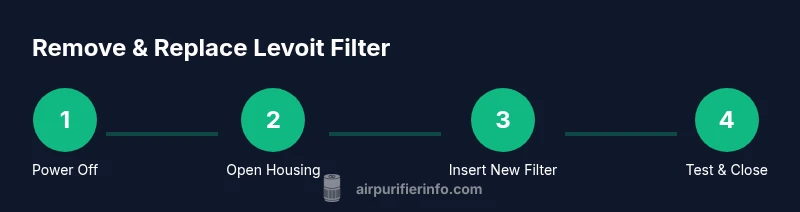
This section provides a concise overview of the removal flow. You’ll power down, access the filter compartment, remove the old filter without forcing components, inspect the housing, and prepare for the new filter insertion. While this overview is high level, the detailed, numbered steps below keep you on track and reduce the chances of damaging clips or seals.
Post-removal inspection and cleaning
After removing the old filter, inspect the interior and the gasket for signs of wear, cracks, or residue. Wipe the interior surfaces with a dry microfiber cloth to remove accumulated dust. Do not use water on the filter or housing unless explicitly stated by the manufacturer. If you see any damage, pause and consult support before proceeding.
Replacing and resealing the filter
Align the new filter with the arrows oriented toward the purifier’s airflow direction and slide it into the housing until it seats firmly. Reattach the housing cover or clamps, ensuring all latches click into place. Plug the unit back in and run a short test cycle on low to confirm proper installation and airflow.
Maintenance tips to extend filter life
To maximize filter life, run the purifier at appropriate speeds for your space and avoid placing it in direct drafts or near humid sources. Regularly inspect the filter every 1–3 months during heavy use, and replace it when you notice reduced airflow or unusual odors. Consider pairing with a pre-filter if your model supports it to reduce particulate load on the main filter.
Authority sources and practical cautions
For further reading, consult established sources on indoor air quality. EPA guidance on air cleaners and indoor air quality provides general principles for filter maintenance and replacement timing. The National Institute for Occupational Safety and Health (NIOSH) and the American Lung Association also offer context about air purifier usage and maintenance in homes. Citing these sources helps you make informed decisions and aligns with best practices in air quality management.
Tools & Materials
- Levoit replacement filter (model-specific)(Confirm compatibility with your purifier model before purchase)
- Soft cleaning cloth(Dry microfiber preferred for interior wiping)
- Small screwdriver (if needed)(Phillips or flathead depending on housing screws)
- Disposable bag or tray(To catch dust when removing the old filter)
- Gloves (optional)(Protect hands from dust and oils)
- Flashlight or phone light(Inspect inside the housing for dust buildup)
Steps
Estimated time: 5-10 minutes
- 1
Power down and prepare workspace
Unplug the purifier and place it on a stable, dry surface. Clear the area of obstacles and ensure you have good lighting. This reduces the risk of accidental starts and keeps dust contained during removal.
Tip: Keep a plastic bag handy to capture dust and debris before you remove the old filter. - 2
Open the filter compartment
Access the filter housing by removing any exterior cover or screws as indicated in your model’s manual. Use the screwdriver only if your unit has screws; otherwise, detach latches gently. Avoid forcing parts to prevent damage.
Tip: If latches resist, double-check the manual to confirm you’re lifting the correct clips. - 3
Remove the old filter
Carefully pull the filter straight out, avoiding tilting or bending. Hold the filter edges to minimize dust escape and place it into the disposal bag.
Tip: Take a quick photo of orientation before removal so you can reinstall correctly. - 4
Inspect the housing and gasket
Look for dust buildup, cracks, or degraded gaskets around the compartment. Wipe clean with a dry microfiber cloth; never rinse the filter housing unless your model explicitly allows it.
Tip: If you detect damage, stop and consult customer support before proceeding. - 5
Prepare the new filter
Remove packaging, check that the arrows on the filter align with the purifier’s airflow direction, and ensure it’s the correct model. Do not reuse old packaging; keep the new filter clean until installation.
Tip: Handle the new filter by its edges to avoid contaminating the media. - 6
Insert the new filter and reseal
Slide the new filter into the housing until it seats firmly. Reattach the cover or screws, then plug the unit back in and run a short low-speed test to verify airflow.
Tip: Run the purifier on low for 5-10 minutes to let the filter settle before normal use.
Questions & Answers
Can I remove the filter while the purifier is on?
No. Always unplug and power down the device before removing the filter to prevent electric shock or accidental operation.
Always unplug the purifier before removing the filter to stay safe.
Do I need to unplug the unit before opening the housing?
Yes. Unplugging ensures your safety while you access the filter compartment and avoids unintentional starts.
Yes, unplug first to stay safe.
How do I know when to replace the filter?
Typically when you notice reduced airflow, persistent odors, or after the manufacturer’s recommended interval for your model. If you have pets or smoke exposure, more frequent changes may be needed.
Watch for airflow drop and odors; replace as recommended.
Can I clean the filter housing?
Yes, wipe the interior housing with a dry microfiber cloth. Do not use water or cleaners on the filter media itself.
Wipe the housing with a dry cloth, avoid moisture on filters.
Is it okay to rinse or reuse a filter?
Most Levoit filters are not washable. Rinsing can damage filtration media. Replace with a new filter for best performance.
Don’t rinse—replace with a new filter.
What’s the correct order to reassemble after replacement?
Return the filter to the housing with arrows facing the correct direction, reseal the unit, and run a test cycle to ensure proper operation.
Insert the filter with arrows aligned, then seal and test.
Watch Video
Main Points
- Unplug before starting
- Identify the correct filter for your model
- Insert the filter with proper orientation
- Securely reseal housing and test airflow