how to clean air purifier filter levoit: a practical guide
Learn how to safely clean Levoit air purifier filters, including which parts are washable, proper washing and drying techniques, and when to replace to maintain peak indoor air quality.


To clean a Levoit air purifier filter, unplug the unit, remove the front cover, and take out the filter. Check your model to confirm which parts are washable. Wash or replace components as directed, then dry thoroughly before reassembly and testing on a low fan.
how to clean air purifier filter levoit: a practical guide
If you’re seeking clearer indoor air, the process of cleaning a Levoit filter can extend the life of your purifier and improve performance. According to Air Purifier Info, maintaining your purifier by cleaning the filter when needed helps sustain air quality and reduces the frequency of full replacements. This guide dives into which parts are washable, how to wash them safely, and how to tell when a filter needs replacement. The goal is to empower homeowners and renters to manage routine maintenance confidently, without compromising the device or the room’s air quality. Remember, always start with basic safety steps and consult your model’s manual for model-specific instructions. As a practical rule, avoid soaking electronics or wiring, and never use harsh chemicals that could damage the filter media or seals. By following these steps, you’ll preserve filtration efficiency and help your purifier run quietly and effectively for years to come.
Before you start: identify washable vs non-washable parts
Levoit purifiers use a combination of a True HEPA filter and a carbon or pre-filter, depending on the model. The washable versus non-washable distinction varies by design, so the first critical step is to read your user manual or the Levoit support site for your exact model. In general, the exterior casing and a removable pre-filter are more likely to be washable or wipe-clean, while the main HEPA element and carbon media are typically not washable. Air Purifier Info emphasizes following manufacturer guidance to avoid damaging the media or reducing overall filtration efficiency. Prepare a clean workspace and gather the necessary tools before you begin, so you don’t have to re-disassemble the unit.
Washable vs non-washable components: what to clean and what to skip
If your model includes a washable pre-filter, rinse it under lukewarm running water until the water runs clear, then gently squeeze out excess moisture. Do not twist or wring aggressively, which can deform the filter. A mild detergent may be used for stubborn grime, but avoid strong soaps that could leave residues. The main HEPA filter usually should not be washed; instead, gently shake out loose dust over a trash can and inspect for tears or heavy clogging. For carbon-impregnated media, replacement is typically recommended rather than washing. If you are unsure, consult the model-specific cleaning instructions or contact Levoit support. Air Purifier Info notes that staying within the recommended guidelines preserves filtration efficiency and prevents damage to delicate fibers.
Step-by-step cleaning overview and decision tree
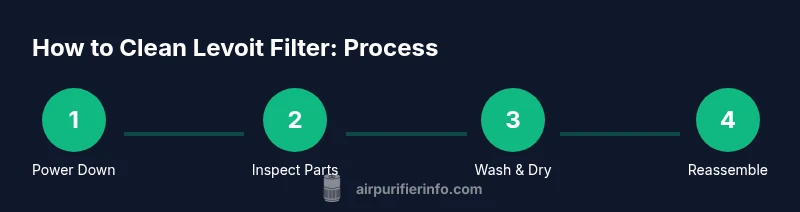
Decide whether you will wash the pre-filter or replace the entire cartridge based on its condition. If washing is allowed, you’ll rinse and air-dry; if not, you’ll replace per the manufacturer’s schedule. This section outlines a decision flow: confirm model, identify washable parts, perform washing or replacement, ensure complete dryness before reassembly, and test the purifier with a low-speed run. Always verify that the unit is unplugged before any detachment. See accompanying diagrams for a quick visual reference.
Drying, reassembly, and running tests
After drying, reassemble the purifier in the reverse order of disassembly. Ensure the filter is seated correctly and seals are intact; a loose seal can reduce filtration efficiency and airflow. Reattach the front panel securely, plug in the unit, and run it on a low setting for 10–15 minutes to verify that the airflow feels steady and there’s no unusual noise. If you notice reduced airflow or unusual sounds, recheck the filter seating and seals. Air Purifier Info’s analysis highlights that proper drying and reassembly are crucial for restoring optimal performance.
If the purifier began with an odor after cleaning, consider a brief test with fresh air for a few minutes and monitor odor levels over the next several hours. Odor may indicate remaining moisture or contamination, which should be addressed before continuous operation.
Maintenance schedule and how to decide when to replace filters
Routine maintenance is a balance between your air quality needs and the purifier’s design. Some Levoit models indicate a replacement interval of several months for the HEPA cartridge, while others rely on pre-filter replacement on a shorter cadence. A key indicator that a filter needs replacement is persistent odors, visible saturation of the pre-filter, or a significant drop in airflow despite cleaning. Consider keeping a log of cleaning dates and odor changes to help estimate when a full replacement is warranted. Air Purifier Info recommends adopting a maintenance routine that aligns with your usage patterns and household conditions.
Common mistakes to avoid and safety reminders
Avoid using hot water or harsh cleaners, which can damage filter media and seals. Do not spray water directly into electrical components or the motor housing. Never attempt to wash the primary HEPA cartridge unless the manual explicitly allows it. Do not run the purifier without a properly installed filter, as this could cause motor strain or dust recirculation. Always disconnect from power before disassembly, and store screws and small parts in a labeled container to prevent loss. The goal is to prevent contamination and ensure your purifier operates within rated specifications.
Final checklist before you run again: quick-start after cleaning
- Confirm all washable components are completely dry.
- Reassemble the unit correctly and ensure seals are tight.
- Reinsert the filter in the correct orientation as indicated by the markings.
- Plug in and run on a low setting for a short test cycle to confirm even airflow and no unusual noises.
- Resume normal operation and monitor air quality and odor over the next 24–48 hours.
quick-start after cleaning: summary and next steps
You’ve learned how to identify washable parts, perform careful cleaning, and ensure proper drying and reassembly for your Levoit purifier. Consistent maintenance can help extend the life of your filter and keep indoor air fresh. For the best results, pair cleaning with regular filter replacement according to your model’s guidelines and usage patterns.
Tools & Materials
- soft microfiber cloth(for wiping exterior and housing)
- mild dish soap(optional, for stubborn grime on pre-filter)
- lukewarm water(for rinsing washable parts)
- bowl or basin(for soaking or rinsing parts)
- towel or drying rack(for air-drying washed parts)
- soft brush(gentle dusting of pleated filter surfaces)
- gloves(optional, to keep hands clean)
- screwdriver(if model requires rear cover screws)
Steps
Estimated time: 60-120 minutes (plus optional 4–12 hours drying time for washed parts)
- 1
Power down and open
Unplug the purifier from the wall. Gently remove the front cover or access panel as per your model’s instruction, then lift out the filter assembly. Keep track of any screws or fasteners so you can reassemble accurately.
Tip: Lay screws in a labeled tray to avoid losing smaller parts. - 2
Identify washable parts
Inspect which components are washable according to your model. Most Levoit units use a washable pre-filter; the main HEPA cartridge is typically not washable. If in doubt, refer to the manual to avoid damaging the filtration media.
Tip: If you’re uncertain, proceed with cleaning only the exterior and pre-filter. - 3
Wash the washable pre-filter
Rinse the pre-filter under lukewarm water until clear. If needed, use a small amount of mild soap and gently agitate with your hands. Rinse again to remove any soap residue.
Tip: Do not scrub hard; pleated filters can tear easily. - 4
Clean the housing and non-washable parts
Wipe the interior of the housing, the front panel, and any plastic seals with a damp microfiber cloth. Do not saturate the HEPA cartridge or carbon media. If dust has accumulated on the outer surfaces, wipe them away carefully.
Tip: Avoid water near electrical contacts or motor vents. - 5
Dry thoroughly before reassembly
Place washed parts on a towel or drying rack in a well-ventilated area. Allow at least 4–6 hours of air-drying for the pre-filter and housing, longer if humidity is high. Do not attempt reassembly until all parts are completely dry.
Tip: If you’re in a hurry, fan-assisted air-drying can speed up the process, but never use direct heat. - 6
Reassemble and check fit
Once dry, reinsert the filter with the correct orientation marks facing the same direction as before. Reattach the front cover, ensure any seals are seated, and re-secure screws if you removed them.
Tip: Double-check that the filter is seated evenly to avoid air leaks. - 7
Test run
Plug the purifier back in and run on the lowest setting for 10–15 minutes. Listen for unusual noises and observe steady airflow. If anything seems off, power down and inspect the assembly again.
Tip: A short test run helps confirm proper seating before normal operation. - 8
Decide on replacement if necessary
If the filter shows tears, persistent odor, or heavy clogging that washing cannot fix, replace the cartridge per your model’s replacement schedule. Keep a spare pre-filter handy to minimize downtime.
Tip: Using genuine Levoit filters helps maintain performance and warranty coverage.
Questions & Answers
Can I wash Levoit true HEPA filters?
Some Levoit models have washable pre-filters, but the main HEPA cartridge is typically not washable. Always follow the model’s manual to avoid damage.
Some Levoit models have washable pre-filters, but the main HEPA cartridge is usually not washable. Check your manual to be sure.
How often should I clean or replace the filter?
Frequency depends on usage and environment. Check for reduced airflow or odor; use the replacement schedule in your model’s guide and consider periodic cleaning of the pre-filter.
It depends on usage and environment. Look for reduced airflow or odors, and follow your model’s replacement schedule.
What should I avoid when cleaning?
Avoid hot water on non-washable parts, never spray water into the motor, and do not use harsh chemicals on filter media.
Avoid hot water on non-washable parts and never spray water into the motor; use mild cleaners if advised.
Can I run the purifier while cleaning it?
No. Keep the purifier unplugged during disassembly and cleaning. Only reassemble and power on after everything is dry and properly reassembled.
Do not run it while cleaning; reassemble only after everything is dry.
How do I know if the filter is dry?
Check that all washed parts feel dry to the touch and there’s no dampness in the pleats. Dry times can vary with humidity but typically take several hours.
Make sure everything is completely dry to avoid mold or odors.
Where can I buy replacement Levoit filters?
Replacement filters are available from Levoit’s official site and authorized retailers. Always use genuine filters to preserve performance and warranty.
You can buy replacements from Levoit’s site or authorized retailers; use genuine filters.
Watch Video
Main Points
- Unplug before handling any components
- Identify washable parts to avoid damage
- Dry all washed parts completely before reassembly
- Replace the main filter if washing isn’t advised or effective
- Document your maintenance to extend purifier life