How to Open an Air Purifier: A Step-by-Step Guide
Learn how to safely open an air purifier for filter maintenance and cleaning. This educational guide covers safety, tools, step-by-step actions, and troubleshooting to help homeowners and renters maintain clean indoor air.


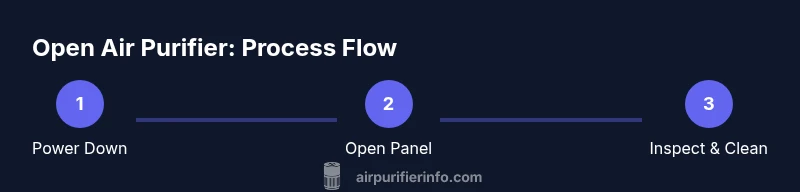
Opening an air purifier safely starts with powering down, unplugging, and removing the access panel to reach the filter chamber. This step-by-step guide outlines exact actions, safety checks, and reassembly tips so you can perform maintenance confidently and protect your device.
How to Open an Air Purifier Safely: An Overview
If you’re wondering how to open air purifier safely, this guide walks you through each essential step. According to Air Purifier Info, gaining access to the interior lets you verify filter status, remove dust buildup, and inspect seals and fans for wear. The process is model-variant but the core principles are universal: unplug, protect yourself, and follow the manufacturer’s instructions. This middle section dives into why access is needed, what to check before you touch anything, and how to prevent damage to your unit while maintaining indoor air quality.
Safety and Preparation Before You Open the Unit
Safety first. Always power down the purifier, unplug from the wall, and move the device away from walls or fabrics to reduce heat exposure and avoid dust migration. Wear protective gloves if you have sensitive skin or allergies, and keep a small tray handy for screws or small parts. Avoid touching electrical boards or wiring; static discharge can affect the control system. If you notice signs of moisture, odd smells, or unusual noises, stop and consult the user manual or contact support. Following these precautions helps protect you and your purifier from damage and ensures a safe maintenance session.
Tools and Materials You May Need
Before you open the purifier, assemble a small workspace with the right tools to minimize time spent with the unit open. A screwdriver compatible with your model’s screws, a microfiber cloth, and a soft brush are commonly sufficient. Have a replacement filter available if you plan to refresh during this session. Optional items include nitrile gloves, isopropyl wipes for quick interior surface cleaning, and a small container for screws. Using the recommended tools reduces the risk of scratching surfaces or misplacing small parts.
Locating the Access Panel and Gaining Access
Most air purifiers have a front, back, or bottom panel that acts as the access point for filters and internal components. Inspect for visible screws or clips; some panels slide or hinge off rather than unscrewing. If screws are present, use the correct bit to avoid stripping. Gently detach the panel while supporting it to prevent the grille from snapping back. Keep track of fasteners and note their locations for easier reassembly. Establishing this access is the crucial first step in safely performing any maintenance.
Removing the Filter and Inspecting Components
With the panel removed, carefully slide the filter out by its frame. Check the filter for dust buildup and discoloration; a dirty filter reduces efficiency and may indicate smoke or strong odors in the room. Wipe the interior surfaces with a dry microfiber cloth or a lightly damp cloth if the manufacturer approves water contact on non-electronic surfaces. Inspect the seal around the filter housing for cracks or wear, and take a look at the fan blades for dust accumulation. Never touch the electronic boards directly. If the unit uses multiple filters, note the order and orientation before removal.
Cleaning, Reassembly, and Testing
After inspection and cleaning, reinsert the filter in the correct orientation, reseal the housing, and reattach the access panel. If you replaced a filter, ensure the new unit is seated evenly and the seals are snug. Plug the purifier back in and run it on a low fan setting to listen for abnormal noises or vibrations. Check for proper air output and observe that indicator lights respond normally. If anything seems off, power down again and recheck the assembly. A careful reassembly ensures optimal performance and longevity.
Common Mistakes, Troubleshooting, and When to Seek Help
Common mistakes include forcing panels, using excessive moisture, or neglecting to reseal the filter housing. If the unit does not power on after reassembly, verify the power source and any safety interlocks described in the manual. For persistent issues like unusual smells, reduced airflow, or persistent noise, consult the manufacturer’s troubleshooting guide or contact support. Air Purifier Info recommends relying on model-specific manuals for detailed steps and warranty considerations to avoid inadvertent damage and protect your investment.
Maintenance Schedule and Best Practices After Opening
Regular maintenance—performed per the manufacturer’s guidance—helps sustain air quality and purifier efficiency. Schedule periodic checks to verify filter integrity and inspect seals after cleaning. Keep a log of maintenance activities to track when filters were last replaced and when panels were opened. This discipline supports consistent performance and a healthier indoor environment.
Tools & Materials
- Screwdriver (Phillips or flathead, depending on model)(Have the correct bit size to avoid stripping screws)
- Microfiber cloth(Lint-free for interior surfaces)
- Replacement filter (optional)(Choose the correct size/part for your model)
- Gloves (nitrile or disposable)(Reduces skin contact with dust and sharp edges)
- Soft brush or cotton swabs(For gentle dusting in tight corners)
- Small container for screws(Helps keep fasteners organized)
Steps
Estimated time: 15-25 minutes
- 1
Power down and unplug
Turn off the purifier and unplug from the wall before you begin any disassembly. This prevents electrical shock and protects internal electronics. Move the unit away from walls and fabrics to reduce dust intrusion while you work.
Tip: Double-check that all indicator lights are off before proceeding. - 2
Open the access panel
Identify whether the panel is held by screws or a hinge. Use the appropriate tool to remove fasteners or gently lift the panel if it’s a hinged design. Support the panel as you remove it to avoid dropping it into the interior.
Tip: If you’re unsure about screw size, take a quick photo before removing them all. - 3
Remove the filter
Carefully slide the filter out by its frame, holding it level to prevent dust from falling. Note orientation for correct reinstallation. Place the filter on a clean surface for inspection.
Tip: If you see oily residue or unusual odors, plan to replace the filter rather than clean it. - 4
Clean interior surfaces
Wipe interior surfaces with a dry microfiber cloth. For stubborn dust, use a slightly damp cloth only if the manufacturer allows moisture on non-electronic surfaces. Avoid touching the motor or circuit boards.
Tip: Never spray liquids directly into the purifier. - 5
Inspect seals and the fan area
Check the seal around the filter housing for cracks or wear. Look at the fan blades for dust buildup and clean if accessible. Replace any worn seals or damaged components following the manual.
Tip: Worn seals can reduce efficiency; replace them rather than attempting DIY repairs. - 6
Reassemble and test
Reinsert the filter in the correct orientation, reseal the housing, and reattach the access panel. Plug in the unit and run it briefly on a low setting to verify airflow and panel fit. If everything operates smoothly, you’re done.
Tip: Keep screws in a labeled tray to simplify reassembly.
Questions & Answers
Do I need to unplug the purifier before opening it?
Yes. Unplugging ensures there is no electrical current while you access internal parts, reducing shock risk and protecting sensitive electronics. Always confirm the device is completely powered down before starting.
Always unplug the purifier before opening. This prevents shocks and protects the internal electronics.
Can I open every model, or are some sealed?
Most household purifiers have an accessible panel for filter maintenance, but some models employ sealed housings or integrated panels. Check your manual for the exact access method to avoid forcing components.
Most have an access panel, but some models are sealed. Check the manual first.
Is it safe to clean the interior with water?
Water should generally not contact electronic components. Use a dry or lightly damp cloth on non-electronic surfaces as directed by the manufacturer. If in doubt, use dry cleaning methods only.
Avoid water on electronics; use a dry cloth or a lightly damp cloth only where approved by the manual.
How often should I open the purifier for maintenance?
Follow the manufacturer’s guidelines for your model. Regular checks are part of routine upkeep and help sustain air quality, but exact intervals vary by design and usage.
Follow your model’s maintenance schedule; it varies by device and usage.
What if the screws won’t budge or the panel is stuck?
Pause and reassess; forcing panels can cause damage. Confirm you have the right screwdriver size and that you’re removing the correct fasteners. If stubborn, consult the manual or contact support.
If screws are stuck, stop and verify you’re using the right tool. If needed, contact support.
Watch Video
Main Points
- Power down and unplug before starting.
- Use the correct tool to avoid damage to fasteners.
- Check filter orientation and sealing during reassembly.
- Test the unit after reassembly to confirm proper operation.
- Follow manufacturer guidelines to protect warranty and safety.