Repair Air Purifier: Step-by-Step Guide
Learn how to diagnose, clean, and repair your air purifier to restore optimal performance. Step-by-step instructions, tools, safety tips, and when to call a pro help homeowners and renters improve indoor air quality.


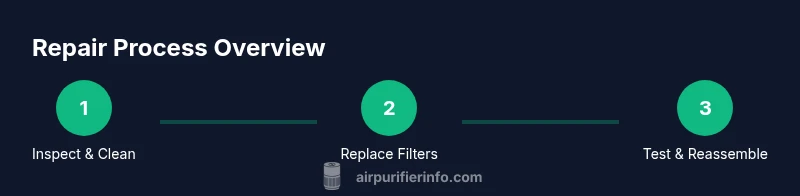
Repairing an air purifier involves diagnosing common faults, cleaning the unit, replacing worn filters, and re-testing performance. Start by unplugging, inspecting power and filters, and cleaning the housing. If airflow remains weak or alarms persist, upgrade or seek professional help. This approach preserves investment and maintains clean indoor air.
Why Repairing Your Air Purifier Matters
According to Air Purifier Info, repairing an air purifier can extend its life, reduce waste, and keep your indoor air clean without the cost and environmental impact of a full replacement. When a purifier starts to underperform—unusual noises, reduced airflow, or persistent odors—there are often simple, solvable causes. Regular maintenance, such as cleaning pre-filters and sensors and replacing worn HEPA and carbon filters, can restore efficiency and protect your family from dust, pollen, and VOCs. This section explains the mindset of repair: diagnose first, clean thoroughly, and replace parts only when necessary. By approaching repairs in a methodical, safe way, you’ll preserve the device’s warranty where applicable and minimize downtime.
Air Purifier Info’s guidance emphasizes safe handling, compatible replacement parts, and avoiding over-cleaning or wet-dusting that can damage motor components. The goal is to recover performance without over-extending a broken unit or exposing yourself to risks from electrical components. You’ll learn how to identify when a problem is simply dirty filters, a clogged intake, or a failing fan, and when it’s time to consider professional repair or replacement.
Common Issues That Signal Repair Is Needed
Air purifiers are designed for long service lives, but several problems can creep in over time. Common signals include a noticeable drop in airflow, unusual sounds from the fan, persistent unusual odors, frequent resets, and wake-up alarms indicating sensor issues. Dust buildup on intake grilles or behind removable panels is a frequent culprit that reduces suction and traps air before it reaches the filter. A filter that looks clogged or discolored may not adequately trap pollutants, reducing overall performance. In some models, a blinking indicator light signals a sensor fault or a faulty power supply. This section helps you differentiate symptoms caused by simple maintenance from more serious failures. By the end, you’ll know which issues you can safely address and when to seek support.
Safety First: Before You Begin
Before any repair work, unplug the device and disconnect it from power. Do not operate the purifier while disassembled. If your unit uses a plug-in transformer, avoid pulling wires or forcibly twisting cords. Wear close-fitting clothing and, if you have sensitive skin, gloves to protect against sharp edges inside the housing. Work in a well-ventilated area to prevent inhalation of accumulated dust. If you suspect a damaged cord, cracked housing, or exposed wiring, stop and seek professional assistance. Always refer to the user manual for model-specific cautions. Safety should guide every repair action, from battery or capacitor handling to fan inspection.
Diagnosing Problems Without Full Disassembly
Start with the simplest checks first. Verify the unit is truly powered on by testing the power switch and outlet with another device. Inspect the intake and outlet grilles for visible blockages and clean any debris using a soft brush or compressed air if available. Remove and inspect the pre-filter—often the easiest to access—and check for clogging. If your model has a secondary carbon or HEPA filter, remove and visually inspect it for discoloration or tears. Listen for the fan’s operation; if you hear grinding, rubbing, or a stuck blade, the fan may require lubrication or replacement. Sensor-based errors are tricky; consult the manual for fault codes and default reset procedures. A quick reset can resolve many transient sensor issues.
Cleaning and Maintenance to Restore Performance
Regular cleaning is a foundational repair activity. Remove external dust with a microfiber cloth and a soft brush. For stubborn grime, lightly dampen the cloth with water or isopropyl alcohol (don’t soak). Clean the outer housing, grill openings, and the airflow path, avoiding moisture around the motor and electrical contacts. Vacuum any vents or dust collection areas if your model allows. Let components dry completely before reassembly. Replace pre-filters as recommended by the manufacturer; a fresh pre-filter catches larger particles and extends the life of the HEPA element. Cleaning should be gentle, consistent, and thorough rather than aggressive scrubbing that can damage seals or plastics.
Replacing Filters: Choosing and Installing the Right Type
Filters are the core of any purifier’s performance. Identify the correct filter type for your model—pre-filter, HEPA, and any activated carbon stage—and purchase compatible replacements from reputable sources. When installing, follow the orientation arrows and ensure seals are snug to avoid bypass leakage. Do not mix filter brands or use expired parts, as mismatched components can reduce efficiency or void warranties. After installation, run a brief test cycle to confirm airflow is restored and there are no abnormal noises. If your model includes a filter life indicator, note the current reading as a baseline for future maintenance.
When to Seek Professional Help or Consider Replacement
If the unit fails electrical tests, exhibits signs of motor failure, or the fault codes indicate a control board problem, professional repair is often warranted. Attempting to repair a failed circuit or power supply without proper equipment can be dangerous. For units under warranty, contact the manufacturer’s service support to preserve coverage. If repair costs approach or exceed the price of a new purifier, replacing the unit may be the most economical option. Air Purifier Info advises weighing the cost of parts, labor, and the purifier’s remaining useful life against the price and energy efficiency of a newer model.
Building a Maintenance Routine to Prolong Lifespan
A proactive maintenance plan reduces the likelihood of major repairs and keeps indoor air quality high. Schedule quarterly checks for dust buildup, annual replacement of filters (or as recommended), and periodic cleaning of sensors and housing. Keep spare filters on hand to minimize downtime. Maintain a clean environment around the purifier to prevent excessive dust accumulation. A simple maintenance routine, documented in a quick checklist, can help renters and homeowners sustain optimal performance with minimal surprises. Regular inspections also provide opportunities to notice changes in noise, airflow, or even the presence of any odors that could indicate a problem.
Quick-Reference Troubleshooting Checklist
- Power: Verify outlet and switch; try a different outlet.
- Airflow: Check for blockages at intake/outlet; clean if needed.
- Filters: Inspect for discoloration or tears; replace as required.
- Noise: Listen for grinding or rubbing; inspect the fan housing.
- Sensor lights: Consult the manual for fault codes and reset steps.
- Reassembly: Ensure all clips and seals are properly seated after maintenance.
Tools & Materials
- Screwdriver set (Phillips and flathead)(Small precision driver for panel screws)
- Soft brush and microfiber cloth(Gentle on plastic; avoid scratching surfaces)
- Compressed air can (optional)(Use with caution; short bursts to dislodge dust)
- Isopropyl alcohol (70% or higher)(For light surface cleaning; avoid soaking electronics)
- Replacement filters (pre-filter, HEPA, carbon as applicable)(Use manufacturer-recommended specs for your model)
- Multimeter (optional for electrical checks)(Only if you’re comfortable testing continuity and voltage)
- Gloves (optional)(Protect hands from sharp edges and dust)
Steps
Estimated time: 45-75 minutes
- 1
Power down and unplug
Unplug the purifier from the wall and disconnect any power cords. This prevents shock or accidental startup during disassembly. If the unit uses a detachable plug, remove it completely and place the purifier on a stable work surface.
Tip: Double-check that the device cannot be energized by a residual charge before handling internals. - 2
Remove access panels
Use the appropriate screwdriver to remove the front or bottom access panel. Keep screws in a labeled container to avoid losing them. Note how the parts are arranged so you can reassemble correctly.
Tip: Take a quick photo per step before removing components to aid reassembly. - 3
Inspect and clean interior components
Visually inspect the fan blades for dust buildup and the filter housing for clogs. Clean dust with a soft brush, then wipe surfaces with a microfiber cloth lightly dampened with isopropyl alcohol. Do not wet the motor or electrical contacts.
Tip: Focus on intakes and outlets—dust there most directly lowers airflow. - 4
Check and replace filters
Remove used filters and examine their condition. Replace pre-filters, HEPA, and activated carbon filters as required by your model’s maintenance schedule. Align the new filters with the direction arrows and ensure a tight seal to prevent bypass leakage.
Tip: Always verify the correct filter orientation before sliding them back in. - 5
Test electrical components
With panels in place but still disconnected from power, check visible wiring for loose connections. If you’re comfortable, use a multimeter to confirm continuity on accessible lines. If anything looks loose, reseat connectors firmly.
Tip: If you see scorched insulation or a burnt smell, stop and seek professional help. - 6
Reassemble and run a test cycle
Reinstall all panels and screws, plug the unit in, and run a short test cycle. Listen for smooth operation and confirm there are no unexpected noises or vibrations. Monitor airflow from the outlet for a minute or two.
Tip: If airflow remains weak after a reset, re-check the seals and filter seating.
Questions & Answers
How do I know if my air purifier needs repair?
If you notice reduced airflow, unusual noises, persistent odors, or alarm indicators, repair is often warranted. Start with a clean pre-filter and reseat seals. If problems persist after maintenance, consult the manual or a professional.
If airflow drops, noises change, or alarms appear, check filters and seals first, then consider professional help if needed.
Can I repair an air purifier myself?
Many basic issues—dust, clogged filters, and loose panels—can be addressed safely at home. Electrical faults or motor problems require professional service. Always unplug the unit and follow the manual.
Most simple fixes are doable at home with care, but avoid electrical repairs unless you’re trained.
How often should I replace filters?
Filter life depends on usage and environment. Check manufacturer guidelines; typically, HEPA filters last 6–12 months with heavy use, while pre-filters may need monthly attention in dusty homes.
Follow the model’s schedule for filter changes and inspect them monthly if you’re in a dusty space.
What safety steps are essential when repairing an air purifier?
Always unplug before opening the unit, avoid water on internal electronics, check for sharp edges, and handle capacitors and wiring with care. If unsure, seek professional help.
Unplug first, avoid moisture, and don’t touch exposed wiring if you’re not trained.
Is it better to repair or replace an old air purifier?
If repair costs approach or exceed the price of a new unit, or energy efficiency is poor, replacement may be the better option. Compare ongoing maintenance costs and energy use.
If repairs are expensive and energy use is high, buying a newer, efficient model may pay off.
Watch Video
Main Points
- Diagnose before disassembly to avoid unnecessary work
- Regular cleaning and timely filter replacement restore performance
- Safety first: unplug, avoid moisture, and follow manufacturer guidance
- Reassemble carefully and test thoroughly to confirm repair success