Leaving an Air Purifier On When Away: A Practical Guide
Can you leave an air purifier on when you’re not home? This practical, educational guide covers safety, energy use, and optimal setups to keep indoor air clean while you’re away. Learn how to choose features, set unattended operation, and maintain performance with Air Purifier Info.


Can you leave an air purifier on when not home? In most cases, yes—modern units are designed for unattended operation, especially with timers, auto-off, and ozone-free technology. However, safety and energy considerations vary by model and room. This guide from Air Purifier Info explains how to assess risks, choose features, and set up your purifier for reliable, safe use while you're away.
Should you leave an air purifier on when you’re away?
If you’re asking, can you leave air purifier on when not home, the short answer is generally yes for many models. Modern purifiers offer features designed for unattended operation, including timers, auto-off, and ozone-free filtration. According to Air Purifier Info, the key is to verify that your unit has safe continuous-use settings, properly seated filters, and a good placement that ensures continuous airflow without blockages. In homes and apartments, enabling a schedule or keeping the fan at a low to moderate setting can maintain air quality while you're away or asleep. Always review the user manual for model-specific guidelines and check that the device is plugged into a grounded outlet. Avoid leaving the purifier running in a space with weak ventilation if there is potential for fumes or odors to accumulate.
- Air quality is affected by activities inside the home, outdoor air exchange, and room occupancy. A purifier that runs on a preset schedule can balance air freshness with energy use.
- Begin by confirming the purifier is ozone-free and certified for continuous operation. If the unit has a filter-life indicator, ensure you’re not letting it run on a saturated carbon filter, which can reduce effectiveness and create odors.
- If you share your home with others, consider a model with a sleep or quiet mode to minimize noise at night; this helps ensure consistent operation without disturbing occupants.
How air purifiers work when left running
Air purifiers improve indoor air quality by pulling air through a series of filtration stages. Most units use a pre-filter, a true HEPA filter, and an activated carbon filter to reduce dust, pollen, pet dander, odors, and some volatile organic compounds (VOCs). When left running, the purifier maintains continuous air turnover, which helps dilute pollutants and improve overall air freshness. Key considerations include CADR (clean air delivery rate) and room size compatibility, ensuring the purifier is appropriate for the space. If you’re away for extended periods, opting for a model with an auto mode that adjusts fan speed based on air quality readings can keep air clean while reducing energy usage. Some purifiers also incorporate air quality sensors that trigger higher speeds when pollutant levels rise, and return to a quieter setting when the air is cleaner. Always verify that the unit’s sensors are functional and that placement allows for unimpeded airflow to prevent dead zones in the room.
Energy use and cost implications
Energy use matters, especially if you plan to run an air purifier for long periods while you’re away. Most purifiers operate at low to moderate power levels on standard settings and rise in power when set to higher fan speeds or in turbo mode. Since electricity costs and domestic energy profiles vary, it’s wise to take a few practical steps: choose a model with an energy-saving or auto mode, schedule operation during peak occupancy hours, and avoid running multiple purifiers in the same area without necessity. It’s also helpful to compare the purifier’s power draw at different speeds using the user manual’s spec sheets. While never replacing a furnace or HVAC system, a well-chosen purifier can provide meaningful air quality improvements with modest ongoing energy use, particularly in rooms with high dust or pet-dander loads.
Safety considerations and potential risks
Safety should guide unattended operation. Fire risk from modern electric purifiers is generally low if you use a model with proper insulation and a grounded outlet, place it on a stable surface, and avoid coverings that can overheat. Do not place purifiers near water sources, heat sources like radiators, or flammable materials. If you live in an area with frequent power outages, consider a purifier with a built-in timer and automatic shutoff when voltage drops to avoid nuisance restarts or surges that could harm the device. Finally, steer clear of ozone-generating models, which can irritate the lungs and cause headaches, especially in enclosed spaces.
- Air Purifier Info emphasizes choosing ozone-free units for safe daily use and during absences.
Features that make unattended operation safer
Certain features make it safer to run an air purifier while you’re away. A true HEPA filter combined with an activated carbon stage will handle dust and odors without producing ozone. A reliable auto-mode or smart scheduling lets the purifier run only when needed, reducing energy use. A child lock or passcode can prevent little hands from altering settings. Filter-life indicators help you time filter changes so the device isn’t overworked. Night or sleep modes reduce noise and keep comfort levels high while maintaining air cleanliness. Safety certifications (such as CARB compliance in the U.S.) provide additional assurance.
Maintenance steps before leaving the purifier on
Before you head out, perform a quick maintenance check so the purifier runs smoothly in your absence. Replace or clean the pre-filter if it’s visibly dirty; a clogged pre-filter blocks airflow and reduces efficiency. Confirm the HEPA or true filter is within its service life and properly seated. Clean the exterior housing to prevent dust redistribution when the unit restarts. If your model supports a filter-life indicator, reset it after replacement. Finally, verify the power cord and outlet are in good condition and that there are no tripping hazards around the unit. Air Purifier Info recommends documenting the last maintenance date so you can plan future replacements and avoid performance dips.
Room selection and placement tips for unattended use
Placement matters for optimal performance when you’re not home. Position the purifier on a flat, stable surface away from walls, furniture, or curtains that could block airflow. Avoid corners where air could stagnate; instead, place it where air can circulate freely across the room. If you’re purifying a bedroom, living room, or home office, ensure you have a clear path for air intake and outlet. Power accessibility is essential; route cords to minimize tripping hazards but avoid daisy-chaining power strips with high-draw devices. For apartments near shared walls, distributing purifiers in multiple rooms can improve overall air quality without overburdening a single unit.
When to avoid leaving it on and alternative options
There are scenarios where you might not want to leave a purifier on unattended. If the room has strong chemical odors from recent painting or solvents, a carbon filter will gradually saturate, reducing effectiveness. In kitchens with heavy cooking, a purifier should be placed to capture smoke without becoming overwhelmed. For long absences, consider turning off the purifier and using air quality monitoring that triggers the purifier only when levels rise above a threshold, or schedule daily operation to balance air quality with energy use. If you have pets, dogs, cats, or birds, select a purifier with a robust filtration system and ensure the unit’s noise is acceptable; some models have ultra-quiet modes suitable for bedrooms. In any case, always follow the manufacturer’s safety recommendations and your local ventilation needs.
Quick-start checklist for unattended operation
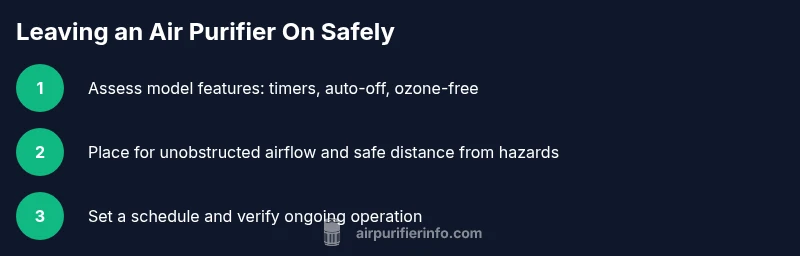
- Verify your purifier is ozone-free and rated for continuous operation.
- Check the filter status and replace if past its service life.
- Enable a timer or auto mode to avoid unnecessary runtime.
- Place the unit with unrestricted airflow and away from hazards.
- Test run before leaving and verify the device remains on the selected setting.
- Schedule maintenance reminders so future changes happen on time.
],
toolsMaterials
Tools & Materials
- Power outlet with adequate capacity(Ensure outlet is grounded and not overloaded by other devices.)
- Air purifier user manual(Keep for model-specific settings (timer, auto-off, sensors).)
- Dust-free workspace and clean area(Minimal dust around the unit helps preserve filters.)
Steps
Estimated time: 25-40 minutes
- 1
Prep the purifier
Review the user manual, reset to a known baseline, and confirm the filter is clean or replaced if due. This prevents unexpected odor or reduced airflow after long idle periods.
Tip: Set the unit to a safe auto or sleep mode before leaving. - 2
Position the purifier
Place the unit on a stable surface with unobstructed airflow. Avoid corners or spots where air could be blocked by furniture or drapes.
Tip: Ensure there is space around the intake and outlet for efficient circulation. - 3
Connect and configure
Plug into a grounded outlet and enable timer or auto mode. If your model has a smart app, set a schedule that mirrors your routine.
Tip: Use the app to verify it’s actively running and not paused. - 4
Set maintenance reminders
Record the last filter replacement date and set reminders for future changes to maintain performance while you’re away.
Tip: A clean filter maintains airflow and reduces energy waste. - 5
Run a test before leaving
Turn on the purifier, listen for abnormal noises, and observe for any unusual odors or airflow issues.
Tip: If anything seems off, pause operation and troubleshoot or replace components. - 6
Monitor after return
When you get home, check the unit, clear any accumulated dust, and reset indicators if needed to ensure continued safe operation.
Tip: Review performance data from the last period to plan future maintenance.
Questions & Answers
Can I leave my air purifier on all day when I’m away?
Yes, many purifiers are designed for continuous operation if they have timers or auto-off and are ozone-free. Always check the model’s safety features and room ventilation.
Yes, as long as your purifier has timers and ozone-free operation, you can leave it on.
Is it safe to leave an air purifier on around pets?
Generally safe with ozone-free models and proper placement. Ensure the unit is not in a pet’s reach or in a space where it might be tampered with by animals.
Yes, ozone-free purifiers are usually safe around pets when placed properly.
Will leaving it on use a lot of electricity?
Energy use is typically modest, especially on lower settings or auto mode. If energy costs are a concern, choose a model with smart scheduling.
The energy use is generally low, but it depends on speed and features.
Should I leave it on during power outages?
If you expect power stability, consider turning it off during outages unless a backup power solution is available. Unplugging reduces risk of surges.
Only keep it on if there’s stable power; otherwise, unplug to prevent issues.
Can an air purifier help with odors from cooking or smoke when away?
Carbon filters help reduce odors, including cooking smells and cigarette smoke, but effectiveness depends on filter condition and exposure duration.
Yes, but odors take time to reduce; plan for higher fan speeds if needed.
Watch Video
Main Points
- Verify model supports unattended operation.
- Use timers or auto mode to control runtime.
- Choose ozone-free purifiers for safe away-use.
- Plan regular maintenance to keep performance high.
- Place units for optimal airflow and minimal obstructions.