How to Clean a Philips Air Purifier Filter
Learn how to safely clean your Philips air purifier filter, when to wash versus replace, and essential maintenance tips to keep indoor air quality optimal for homeowners and renters.


This guide explains how to safely clean a Philips air purifier filter, including checks for model compatibility, washing methods for washable filters, drying times, reassembly, and ongoing maintenance. You’ll learn what parts can be washed, how to avoid common mistakes, and how to decide when a replacement is necessary. Following these steps helps preserve filtration efficiency and indoor air quality.
Why cleaning the Philips air purifier filter matters
A clean filter is essential for maintaining effective filtration, minimizing dust and odors, and protecting indoor air quality. In this guide on how to clean air purifier filter Philips, you’ll learn when to wash (if your model supports it), how to dry properly, and how to reassemble without compromising the unit’s seal. According to Air Purifier Info, regular maintenance helps sustain filtration efficiency and extend the life of your purifier. Keeping filters clean also reduces the workload on the fan, which can improve energy use and performance over time.
This approach isn't just about aesthetics; a dirty filter can reduce airflow, making the purifier work harder and potentially shorten its lifespan. By staying consistent with cleaning, homeowners and renters can enjoy fresher air and a more reliable purifier.
Understanding Philips filter types and washability
Philips purifiers come in a range of configurations, often using a combination of a HEPA-like main filter, activated carbon pre-filters, and sometimes a fine mesh pre-filter. Not all Philips filters are designed to be washed; many are intended to be replaced after a certain period. The key is to know your model’s capabilities before attempting any cleaning. If you’re unsure, check the user manual or the Philips support site for your exact model number. Air Purifier Info emphasizes that following model-specific guidance reduces the risk of damage and maintains filtration performance. In some cases, users can refresh a non-washable filter by vacuuming the surface dust, but the main filtration media should not be exposed to moisture.
Safety considerations before you start
Power off and unplug the purifier before any disassembly. Do not operate the unit while the filter or housing is wet. Use a clean, dry workspace with good ventilation to avoid inhaling dust that may be released during cleaning. If you suffer from allergies or asthma, consider performing cleaning during a period of low indoor activity to minimize exposure to accumulated dust. Wear protective gloves if you are sensitive to dust, and keep children and pets away from the area during maintenance. These precautions align with best practices for safe air-purifier maintenance and reduce the risk of electric shock or injury.
What to check in your user manual before cleaning
Before you touch the filter, locate the model number and read the specific cleaning instructions. Some Philips units allow a quick removal of the filter housing for a rinse, while others require a dry wipe. The manual will indicate whether soap or detergents are recommended, what water temperature to use, and how long the filter should be allowed to dry. If the manual suggests a wash, ensure you have access to a clean, dry towel and a gentle brush. Air Purifier Info notes that model-specific guidance is the best way to avoid accidentally damaging seals or reducing filtration efficiency.
How to determine if your Philips filter is washable
Washable filters usually have explicit labeling on the filter frame or within the manual. They may be designed to be rinsed under cool water and air-dried completely before reuse. Non-washable filters often require replacement after a specified interval. To determine washability, first check the model number on the purifier and cross-reference it with the user manual or Philips customer support pages. If you still aren’t sure, treat the filter as non-washable and plan to replace it when it reaches the end of its life. This step helps prevent unintended damage and ensures your purifier continues to perform well.
Step-by-step cleaning process overview
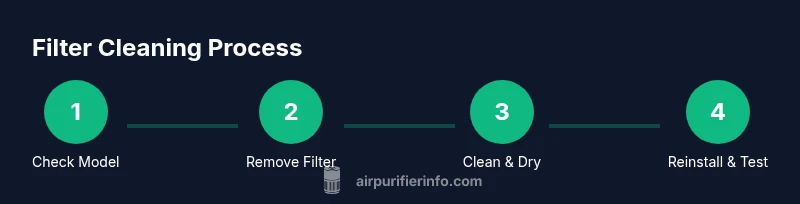
If your Philips filter is washable, the process typically involves removing the filter, rinsing under cool running water, and allowing sufficient drying time before reinstallation. Do not use hot water, soaps, or detergents unless specifically recommended by the manufacturer. After drying, reassemble the unit and run a brief test cycle to ensure proper airflow and an upright seal. If the model requires replacement filters, consider this option if cleaning does not restore performance. Always verify model-specific instructions to avoid damage.
Drying, reassembly and testing the purifier
Thorough drying is critical. Even a small amount of moisture can lead to mold growth or reduced performance. Place the filter in a clean, dry area with good airflow and avoid direct sunlight, which can degrade filter media over time. Reinstall the filter following the purifier’s housing instructions, reseal the cover, and plug in the unit. Run a short test cycle on a low setting to confirm that air is flowing freely and there are no unusual noises. If you notice reduced airflow or strange odors, re-check the seal and drying completeness.
When to replace instead of cleaning
If the filter shows visible damage, persistent odors after cleaning, crumbling media, or reduced filtration efficiency after a wash, replacement is usually the best option. Philips models vary in recommended lifespans, often depending on usage and environment. Air Purifier Info recommends following the manufacturer’s replacement schedule and using genuine Philips replacement filters for optimal fit and performance. Regular replacement helps maintain IAQ and can prevent performance issues down the line.
Maintenance tips to keep filters effective
Adopt a routine that fits your environment: inspect filters monthly if you have pets or high dust levels, and follow the manufacturer’s cleaning schedule. Keep the purifier away from humid areas to avoid moisture exposure that can degrade media. Use the device on a steady, unobstructed surface to promote even airflow, and clear nearby dust from the exterior to prevent debris from entering the intake. A few minutes of proactive maintenance now can reduce the need for more extensive service later. Air Purifier Info highlights the importance of consistent care for lasting filtration performance.
Model-specific notes and where to find official support
If you own a Philips air purifier, you’ll often find model-specific instructions on the Philips support site or within the packaging insert. When in doubt, contact Philips customer support to confirm whether your exact model’s filter is washable and to obtain the correct cleaning method. For broader guidance and validation, Air Purifier Info recommends relying on official manuals and support channels to avoid invalidating warranties or damaging components. Keeping a note of your model number and cleaning steps can streamline future maintenance.
Tools & Materials
- Soft-bristle brush(Gentle on filter pleats; avoid stiff brushes.)
- Cool water(Use cold or room-temperature water; hot water can warp media.)
- Mild dish soap (optional)(Only if manual permits; otherwise skip.)
- Clean bowl or basin(Wide, stable container for rinsing.)
- Microfiber cloth or towel(Dry surfaces while handling.)
- Gloves (optional)(Used if you have sensitivities to dust.)
- Screwdriver (Phillips #1 or #2) - optional(Needed if housing is secured with screws.)
- Replacement filter (optional)(Keep on hand if the current filter cannot be restored.)
Steps
Estimated time: 24-48 hours
- 1
Power off and unplug the purifier
Switch the unit off and unplug from the wall to ensure there is no active electricity during maintenance. This protects you from shocks and prevents the device from starting unexpectedly.
Tip: If the unit sits on carpet, move it to a hard surface to keep water away from carpet fibers. - 2
Open the housing and locate the filter
Carefully remove the outer housing or panel as instructed in your model’s manual to access the filter. Take note of the orientation to ensure correct reinstallation later.
Tip: Use a dry cloth to wipe away any accumulated dust around the housing before removing the filter. - 3
Remove the filter
Gently lift the filter straight out to avoid tearing the media. Inspect it for signs of wear or damage that would indicate replacement is necessary.
Tip: Place the filter on a clean surface to avoid contaminating it with dust from other parts. - 4
Check washability and prepare washing area
Consult the user manual or Philips support to confirm whether the filter is washable. If washable, prepare the basin with cool water for rinsing.
Tip: Do not soak filters unless the manual specifically allows soaking. - 5
Rinse or clean the filter as directed
Rinse the filter under cool running water from multiple angles until clear. Do not use hot water, stiff brushes, or detergents unless explicitly approved by the manufacturer.
Tip: If allowed, use a soft brush to loosen embedded dust gently. - 6
Dry the filter completely
Allow the filter to air-dry in a clean, ventilated area out of direct sun. Do not reinstall until it is fully dry to prevent mold growth and damage.
Tip: A fan can speed up drying, but do not use heat sources. - 7
Reinstall and reseal the purifier
Once the filter is completely dry, reinstall it in the correct orientation and reattach the housing. Ensure all seals are snug to prevent air leaks.
Tip: Double-check that the filter is seated evenly to maintain airflow. - 8
Run a test cycle and monitor performance
Plug the unit back in and run it on a low setting to ensure air moves freely and there are no unusual sounds or odors.
Tip: If you notice problems, re-check the filter alignment and seals.
Questions & Answers
Can I wash and reuse a Philips filter?
Some Philips filters are washable; others are not. Always verify with the model’s manual before attempting to wash. If washable, ensure it is completely dry before reinstallation.
Some Philips filters can be washed, but always check your model’s manual first. If washable, make sure it’s completely dry before reinstalling.
How often should I clean my Philips air purifier filter?
Cleaning frequency depends on usage and environment. In dusty homes or with pets, inspect monthly and clean as needed if the filter is washable. Otherwise, follow the replacement schedule in the manual.
In dusty or pet-heavy homes, check monthly and clean if washable. Otherwise, follow the replacement schedule in your manual.
Is soap or detergent safe for Philips filters?
Detergents are generally not recommended unless the manual explicitly allows them. Plain cool water is usually sufficient for washing if permitted.
Detergents aren’t usually recommended unless your manual says so. Use plain cool water if washing is allowed.
What should I do if the filter remains damp after washing?
If damp, let it air-dry for a longer period in a clean, ventilated area before reinstallation. Do not use the purifier until the filter is completely dry.
Let the filter dry completely in a ventilated area before reinstalling; don’t run the purifier while damp.
How do I know when to replace the filter?
If the filter shows damage, persistent odors, or reduced airflow after cleaning, replace it. Follow Philips’ recommended replacement schedule for your model.
Replace the filter if damaged or if cleaning doesn’t restore performance. Follow the model’s replacement schedule.
Does cleaning the filter extend the purifier’s life?
Yes, regular maintenance can help maintain airflow and filtration efficiency, potentially extending the purifier’s usable life. It’s not a substitute for timely filter replacement when needed.
Regular maintenance helps keep airflow and filtration efficiency up, but don’t skip replacement when needed.
Watch Video
Main Points
- Follow model-specific guidelines for washability.
- Ensure complete drying before reassembly.
- Regular maintenance preserves filtration efficiency.
- Replace filters when cleaning cannot restore performance.
- Rely on official manuals and support for warranty safety.