Why Is My Air Filter So Loud? Troubleshooting Guide
Discover why your air filter sounds loud and how to fix it fast. This Air Purifier Info guide covers common causes, DIY steps, and when to call a professional.


The most likely cause of a loud air filter is airflow restriction from a dirty or ill-fitting filter, plus a loose housing or a failing motor. Quick fix: turn off the unit, replace or clean the filter, verify seals and duct paths are clear, and reduce fan speed if possible. If noise persists, consult a pro.
Why the Noise Happens
Loud operation from an air purifier or HVAC air filter usually comes from airflow stress or mechanical wear rather than a mysterious malfunction. When the filter becomes dirty, clogged, or the wrong size for the unit, the fan has to work harder to push air through, which amplifies motor hums and blade thwacks. The Air Purifier Info team notes that many cases of excessive noise are solvable with a simple filter change and a quick housing check. Start by evaluating whether the odor-absorbent or dust-loaded filter is blocking air paths or sagging in its frame. If the filter is older than six months and visibly loaded with dust, replace it with a fresh one that matches the device’s MERV or PPF rating. Also confirm that the seal between the filter, frame, and housing is intact; even a small gap can produce rattle or whistle sounds as air leaks through. If you’ve ever asked yourself, "why is my air filter so loud?", the answer is often airflow restrictions rather than a dead motor. In many quieter operations, replacing a clogged filter and ensuring a proper seal reduces noise almost immediately.
Common Noises and Their Causes
Different noises point to different issues. A high-pitched whine often means air is being forced through a narrow gap or the filter is mis-seated. A grinding or rubbing sound may indicate a sticking fan blade or a worn bearing. A buzzing or humming noise can come from loose screws, a damaged motor mount, or resonance with ductwork. A rattling sound usually means debris in the blower path or a loose grille. By mapping the sound to a likely cause, you can target the fix more quickly. The goal is not only quieter operation but also safer operation, as unusual noises can signal problems that could degrade performance or shorten the purifier’s life. Air Purifier Info’s guidance emphasizes listening for where the vibration originates (front, back, or sides) and noting whether the sound changes with fan speed.
Quick Visual Check You Can Do Right Now
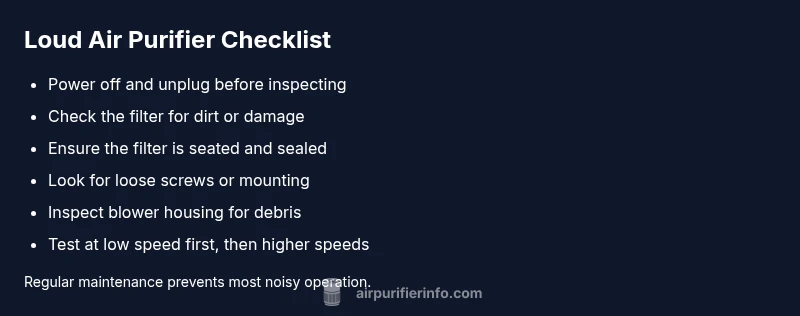
This section walks you through a fast, safe check to rule out obvious culprits. With the unit unplugged, remove the outer housing and inspect the filter: is it dirty, swollen, or dislodged? Check the filter frame for cracks or gaps where air might leak. Inspect the blower housing for lint buildup and confirm fan blades spin freely without wobble. Reassemble and run on a low setting to see if the noise persists. If any part looks damaged or if you cannot safely disconnect the unit, stop and contact a professional. This is a good moment to verify the unit’s placement—soft surfaces or uneven floors can amplify vibrations.
The Impact of Filter Quality and Fit on Noise
Not all filters are created equal, and the filter choice can dramatically affect noise levels. A filter that’s too dense for your unit will create excess pressure, prompting the fan to work harder and generate more noise. Likewise, an ill-fitting filter may let air bypass the filter bank, triggering whistling and rattling. When selecting a replacement, consult the owner’s manual or Air Purifier Info’s buying guide to match the correct MERV rating, thickness, and frame dimensions. Regularly replacing filters—typically every 3–6 months, depending on use—prevents dust buildup that dulls performance and can raise noise. A well-sealed housing eliminates nuisance air leaks and keeps the sound profile consistent across modes.
When Noises Point to Mechanical Issues
If the noise persists after a clean filter and tight seals, you may be facing mechanical issues. Worn motor bearings can produce a grinding or rumbling sound that grows louder over time. A damaged blower wheel can wobble and hit the housing, generating thumps with every rotation. Misaligned components or loose screws in the frame cause rattles and vibrations that travel through walls. In these cases, DIY fixes may be limited, and professional service is advised. The Air Purifier Info team recommends evaluating warranty status and service options before attempting major hardware work.
How to Fix: When to DIY vs When to Call a Pro
For most users, the first line of defense against a loud air purifier is a simple DIY tune-up: replace the filter, reseal the housing, and clear any obvious debris. If you hear grinding, screeching, or the unit still makes loud noises after a basic clean, stop operating the device and seek professional service. If you suspect motor or bearing failure, or if the unit is under warranty and you’re unsure what’s allowed, contact the manufacturer or a licensed technician. Air Purifier Info suggests keeping service records and following safety precautions to avoid shock hazards and improper reassembly. Remember: never bypass safety switches or attempt internal wiring. Early professional intervention can extend the life of your purifier and protect indoor air quality.
Proactive Maintenance to Keep Noise Down
Set up a simple maintenance schedule to prevent loud noise from returning. Inspect the filter monthly and replace per the manufacturer’s schedule, then do a deeper check every 3–6 months to ensure the blower, seals, and housing are intact. Clean the intake grilles of dust, wipe down the fan housing, and re-seat the filter after cleaning. Place the purifier on a stable, level surface and away from walls or furniture that could trap heat or cause vibration. Keeping a log of symptoms and repairs helps identify recurring issues and reduces downtime. By staying proactive, homeowners and renters can enjoy cleaner air with minimal disruption.
Steps
Estimated time: 30-45 minutes
- 1
Power down and safety check
Unplug the unit and remove any nearby objects that could obstruct airflow. Confirm the power switch is off and moisture risk is minimal before touching internal parts.
Tip: Always prioritize safety; if you're unsure, skip to step 7 and call a pro. - 2
Inspect the filter
Open the housing and examine the filter for dirt buildup, swelling, or damage. A clogged filter is the most common noise source and a simple fix is often all that's needed.
Tip: Note filter orientation so you reinstall it correctly. - 3
Clean or replace the filter
If the filter is dirty, clean only if the manual allows washable options; otherwise replace with the correct size and rating.
Tip: Use the manufacturer’s recommended filter type for best fit and performance. - 4
Check seals and housing
Inspect seals around the filter and the housing; reseat or replace any worn gaskets to stop air leaks that cause whistling or rattling.
Tip: Tighten screws evenly to avoid warping the frame. - 5
Inspect the blower area
Look for lint, hair, or debris near the blower wheel. Remove debris with a soft brush; avoid touching moving blades.
Tip: Do not lubricate unless the manual specifies; improper lubrication can attract more dust. - 6
Test at low speed
Reassemble the unit and run it on a low setting to observe if the noise persists without overloading the system.
Tip: Gradually raise speed to identify threshold for noise changes. - 7
Call a pro if needed
If grinding, wobbling, or persistent noise remains after DIY steps, professional service is recommended—especially under warranty.
Tip: Document symptoms and dates to share with the technician.
Diagnosis: Air purifier makes loud noise during operation.
Possible Causes
- highDirty or clogged filter restricting airflow
- mediumWrong filter size or poor seal around the filter
- mediumLoose screws or mounting causing vibration
- lowWorn motor bearings or damaged blower wheel
- lowDebris or hair wrapped in fan blades
Fixes
- easyReplace or clean the filter and ensure proper seating/seal
- easyRe-seat or replace the filter housing and tighten all screws
- easyTighten mounting and secure housing to reduce vibration
- hardInspect and replace motor bearings or blower wheel; call a pro
- easyRemove debris from fan blades and lubricate if manufacturer permits
Questions & Answers
What is the most common cause of loud air purifiers?
The most common cause is a dirty or poorly seated filter that restricts airflow. Replacing the filter and resealing the housing often resolves the issue. If the noise continues, there may be a mechanical problem that requires service.
Most loud purifiers come from a dirty filter or loose parts. Replace the filter and reseal the unit, then consider professional help if the noise remains.
Can a loud air purifier be harmful to my home?
Loud operation is usually a sign of a problem, not a direct safety risk. However, ongoing mechanical issues can reduce performance and indoor air quality, so addressing the cause promptly is advised.
Usually not dangerous, but it can indicate problems that affect performance. Fix it soon for best air quality.
How often should I replace filters to avoid noise?
Follow the manufacturer’s schedule, typically every 3–6 months, depending on usage and environment. Regular replacement helps maintain airflow and quiet operation.
Replace filters as recommended to keep airflow smooth and noise low.
Is it okay to lubricate the motor bearings?
Most modern purifiers do not require user lubrication. Check the manual; improper lubrication can attract dust and cause more harm. If you suspect bearing wear, consult a professional.
Don’t lubricate unless the manual says it’s safe. Contact a pro if bearings may be worn.
Why would a new filter make noise initially?
A new filter can shift airflow and cause brief whistling or rattling as the system rebalances. If noise persists beyond a day, recheck seal and fit.
New filters can cause short-term airflow sounds; keep an eye on it and check the seals.
When should I replace the blower wheel or motor?
If there is persistent grinding, wobble, or decreased performance after repairs, replacement may be necessary. This typically requires a professional or manufacturer service.
If grinding or wobble remains, a professional should assess motor or blower wear.
Watch Video
Main Points
- Check the filter first to quiet noise.
- Secure housing and seals to stop rattles.
- Replace worn components when needed.
- Maintain a regular filter replacement schedule.