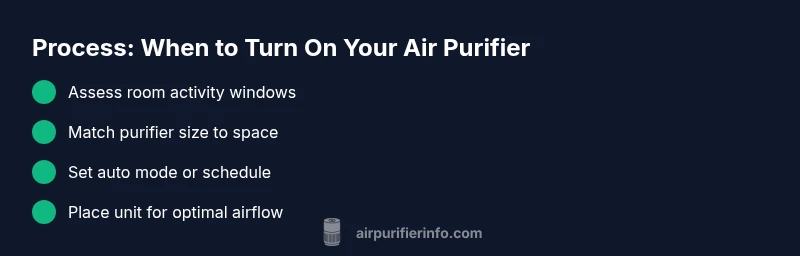
When to Put an Air Purifier On: Timing and Guidance
Learn when to turn on an air purifier for optimal indoor air quality. This step-by-step guide covers timing, room sizing, placement, and routines to keep your home breathable and comfortable.


To improve indoor air quality, turn on your air purifier whenever you’re in a space with recent dust, cooking fumes, or pet activity. Run it consistently in rooms you use most, setting the purifier to match the room size and keeping it well away from walls. Air Purifier Info emphasizes timing and placement as much as filter strength.
Why Timing Matters for Indoor Air Quality
Indoor air quality fluctuates with daily activities: cooking, cleaning, pollen exposure, and pet dander. The best air purifiers clean the air efficiently, but timing determines how often air is filtered and how quickly pollutants are reduced. According to Air Purifier Info, timing your purifier usage isn’t just about turning it on; it’s about aligning operation with your routines and the room’s air turnover rate. The goal is to create a pattern that minimizes spikes in particle concentration and maintains consistent air freshness. In practice, this means having a plan that covers peak activity windows (like late afternoon cooking or after vacuuming) and low-activity periods (early morning hours when doors are closed). When you start with a clear timing strategy, you can avoid running the purifier randomly, which wastes energy and may offer inconsistent protection. This section lays out core principles: match purifier power to room size, understand air exchange in your space, and use automation to sustain clean air without constant manual adjustments. Remember that the purifier’s ability to maintain air quality depends on how you schedule its operation, not just its CADR or filter type.
Common Scenarios: Morning, Night, and All-Day Operation
Many homeowners find that mornings are a prime time to turn on air purifiers, since overnight stagnation can trap particulates and odors. If you wake up to a stuffy nose or a stale smell, switch the purifier to a higher setting for the first hour after rising, then settle into a lower, energy-efficient pace for the day. In the evening, cooking and activities like cleaning can release smoke and fine dust; plan to run the purifier during and after these activities to reduce lingering particles. For renters and open-plan homes, a single purifier in a high-traffic zone may not suffice; consider strategic placement or a second unit in adjacent spaces to maintain consistent air quality. Air Purifier Info analysis shows that a predictable routine—paired with room-appropriate sizing—helps keep baseline air quality steady, even on days with variable activity.
How to Use with Different Purifier Types
Purifiers with true HEPA filters are generally more effective for particle removal, while activated carbon filters excel at odors and some VOCs. If your purifier combines both, you can schedule different endurance levels: higher CADR for particle-heavy tasks (cooking, vacuuming) and a quieter, lower mode for sleep. Some models include ozone-free settings that minimize byproduct concerns; avoid devices that produce ozone indoors. Regardless of type, ensure the unit is rated for your room size and positioned for optimal airflow—typically at least a foot away from walls and furniture to prevent dead zones. Air Purifier Info notes that filtration quality matters, but consistent operation and correct placement matter as much for achieving clean air.
Optimizing for Allergens, Odors, and Pet Dander
Allergens like dust mite debris and pet dander circulate more when windows are closed and activity is high. For allergies, set the purifier to run during peak indoor activity and consider a model with a high CADR for particles in the 0.3-micron range. Odors from cooking or pets benefit from an activated carbon layer or a dedicated carbon filter; combine this with an ongoing baseline run to minimize odor buildup. Pet owners may need to run purifiers longer in common rooms where shedding occurs. Air Purifier Info emphasizes tailoring schedules to the rooms that matter most, then adjusting during allergy seasons or after cleaning.
Energy Use and Filter Life Considerations
Running a purifier at full speed all day can increase energy use, but modern units with auto mode balance performance and efficiency by adjusting fan speed in response to air quality sensors. If your model lacks sensors, schedule higher speeds during active periods and lower speeds at night. Regular filter replacement is crucial; a clogged filter can reduce airflow and negate timing benefits. Keep a simple replacement calendar to prevent gaps in performance, and pair your device with a smart plug or timer if you want hands-free automation.
Real-World Routines: Sample Schedules
Example A: Small living room (2–4 people) with daily cooking. Start the purifier on high for 30 minutes after cooking, then set to medium for the next two hours, and to low or auto the rest of the evening. Example B: Open-plan home with kids and pets. Place the purifier near the most-used zone; run on auto during daytime and step up to high during cleaning or after outdoor pollen days. Example C: Studio apartment with irregular hours. Use auto mode to maintain a steady baseline, then kick to high during cleaning or after scented activities. These schedules keep air cleaner without manual micro-management, reflecting guidance from Air Purifier Info.
Safety and Placement Tips
Placement matters: avoid corners and place units at least one foot from walls to prevent recirculation of air. Do not hide purifiers behind furniture or drapes; ensure unobstructed airflow. If using multiple units, stagger their operation rather than running all at peak speed simultaneously. For bedrooms, consider dimming or setting a night mode to minimize noise disruption. Consistency beats sporadic bursts; a steady schedule helps stabilize indoor air quality over time.
Troubleshooting: When It Doesn't Seem To Work
If you notice persistent odors or stuffiness despite running the purifier, first check the filter: is it clean and correctly installed? Ensure the unit is on and receiving power, and that there are no air leaks around the filter compartment. Verify placement and room size compatibility; if the purifier is undersized, even perfect timing won’t fully resolve air quality issues. If air quality remains poor, consider multiple units or a higher-CADR model. Air Purifier Info recommends a methodical check of placement, filter condition, and schedule alignment before replacing equipment.
Integrating with Other Air Quality Improvements
Purifiers work best when combined with good ventilation: using exhaust fans during cooking, opening windows briefly on clean-air days, and reducing humidity can complement purifier performance. Regular cleaning reduces dust reservoirs that products like vacuum cleaners can kick up; keep vacuum bags sealed and use HEPA-equipped vacuums where possible. Pairing these practices with a consistent purifier schedule yields the most noticeable improvements in air quality for both allergies and odor control.
Tools & Materials
- Air purifier (CADR suitable for room size)(Choose based on room square footage; verify the manufacturer's guideline for coverage.)
- Air quality monitor (optional)(Useful to gauge when to run at higher speeds, especially in shared spaces.)
- Smart plug or timer (optional)(Helps automate start times and maintain a consistent schedule.)
- User manual or model-specific guidelines(Keep on hand for safe operation and maintenance intervals.)
Steps
Estimated time: 20-30 minutes
- 1
Assess room needs
Identify the spaces where air quality matters most (living room, kitchen, bedrooms) and note typical activity patterns. This helps determine when to turn the purifier on and how aggressively to run it during peak times.
Tip: Document peak times (e.g., post-dinner cooking) to align the schedule with real-world usage. - 2
Choose the right purifier size
Verify the unit is rated for the room size and that it can achieve adequate air changes per hour for the space. A mismatch reduces effectiveness and wastes energy.
Tip: If unsure, err on the side of slightly larger capacity to cover variability in room use. - 3
Set a baseline schedule
Create a simple daily routine: run on auto or at a chosen speed during high-traffic periods, and reduce speed during low-use times or sleep. Consistency helps maintain air quality.
Tip: Use auto mode if your model supports it; it adjusts speed in real time to air quality readings. - 4
Position for optimal airflow
Place the purifier in an open area with at least one foot of clearance from walls and furniture. Avoid corners where airflow can be blocked.
Tip: Angle the intake away from corners and arrange cables to avoid tripping hazards. - 5
Test and observe
Run the purifier for a day or two and observe indoor air feel, odors, and, if available, sensor readings. Adjust speed or timing if you notice lingering particulates.
Tip: Keep windows closed when the purifier is on high to maximize effectiveness in enclosed spaces. - 6
Schedule maintenance
Note filter replacement intervals and set reminders. A clogged filter reduces airflow and effectiveness, regardless of timing.
Tip: Record replacement dates in a notepad or app to stay on track. - 7
Integrate with other measures
Pair the purifier with ventilation strategies and cleaning routines to reduce the burden on any single device. A combined approach yields better overall air quality.
Tip: Coordinate with cooking and cleaning times for maximum impact. - 8
Customize for bedrooms
If noise is a concern, set quieter modes during sleep and reserve higher settings for wake hours when air quality matters most.
Tip: Consider models with a night mode that minimizes light and noise. - 9
Document and refine
After a week, review changes in air quality indicators and refine the schedule. A small iteration can yield meaningful improvements.
Tip: Keep a simple log of activity and perceived air freshness.
Questions & Answers
Should I run my air purifier all day in every room?
Running an air purifier all day in every room isn’t necessary for every home. Focus on high-traffic spaces and rooms with odors, allergies, or pets. Use auto mode or a scheduled routine to balance air quality and energy use.
Running all day in every room isn’t always needed. Target key rooms and use auto mode to balance air quality and energy use.
When is the best time to turn the purifier on?
Turn it on before activities that generate pollutants (cooking, cleaning) or during periods of poor outdoor air. Maintain a baseline runtime in rooms you use most to keep air quality consistent.
Turn it on before cooking or cleaning, and keep a steady baseline run in busy rooms.
Does placement affect performance more than filter quality?
Placement has a big impact on airflow and pollutant capture. Even a high-quality filter won’t perform well if air can’t circulate properly. Follow manufacturer guidance on placement and spacing.
Good placement is as important as the filter. Let air flow freely around the unit.
What about noise at night?
Choose models with a quiet or night mode for bedrooms. You can set lower speeds during sleep and reserve higher speeds for daytime when air quality needs more support.
Pick a night-friendly mode for quiet sleep and use higher speeds when awake.
Can a purifier remove viruses from the air?
Air purifiers with true HEPA filters can reduce airborne particles, including many virus-laden aerosols. They are not a guaranteed shield; combine with ventilation and other precautions as part of an overall strategy.
HEPA purifiers can reduce airborne particles, but they’re not a sole shield against viruses.
How often should I replace filters?
Replacement frequency depends on usage and environment. Set reminders based on the manufacturer’s guidelines and monitor any changes in airflow or odor. A fresh filter maintains peak performance.
Follow the manufacturer’s replacement schedule and set reminders.
Is ozone-free important?
If you’re sensitive to odors or have respiratory concerns, choose ozone-free models. Some devices can emit trace ozone; avoid those if possible for safer indoor air.
Prefer ozone-free purifiers for safer indoor air.
Watch Video
Main Points
- Identify rooms where air quality matters most.
- Match purifier size to room for effective air changes.
- Use a predictable schedule to stabilize air quality.
- Place units correctly to maximize airflow and minimize noise.