When to Change Xiaomi Air Purifier Filter: A Practical Guide
Learn exactly when to change the Xiaomi air purifier filter. This practical guide explains indicators, timing, and maintenance tips to keep indoor air clean and efficient.


Correct maintenance begins with recognizing Xiaomi filter change cues. The simplest rule is to replace the filter when performance drops or the device signals a filter alert. In typical home use, expect replacement every 6 to 12 months, but this window shifts with dust from cooking, smoking, pets, and high indoor pollutant levels. Regular cleaning of the housing can extend filter life between changes.
When to change the Xiaomi air purifier filter
Determining the right time to replace the filter on a Xiaomi model starts with understanding the model’s indicators and your room’s air quality. According to Air Purifier Info, Xiaomi devices typically provide a filter alert when the performance degrades or after a preset service interval. In practice, you’ll notice reduced airflow, louder operation, or a drop in CADR readings before the alert activates. By tracking these cues and comparing them with your usage, you can schedule changes more reliably.
For homeowners and renters, the timing isn’t a fixed number. A high-traffic kitchen, a home with pets, or a smoker-friendly environment accelerates filter loading. If your purifier operates in a crowded living area or a bedroom near a busy street, plan for more frequent checks. Keeping a simple maintenance log can help you spot patterns over months rather than guessing month by month.
The Xiaomi model you own matters too. Some devices rely on a time-based schedule (e.g., a 6–12 month window), while others lean heavily on real-time air quality readings. In any case, the goal is to maintain a comfortable, dust-free indoor environment without overpaying for unnecessary changes.
Pro tip: set a reminder every 4–6 weeks to inspect the filter housing, even if the unit hasn’t shown an alert yet. This habit makes it easier to stay ahead of dirty filters and preserve airflow.
Factors that shorten or extend filter life
Filter life is not a one-size-fits-all figure. Several variables drive how quickly a Xiaomi purifier’s filter gets loaded with dust and particles. Daily habits and environmental conditions can dramatically shorten or lengthen intervals between changes. If you live in a city with heavy traffic or near construction sites, expect more rapid clogging. Kitchens with frequent frying, or homes with multiple pets, also accelerate filter loading. Conversely, an apartment with good outdoor air, minimal cooking emissions, and limited pet dander can stretch the replacement window toward the upper end of the typical range.
Regular use matters too. A purifier running constantly in a large room will accumulate particulates faster than a unit operating intermittently in a smaller space. The size and cleanliness of the room affect the number of particulates entering the filter. Remember that the filter’s job is to capture dust, pollen, dander, and odors. When these loadings rise, the filter’s efficiency drops, and you’ll feel the need to change it sooner.
To maximize filter life, pair a well-sized purifier with proper placement. Position units away from walls and near source zones of pollution (like the living room or kitchen) to optimize airflow without overworking the filter. Clean the exterior and housing regularly to prevent dust from bypassing the filter.”,
Tools & Materials
- Replacement Xiaomi air purifier filter (model-specific)(Ensure compatibility with your exact Xiaomi purifier model)
- Soft cloth(For gentle cleaning of the housing and intake grille)
- Mild cleaning solution (optional)(Use sparingly; avoid soaking filters)
- Screwdriver (if applicable)(Some models require panel screws to access the filter)
- Gloves(Protect hands from dust when handling old filter)
- Owner’s manual(Check model-specific instructions and safety warnings)
- Trash bag(For disposing of the old filter)
Steps
Estimated time: 10-15 minutes
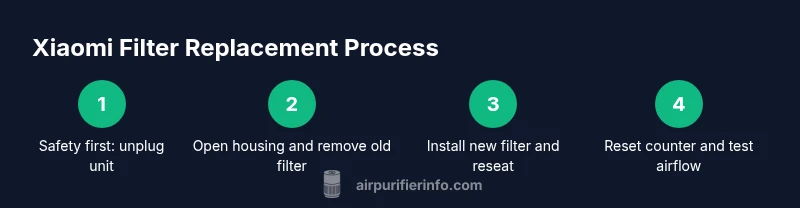
- 1
Power down and access the filter
Unplug the purifier before any maintenance. Gently remove the front panel or open the access compartment to expose the filter housing. This prevents electrical shock and protects you from moving parts.
Tip: Always start with safety: unplug and wait 30 seconds after unplugging before touching internal components. - 2
Remove the old filter
Carefully pull out the used filter from the housing, noting its orientation. Place it in a trash bag to minimize dust release. If your model uses a secondary pre-filter, remove and set it aside for cleaning.
Tip: Handle the filter by the frame, not the media, to avoid tearing the filter media. - 3
Check filter life indicator or timer
Look at the purifier’s indicator lights or the companion app to verify whether a replacement is due. If you see a replacement alert, prioritize installing a new filter, even if the old one looks acceptable to the naked eye.
Tip: Record the date of installation to track future replacement intervals. - 4
Clean the housing and pre-filter
Wipe the interior with a soft cloth, removing dust from the housing and intake grilles. If your model has a removable pre-filter, rinse or vacuum it according to the manual, then allow it to dry fully before reassembly.
Tip: Dust on the housing can bypass the new filter if not cleaned. - 5
Install the new filter
Insert the new filter in the correct orientation, ensuring it sits firmly in the housing. Replace any pre-filter and reattach the panel securely.
Tip: Double-check alignment marks or arrows on the filter housing to avoid installing upside down. - 6
Reset the counter and test
Reset the purifier’s filter life counter per the manual, then power on and run the unit for a few minutes to confirm proper airflow.
Tip: If the alert reappears after replacement, recheck filter seating and reset procedure.
Questions & Answers
How often should I change the Xiaomi air purifier filter?
Most users replace filters every 6–12 months, but frequency depends on usage patterns, room size, pets, and cooking emissions.
Most users replace every six to twelve months, depending on use and air quality.
Does the Xiaomi purifier alert you when the filter needs changing?
Yes, many Xiaomi models show a filter replacement alert in the device or app.
Yes, you’ll usually see a replacement alert in the device or app.
Can I wash Xiaomi filters and reuse them?
Disposable filters should not be washed or reused; washing can degrade filtration effectiveness.
No, don’t wash disposable filters; replace them.
Are there different filter types for Xiaomi models?
Yes, filters vary by model and may include carbon, HEPA, or combo configurations; always check compatibility.
Yes, check your model’s compatibility.
What if the alert stays after I’ve replaced the filter?
Ensure correct filter seating and reset the life counter; if the alert persists, consult support.
Make sure the filter is seated and the counter reset; contact support if it stays.
Watch Video
Main Points
- Replace filters when the indicator signals or airflow drops.
- Environmental factors drive how often you replace filters.
- Regular cleaning extends filter life and maintains performance.
- Always use model-specific filters and reset the life counter after replacement.