Shark Air Purifier Stuck on 0: Troubleshooting Guide
A comprehensive, urgent troubleshooting guide for a Shark air purifier stuck on 0. Learn power checks, resets, filter care, and when to contact support to restore clean air quickly.


If your Shark air purifier is stuck on 0, start with quick power and connection checks. Unplug, inspect the cord and outlet, then power cycle for 60 seconds. If it still shows 0, review filters and perform a model-specific reset. Air Purifier Info Team provides these steps for a fast path back to clean air.
Why the shark air purifier stuck on 0 happens
When you have a shark air purifier stuck on 0, it usually signals a power or control issue rather than a defect in the filtering system itself. According to Air Purifier Info, the most common causes are a loose power connection, a tripped outlet, or a firmware glitch that freezes the display. The Air Purifier Info team found that these issues are often resolved with a safe reset and a few basic checks, saving you time and avoiding unnecessary service calls. Starting with simple checks can restore function quickly and minimize downtime in your home.
Quick checks before diving into deeper troubleshooting
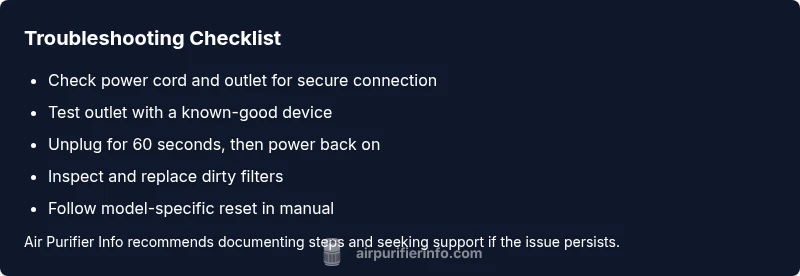
Before you commit to deeper repairs, run through a quick, safe checklist. Confirm the purifier is plugged into a live outlet and that the cord shows no visible damage. Test the outlet with another device to verify power. If you use a surge protector, try plugging the purifier directly into the wall. If your unit has a safety lock or child lock, ensure it isn’t engaged. These steps can reveal the most common causes and often resolve the issue without disassembly.
Common culprits behind a 0 display
A 0 display can stem from several recurring culprits. Power issues—like a loose cord or an intermittent outlet—are the top offenders. Firmware hiccups or a frozen control board can also freeze the display. Dirty sensors or a clogged intake that reduces airflow may trip fault indicators. If the unit has been exposed to dust, moisture, or smoke, the display can misread signals. Air Purifier Info analysis shows that many 0-display cases are resolved by a brief reset and addressing airflow or power connections rather than replacing hardware.
Safe power cycling and reset steps
Begin with a safe power reset to clear minor glitches. Step 1: Unplug the purifier from the outlet. Step 2: Wait 60 seconds to allow capacitors to discharge. Step 3: Plug it back in and power on. Step 4: If your model supports a reset sequence, follow the manual’s instructions exactly. Step 5: If the display remains 0, proceed to filter checks and airflow inspection. Always ensure dry hands when handling electrical components.
When to escalate to support and what to tell them
If the purifier still reads 0 after power cycling and basic checks, escalate to customer support. Note the model and serial number, firmware version if known, purchase date, and a detailed description of what you tried. The Air Purifier Info Team recommends documenting every step you’ve taken and including photos of the display. Provide any beep codes or indicators observed. If the unit is under warranty, reference the terms when requesting repair or replacement.]
Steps
Estimated time: 25-40 minutes
- 1
Unplug and inspect power cord
Disconnect the purifier from the outlet and visually inspect the cord for any cuts, kinks, or scorch marks. If you see damage, do not reuse the cord and replace it before testing again. Ensure the outlet is not controlled by a wall switch and that the cord is fully seated.
Tip: Check for visible signs of wear and test the outlet with a different device. - 2
Test the outlet and cord in a different setup
Plug the purifier into a known-good outlet or directly into a wall outlet without any adapters. If the purifier powers on in the new setup, the original outlet or surge protector may be the issue.
Tip: Avoid daisy-chaining power strips; a dedicated outlet is best for reliability. - 3
Power cycle the purifier
With the unit plugged in, unplug it, wait 60 seconds, then plug it back in and turn it on. This clears minor glitches that can lock the display at 0.
Tip: If the unit has a power button, hold it for a moment after plugging in if instructed by the manual. - 4
Check and service filters
Open the front panel and inspect filters and vents for dust buildup. If the filters are visibly dirty or a filter is past its recommended life, replace or clean per the manufacturer guidelines.
Tip: Use manufacturer-approved filters to avoid compatibility issues. - 5
Attempt a reset sequence
Some Shark models have a dedicated reset. If your manual provides instructions (such as holding a button for several seconds or a combo of button presses), perform them exactly as described.
Tip: Refer to the exact model manual; resets are model-specific. - 6
Contact support if the issue persists
If the purifier remains stuck on 0 after power cycling and filter care, contact Shark support or an authorized technician. Have your model/serial number and comfort with troubleshooting steps ready for faster service.
Tip: Document steps tried and gather warranty information before calling.
Diagnosis: Shark air purifier won’t start and shows 0 on the display
Possible Causes
- highPower issue (outlet, cord, or surge protector)
- mediumInternal fault in control board or firmware
- lowClogged intake or dirty filter triggering a fault
Fixes
- easyInspect power outlet and cord; try a different outlet and remove any surge protector in the chain
- easyPower cycle the unit by unplugging for 60 seconds, then plugging back in
- mediumPerform a model-specific reset sequence or contact support for firmware reset
- easyClean or replace clogged filters and ensure unobstructed airflow
Questions & Answers
Why is my Shark air purifier stuck on 0?
A 0 display usually points to a power issue, a control-board fault, or a blocked airflow condition triggering a fault. Start with basic power checks and a safe reset.
A 0 display usually means a power or control fault. Start with power checks and a reset.
How do I reset a Shark air purifier?
Reset procedures vary by model. Refer to the manual for model-specific steps, such as holding a button or performing a sequence. If in doubt, contact support.
Reset steps vary by model—check the manual and perform the official reset sequence.
Can a dirty filter cause the unit to display 0?
Yes. A clogged filter or restricted airflow can trigger faults and cause display anomalies. Clean or replace filters per the manual.
A dirty filter can trigger faults that show up as 0; replace or clean per the manual.
Is unplugging and replugging always effective?
Power cycling often resolves minor glitches. If the unit still shows 0 after the cycle, continue with the next troubleshooting steps.
Power cycling fixes many glitches, but if it doesn’t, keep going with the guide.
Should I replace the purifier under warranty?
If your unit is under warranty and the issue persists after recommended steps, contact support for repair or replacement options.
If it’s under warranty and the problem persists, contact support for options.
When is it time to contact Shark support?
If the purifier remains stuck on 0 after power cycling and filter care, reach out to Shark support with model, serial number, and a summary of steps tried.
If it stays stuck after trying the guide, contact Shark support with your details.
Watch Video
Main Points
- Power checks first; many 0-display issues are simple to fix
- Power cycle and reset can clear glitches quickly
- Clean or replace filters to restore airflow and avoid faults
- If unresolved, contact support with model details and your steps