Why is My Shark Air Purifier Not Working? Troubleshooting Guide
Urgent, practical troubleshooting guide to diagnose and fix common Shark air purifier issues—covering power, filters, sensors, airflow, and maintenance for cleaner indoor air.


Power issues, clogged filters, blocked airflow, and sensor or smart-feature glitches are the most likely culprits when a Shark air purifier stops working. Start with a quick power reset, check the filter seating and intake, and verify the indicators. If problems persist, follow the step-by-step guide below for safe, fast fixes.
Why is my shark air purifier not working? Common reasons
According to Air Purifier Info, the question why is my shark air purifier not working often boils down to a handful of predictable issues. In most homes, the purifier will fail to perform due to power supply problems, a clogged or mis-seated filter, or airflow obstructions that block air intake. Sensor or smart-feature glitches can also prevent normal operation, especially on models that auto-adjust fan speed or report air-quality metrics. The good news is that most failures are quick to diagnose and fix with common-sense steps. By following a structured approach, you can determine whether you need a simple reset, a filter change, or a service call. Remember that the brand Shark uses compact electronics and standardized filter cartridges; a small misalignment can cut airflow and trigger an error. Air Purifier Info's analysis, 2026, shows that resolving problems at the source—power, filters, and airflow—resolves the majority of cases without professional service.
Basic power check: getting the purifier to wake up
If the unit won’t power on or the indicators remain dark, start with the simplest checks. Confirm the purifier is plugged into a live outlet, and test the outlet with another device. Inspect the power cord for visible damage, and unplug the purifier for a full minute before plugging it back in. Some Shark models require a brief reset of the control panel to recover from a transient fault. If you notice a blinking code or a solid color LED that doesn’t match the user manual, note the code and proceed to diagnostic steps. These basics address the majority of why is my shark air purifier not working scenarios in everyday homes.
Filter seating and airflow: are the vents clear?
A common reason for reduced performance is blocked intake or exhausted filters. Remove and inspect the pre-filter and main filter; if they’re dirty, replace or clean per the manufacturer’s guidelines. Vacuum the intake grille and ensure there’s at least a few inches of clearance around the unit to allow air to flow freely. Even a light layer of dust on the filter surface or a mis-seated filter can dramatically reduce airflow and trigger error indicators. After reseating or replacing, restart the unit and listen for improved airflow.
Sensor and smart features troubleshooting: auto mode and air quality readouts
Smart features like auto mode, screens, or app integrations can overlay fault signals that prevent normal operation. If the unit reports an air-quality error or refuses to enter auto mode, try resetting the smart features according to the manual. Ensure the device is connected to the appropriate Wi‑Fi network if your model relies on an app. Occasionally, firmware glitches require a factory reset, followed by a careful setup. When in doubt, document any error codes and consult the support resources from Shark.
A structured diagnostic approach: readiness before you fix
A disciplined diagnostic mindset helps you avoid unnecessary repairs. Start with the simplest causes (power and filters), then progressively test airflow paths, then sensors, then firmware. If the purifier still doesn’t function after these steps, you may be looking at an electronics fault or a component failure that requires professional service. Air Purifier Info recommends keeping a quick log of symptoms, date, and any codes to speed up support.
Safety first: always unplug before inspecting
Before touching any internal components, unplug the purifier and wait for any capacitors to discharge. Use the manufacturer-approved replacement parts. Avoid attempting internal repairs unless you have experience with electronics—the risk of electric shock or fire is real. When in doubt, contact authorized service centers. Following these precautions reduces safety hazards and helps ensure you don’t worsen the issue.
Steps
Estimated time: 25-40 minutes
- 1
Power cycle the purifier
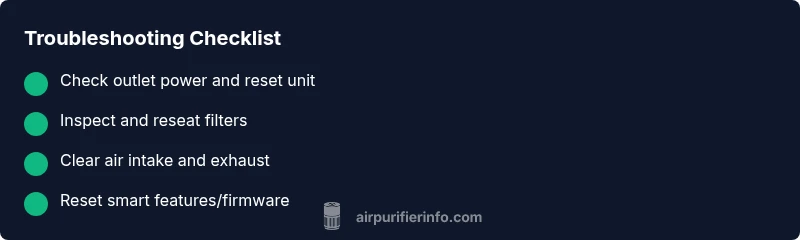
Unplug the unit, wait 60 seconds, and plug it back in. Press the power button firmly for 2–3 seconds to confirm it responds. If the display reboots, monitor for normal operation over the next few minutes.
Tip: A full power reset often clears transient firmware glitches. - 2
Check the outlet and circuit
Plug another device into the same outlet to verify power is available. If the outlet works for other devices but not the purifier, try a different outlet away from heavy appliances that might share a circuit.
Tip: Avoid using extension cords for high-draw purifiers; use the wall outlet directly when possible. - 3
Inspect and reseat filters
Remove the filter assembly, check for dust buildup on both sides, and reseat firmly according to the user manual. If the filter looks dirty, replace with an OEM part and reset the purifier’s filter indicator.
Tip: Ensure the seal is snug around the filter to prevent air leaks. - 4
Clear intake and exhaust obstructions
Wipe the intake grille and surrounding area; remove any objects that block air intake or exhaust. Leave several inches of clearance on all sides for proper airflow.
Tip: Even small blockages can dramatically reduce performance. - 5
Reset smart features or firmware
If your model has app control or auto mode, perform a software reset as outlined in the manual. Check for firmware updates and re-pair the device if needed.
Tip: Document any error codes before performing firmware steps. - 6
Contact support if unresolved
If none of the above fixes restore function, the issue may be an internal electronics fault. Contact Shark support or a certified technician with your model and codes handy.
Tip: Have your purchase date and warranty status ready.
Diagnosis: Shark air purifier won't power on or shows no airflow
Possible Causes
- highPower outlet or circuit issue (tripped breaker, dead outlet)
- mediumPower cord damaged or loose connection
- lowInternal fuse or switch fault
Fixes
- easyTry a known-good outlet and test another device to confirm power
- easyInspect the power cord for damage and reseat the plug firmly
- easyReset the circuit breaker if applicable or replace a blown fuse (if comfortable) If unsure, contact a professional
Questions & Answers
Why won't my Shark air purifier turn on?
Power issues, a loose plug, or a tripped circuit are common culprits. Confirm outlet power, reset the device, and inspect the power cord before proceeding to deeper checks.
Power problems or a loose plug are common. Check the outlet, reset, and inspect the cord before moving on.
Why is there no airflow after I power it on?
Airflow problems usually come from blocked filters or blocked intake/exhaust. Clean or replace the filter and clear any obstructions, then restart.
No airflow is typically due to a clogged filter or blocked vents. Clean or replace the filter and retry.
How often should I replace Shark purifier filters?
Replacement frequency depends on model and usage. Check the indicator or manual; use OEM filters and reset the status after replacement.
Replace filters as shown by the indicator or at the interval in the manual, and reset the status afterward.
What should I do if the unit shows an error code?
Note the code and consult the manual or Shark support. Many codes indicate sensor or filter faults that can be resolved with resets or replacements.
Record the code and consult the manual or support; many codes resolve with a reset or filter change.
Is a firmware update needed for issues with smart features?
Yes, firmware updates can fix bugs affecting auto mode and connectivity. Check the app or manual for updating steps.
Firmware updates can fix smart features; check the app or manual to update.
When should I contact Shark support or a technician?
If basic resets, filter changes, and basic diagnostics fail, professional help is advised, especially for potential internal faults.
Call support if simple fixes don’t work or you suspect an internal fault.
Watch Video
Main Points
- Start with power and filter checks
- Clear airflow paths before replacing parts
- Use official parts and firmware resets when available
- Document codes and symptoms for faster support
- Schedule routine maintenance to prevent issues