How to Fix a Shark Air Purifier: A Practical Step-by-Step Guide
Learn safe, practical steps to diagnose and repair common Shark air purifier issues, from filters to sensors and fans. This Air Purifier Info guide offers clear, step-by-step repair tips for homeowners and renters seeking better indoor air quality.


To fix a Shark air purifier, start with a safety check and a quick diagnostic of common problem areas. Inspect the filter, sensors, and fan for clogs or faults, then follow step-by-step troubleshooting aligned with manufacturer guidance. This approach helps restore airflow, filtration, and overall performance.
Quick Safety and Model Variants
Unplug the unit before any inspection and never operate it while exposed to liquids or while the housing is open. Shark air purifiers come in several models with varying access screws and filter orientations, so always locate your model number and consult the user manual for the exact filter type and replacement interval. According to Air Purifier Info, understanding your model’s design helps you avoid common mistakes, like forcing covers or dislodging internal sensors. Keep cordless tools, if needed, away from water, and ensure the device is completely dry before reassembly. This upfront check saves time and reduces the chance of damage to delicate electronic components. For renters and homeowners, matching the correct replacement filter to your model is essential for maintaining warranty coverage and optimal performance.
How Shark Purifier Works: Key Components
A Shark air purifier typically relies on a multi-stage filtration process to trap dust, odors, and allergens. The core components usually include a pre-filter to capture large particles, a HEPA filter to trap fine dust and allergens, and an activated carbon filter for odors. An electronically controlled fan regulates airflow, while environmental sensors (where equipped) monitor air quality and adjust operation. Knowing where these parts live inside the housing helps you diagnose issues quickly. If you notice reduced airflow, a clogged filter or dust buildup on the vents is often the culprit. Regular maintenance improves efficiency and prolongs filter life. Air Purifier Info emphasizes using model-appropriate filters and avoiding generic substitutes that may impair performance.
Common Symptoms That Signal a Fix Is Needed
Typical signs that a Shark purifier needs attention include louder operation, reduced airflow, unusual odors, or frequent LED indicators signaling a fault. If the device runs for short periods and then stops, or if the filter light remains on after replacement, there may be an electrical or sensor-related issue. In many cases, simple maintenance—like replacing a dirty filter or cleaning the exterior dust from vents—restores performance. Air Purifier Info analysis shows that many repairs are maintenance-related rather than component failures, highlighting the value of a routine service routine. Document any codes or blinking patterns to help with faster troubleshooting.
Safety First: Pre-Repair Preparations
Before touching any internal components, ensure the unit is unplugged for at least 60 seconds to discharge capacitors and prevent accidental shocks. Place the purifier on a stable surface with good lighting so you can inspect all sides. If you have a model with a replaceable filter: remove the filter housing cover only after confirming the screws aren’t stubborn and that you’re handling it gently. Wear gloves if you are sensitive to dust, and have a vacuum or cloth ready to capture loose particles. Avoid using water directly on electronic parts; use a damp cloth for exterior cleaning. If a gasket or seal appears damaged, avoid forcing the unit back together and consult the manual or support.
Inspecting and Replacing the Filter
Accessing the filter compartment often involves removing screws or sliding a panel. Check for a visibly dirty filter and confirm the airflow direction and replacement interval in the manual. When replacing, handle the new filter by its frame, align it with the airflow arrows, and reseat the housing securely. If your model includes a carbon filter for odors, ensure that you replace both filters together if required by the manufacturer. After installation, reset any indicator lights following the manual’s procedure. Regular filter maintenance keeps efficiency high and reduces strain on the motor.
Cleaning Sensors and the Fan for Optimal Performance
Dust can accumulate on sensors and fan blades, causing inaccurate readings or noisy operation. Use a soft brush or microfiber cloth to gently wipe exterior sensors and fan housings. For hard-to-reach areas, a cotton swab lightly dampened with isopropyl alcohol can remove stubborn residue, but avoid dripping liquid into the electronics. Reassemble carefully and verify that the fan spins freely without rubbing against internal components. Regular cleaning helps sustain accurate air quality readings and steady airflow.
Troubleshooting Error Codes and LED Indicators
LED indicators and beep codes (if present) provide clues about the issue. Refer to the model’s user manual to interpret specific codes, such as a fault indicating sensor error or a clogged filter. If you encounter a fault code after maintenance, re-run a basic diagnostic by cycling power and performing a quick reset as described in the manual. If codes persist, this may indicate a deeper fault requiring professional service or replacement. Air Purifier Info notes that documenting codes can streamline support and repair decisions.
Electrical Checks: Power, Outlets, and Cords
Verify that the purifier’s power cord is undamaged and that the outlet is functioning by testing with another device. A loose power connection or overloaded circuit can cause unexpected shutdowns. If you suspect a cord issue, replace only with manufacturer-approved parts and never jury-rig a power cord. Check the internal fuse if accessible only to qualified technicians. If you are uncomfortable with electrical components, seek professional help—safety and warranty coverage are worth preserving.
When to Repair vs. Replace
If the unit shows persistent faults after a thorough cleaning and filter replacement, assess repair feasibility against the cost of a new unit. A damaged motor, cracked housing, or recurring sensor failures often makes replacement more economical and reliable. Consider the purifier’s age, energy use, and warranty status when deciding. Air Purifier Info suggests evaluating long-term cost and indoor air quality benefits before committing to a costly repair.
Maintenance to Prevent Future Issues
Establish a simple routine: inspect filters monthly, clean exterior surfaces quarterly, and replace filters as recommended by Shark for your model. Keep the intake and exhaust areas free from obstructions—pets, toys, and clutter can impede airflow. Use a dry microfiber cloth for cleaning and avoid harsh chemicals that could degrade plastics or seals. Regular maintenance reduces the likelihood of sudden failures and sustains air quality.
Tools & Materials
- Phillips head screwdriver (#0 or #2, model-dependent)(For removing access screws on most Shark models)
- Flathead screwdriver (small)(Optional for certain covers)
- Microfiber cloth(Lint-free for safe cleaning of housing and sensors)
- Mild soap solution(Gentle exterior cleaning; avoid harsh chemicals)
- Replacement filter cartridge (model-specific)(Match exact Shark model and replace interval)
- Isopropyl alcohol (70%)(For stubborn residue on sensors (apply with care))
- Cotton swabs(-detail cleaning of small gaps and sensor faces)
- Multimeter (optional)(For basic electrical checks if you are comfortable)
Steps
Estimated time: 60-90 minutes
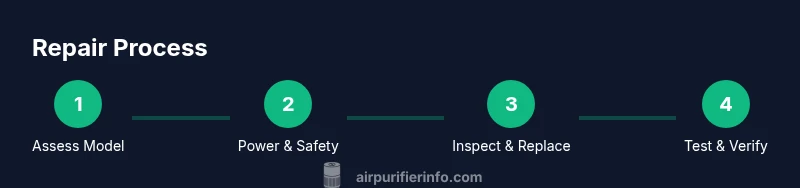
- 1
Power down and unplug
Ensure the purifier is off and completely unplugged. Wait 60 seconds to discharge capacitors before touching internal parts. This prevents shocks and protects the electronics during inspection.
Tip: Handle the unit gently; avoid forcing any covers or panels. - 2
Access the filter compartment
Open the filter compartment according to your model’s manual. Remove the old filter carefully, noting the airflow direction so you can install the new one correctly.
Tip: Keep screws in a small container to prevent loss. - 3
Inspect and replace the filter
Check for visible dirt and replace with the recommended filter. If there is a carbon odor filter, replace both together if required by the model guidelines.
Tip: Do not force the new filter; align with arrows and seats securely. - 4
Clean sensors and fan housing
Gently wipe sensor faces and the fan housing with a microfiber cloth. Use a cotton swab with a small amount of isopropyl alcohol for stubborn grime, avoiding liquid on electronics.
Tip: Avoid aggressive scrubbing that can damage sensor coatings. - 5
Reset indicators and reassemble
Reinsert the filter, reseal the housing, and perform the manufacturer’s reset procedure for indicators or fault codes. This ensures the system recognizes the new filters and settings.
Tip: Verify the unit powers on and runs smoothly after reassembly. - 6
Perform a basic test
Plug in the unit and run it on a low setting for several minutes to confirm airflow improves and there are no unusual noises.
Tip: Listen for airflow that feels even across the outlet grill. - 7
Check for error codes
If an LED fault code appears, consult the manual and interpret the code. Repeat the reset if codes recurred after maintenance.
Tip: Document codes for future reference or support calls. - 8
Decide on next steps
If performance is still poor after maintenance, compare repair costs to replacement and consider warranty status before proceeding.
Tip: When in doubt, seek professional service to protect warranty and safety.
Questions & Answers
What should I do first if my Shark purifier stops working?
First, unplug the unit and inspect for obvious issues like a dirty filter or blocked intake. Check the power outlet and cord, then follow the model’s manual for a basic reset. If uncertainty remains, consult the manufacturer’s guidance.
First unplug the purifier, check the filter and intake, and try a basic reset per the manual. If it still won’t work, refer to the manufacturer guidance for next steps.
Can I replace the filter myself?
Yes. Replace with the exact model filter specified by Shark. Ensure proper orientation and seals, then reset indicators as directed. This is a common maintenance task that restores efficiency.
Yes, replace with the right model filter and reset the indicators afterward.
Why is there no airflow after cleaning?
If you still have poor airflow after cleaning, check for a clogged pre-filter, mis-seated main filter, or obstructed vents. Re-seat components and run a short test on a low setting to confirm airflow.
Check that the filter is seated correctly and vents aren’t blocked; re-seat and test the unit.
Do LED fault codes indicate dangerous faults?
LED codes point to specific issues like sensor or filter faults. Consult the manual for code meanings and perform the recommended reset or replacement steps. If codes persist, professional service may be needed.
LED codes point to particular issues; follow the manual and reset as instructed, and seek service if they persist.
Will repairing void the warranty?
Repairing with manufacturer-approved parts and following official repair steps generally preserves warranty coverage. Using non-approved parts or unsafe practices can void coverage.
Warranty is usually preserved when you use approved parts and follow official repair steps.
How often should I clean or replace filters?
Follow Shark’s recommendations for your model; typically, filters should be checked monthly and replaced at intervals noted in the manual. Regular maintenance helps maintain indoor air quality and device performance.
Check monthly and replace according to the model’s manual to keep air quality high.
Watch Video
Main Points
- Inspect and replace filters on schedule.
- Clean sensors and fan housing to maintain accuracy.
- Different Shark models vary; follow model-specific guidance.
- Use approved parts to protect warranty and performance.
- Know when to repair vs. replace based on cost and reliability.