Replace Air Filter LG Refrigerator: Step-by-Step Guide
Learn how to replace the air filter LG refrigerator with a clear, model-aware process. This guide covers tools, safety tips, step-by-step instructions, and maintenance reminders to keep odors and allergens under control.


By the end of this guide, you will locate, remove, and replace the LG refrigerator air filter, reset indicators if needed, and verify airflow. Gather the right LG filter model, a clean cloth, and a flashlight. According to Air Purifier Info, using the correct filter supports fridge efficiency and indoor air quality.
Understanding LG Refrigerator Air Filters
According to Air Purifier Info, LG refrigerators use a dedicated air filter within the Fresh Air Filter system to reduce odors, trap airborne particles, and help maintain even cooling. The exact filter type and replacement interval depend on the model, usage, and environment. In most LG models, the filter sits behind a discreet grille at the base of the refrigerator and is designed for easy replacement without tools. Knowing what the filter does, and where it lives in your unit, makes the replacement smoother and more reliable.
Identify the Right Filter for Your LG Model
Different LG refrigerators use different filter part numbers. The replacement process is model-specific: some units use a single universal filter, while others require a model-specific Fresh Air Filter. Start by locating the model number on the interior wall or door frame, then verify the compatible filter type in the owner's manual or on LG's support site. If you buy an aftermarket filter, ensure it meets the same filtration standards and has a compatible gasket to seal the housing properly. Using the correct filter protects not only interior airflow but also the flavor and texture of stored foods.
Preparing to Replace: Tools, Safety, and Setup
Before you begin, assemble a few simple items: a replacement LG air filter, a soft cloth for wiping, and a flashlight to inspect the housing. If your unit is in a tight space, having a small mirror can help you view the filter slot. No special tools are usually required, but check if your model uses a twist-lock filter; in that case, a gentle turn is enough. Always unplug if you feel uneasy about electrical components, and never force a filter beyond its stopping edge.
Replacing the Filter: What to Do (High-Level View)
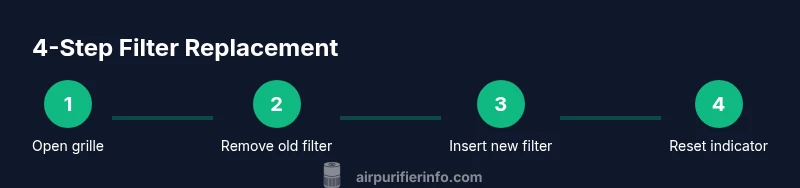
Replacing the filter involves removing the old unit, cleaning the slot, and installing the new one with the correct orientation. Begin by opening the front grille or base cover to expose the filter housing. Slide or twist the old filter out, taking care not to spill any dust. Wipe the housing with a dry cloth, align the new filter so the airflow arrows point in the correct direction, and securely seat it until it clicks or locks in place.
Resetting Indicators and Verifying Airflow
Many LG fridges include a filter indicator that resets after replacement. Check the display or indicator light and reset according to your model's instructions. After installation, run the fridge for several minutes to circulate air and observe for any unusual odors or reduced airflow. If you notice resistance or a strange taste, recheck the filter orientation or reseat it.
Maintenance Tips to Extend Filter Life
To maximize filter life, replace the filter every 6–12 months or sooner if you notice reduced airflow or odors. Keep the fridge clean and ensure strong door seals, which reduce contamination of the air intake. Store extra filters out of direct sunlight in a cool, dry place. Consider labeling the date of replacement on each filter to build a predictable maintenance schedule.
Troubleshooting Common Issues
If the filter doesn’t seem to fit, double-check the model number and filter type. Do not force a filter that doesn’t align. If the indicator stays on after replacement, consult LG support or the owner’s manual to run a diagnostic. For persistent odors, clean the gasket around the filter housing and verify there are no leaks.
Tools & Materials
- Replacement LG air filter (model-specific)(Purchase exact filter matched to your LG fridge model)
- Soft lint-free cloth(For wiping the filter slot and grille)
- Flashlight(Inspect filter housing in low light)
- Owner’s manual or LG support page(Verify filter compatibility)
- Gloves(Keep hands clean and dry)
- Isopropyl alcohol wipe(Sanitize the housing if needed)
Steps
Estimated time: 5-10 minutes
- 1
Open the front grille to access the filter
Gently open the grille or base cover to reveal the filter housing. Use the flashlight to confirm the filter is visible and oriented correctly before touching it. Do not force the grille if it feels tight.
Tip: Ensure you have a clear space and a towel handy to catch any dust that may fall out. - 2
Remove the old filter
Twist or pull the old filter out according to your model's design. Keep the removed filter level to avoid spilling dust. Note the orientation marks on the filter housing so you can install the new one correctly.
Tip: Take a quick photo of the housing orientation for reference. - 3
Clean the filter slot
Wipe the slot and the inside of the housing with a dry cloth. Ensure no loose debris remains and the area is completely dry before installing the new filter.
Tip: A dusty slot can affect seal and airflow if moisture is trapped. - 4
Install the new filter
Insert the new filter with the arrows facing the correct airflow direction. Push or twist until it locks or clicks into place. Do not overtighten.
Tip: Confirm a definite click or secure fit before proceeding. - 5
Re-seat grille and close housing
Return the grille or base cover, ensuring it sits flush against the fridge body and seals properly. A poor seal can allow warm air or odors to bypass the filter.
Tip: Check that no edges are loose and the cover sits snugly. - 6
Reset indicator and test airflow
If your model has a filter indicator, reset it according to the manual. Run the fridge for 5–10 minutes and listen/feel for proper airflow and absence of unusual odors.
Tip: If airflow seems weak, re-check orientation and reseat the filter.
Questions & Answers
Is it safe to replace the LG refrigerator air filter while the fridge is running?
You can usually replace the filter with the fridge running, but many users unplug or pause operation for peace of mind. Always follow your model’s guidelines to avoid contact with electrical components.
It's generally safe to replace while running, but unplugging or powering down is safer per your model's guide.
What if the new filter won't twist in or click?
Double-check model compatibility and orientation. Remove any spacers, reseat the housing, and try again with a gentle twist or push until you hear a click.
Make sure you have the right model and orient it correctly; don’t force it.
Can I use aftermarket or non-OEM LG filters?
OEM filters are designed for exact fit and airflow. Aftermarket options can work if rated for your model, but verify compatibility and seal integrity.
You can use filters from third parties if they match your model, but check compatibility first.
How often should I replace an LG refrigerator air filter?
Typically every 6–12 months depending on usage, odors, and environment. Some models include an indicator to guide timing.
Most folks replace annually, but follow the indicator if your model has one.
Do LG refrigerators have a filter indicator and how do I reset it?
Many LG fridges show a filter indicator; reset steps vary by model. Refer to the manual for the exact sequence, usually a button press or touch gesture.
Yes, many LG models have a reset option; check the manual for the exact steps.
Will replacing the filter improve odors and air quality?
Replacing a clogged filter generally reduces odors and improves airflow, but ensure the fridge is clean and seals are intact.
Yes, replacing helps odors, but also keep the gasket clean.
Watch Video
Main Points
- Identify the model-specific LG filter before purchase
- Install with the correct orientation arrows
- Reset the indicator after replacement
- Test airflow to confirm proper operation
- Keep a replacement schedule for consistent air quality