How to Renew Your Air Purifier for Peak Performance
Learn how to renew your air purifier with a thorough cleaning, filter refresh, sensor checks, and testing. Follow this step-by-step guide to maintain peak filtration and indoor air quality.


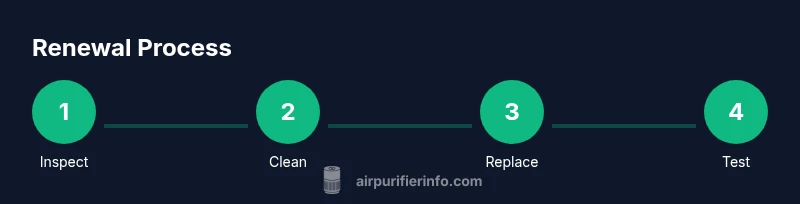
To renew an air purifier, start with a thorough cleaning of the housing and pre-filter, then replace or wash the main filter according to the manufacturer’s instructions. Check sensor seals, empty the intake and outlet grilles, and recalibrate or reset indicators after maintenance. Finally, run a short test cycle to confirm airflow and check for unusual noises. Regular renewal helps maintain filtration efficiency and indoor air quality.
Renewal fundamentals: why renew your air purifier regularly
Renewal of an air purifier is about more than cosmetics. Regular renewal sustains filtration efficiency, prolongs the life of filters and components, and preserves the device’s ability to remove dust, odors, and allergens from indoor air. According to Air Purifier Info, a disciplined renewal routine minimizes the load on the fan motor and maintains steady airflow, which is essential for homes with pets, kids, or allergy-prone residents. This guidance applies whether you rent or own, and it translates into tangible benefits like less dust on surfaces and a more comfortable sleeping environment. Start by recognizing signs that renewal is due, such as visible dust buildup on grilles, reduced airflow, or audible changes in operation. By treating renewal as part of routine maintenance, you safeguard indoor air quality and comfort for every room in your home.
What to renew and how often (general guidance)
The renewal process centers on two pillars: cleaning and filter maintenance. Cleaning the outer housing and pre filter reduces surface dust that can clog the system, while refreshing the main filter restores particle capture efficiency. Rather than chasing a strict calendar, align renewal with model usage and environmental factors. If you live with heavy dust, furred pets, or frequent cooking odors, you will likely need renewal more often. Always consult the purifier’s manual for model specific recommendations, and Reference the manufacturer’s suggested replacement intervals. Remember: renewal is not a one-and-done task; it’s an ongoing practice that supports healthier, cleaner air over time.
Cleaning the housing and pre-filter (step-by-step)
Begin by unplugging the unit and removing the outer shell or access panel as directed by your manual. Use a microfiber cloth dampened with mild soap and water to wipe the housing, then gently brush or vacuum the intake and outlet grilles to remove coarse dust. Wash or rinse the pre-filter if it is washable; otherwise skip to the next step and prepare for main filter renewal. Dry all components thoroughly before reassembly to prevent moisture from entering the motor or electronics.
Replacing or washing the main filter (when and how)
Main filters often wear out with use and should be replaced according to the manufacturer’s guidance. If your purifier uses a washable reusable filter, rinse it under cool water until the water runs clear and shake off excess moisture before air drying. If the filter is disposable, install a new one that matches the model’s specifications and seal the housing properly to prevent bypass leakage. Keep track of the date you replace or wash the main filter to inform future renewal cycles.
Inspecting sensors, seals, and airflow (quality checks)
Sensors are the invisible guardians of air quality. Check that the particle sensor is unobstructed and that the seals around the access panels are intact. Misaligned seals can cause air leaks, reducing efficiency. After renewal, power on the unit and observe the airflow. If you notice inconsistent circulation or a rattling noise, remove the cover and inspect for loose parts or trapped debris. Performing a quick airflow check helps confirm renewal success.
Cleaning accessories and outlets (dust prevention)
Some purifiers include accessories like ionizers, UV-C units, or activated carbon filters. Clean removable components according to the manual and ensure any UV-C or ionization features are operating safely as intended. Dust can accumulate around the intake slot, so vacuum around the exterior periodically. Use low-suds soap on plastics and avoid harsh chemicals that could degrade seals or plastics.
How to select replacement filters and parts (compatibility tips)
Always verify compatibility before purchasing filters or replacement parts. Collect the purifier’s model and serial numbers, then consult the manufacturer’s compatibility chart. When in doubt, buy from authorized retailers and choose filters with the correct pore size, MERV rating, and filtration stage. High-quality filters improve particle capture without overburdening the system, which can extend the device’s useful life.
Resetting indicators and running a test (validation)
After renewal, reset maintenance indicators or timer reminders as instructed by your manual. Run a short test cycle to confirm proper operation and audible quietness. Check for even airflow from all vents and verify there are no unusual vibrations. A successful test indicates renewal was effective and your purifier is ready to protect indoor air quality again.
Troubleshooting renewal hiccups (what to do next)
If renewal yields reduced performance, re-check the main filter seating, seals, and sensor alignment. Inspect for loose screws or a clogged intake. If you cannot resolve the issue, consult the manufacturer’s support resources or contact a qualified technician. Do not operate the purifier with damaged or missing components.
Creating a renewal schedule that fits your home (long-term planning)
Develop a renewal calendar based on your home’s environment and usage. Tie renewal tasks to other cleaning activities to ensure consistency, such as changing filters alongside seasonal deep cleaning. Keep a simple log that records dates of cleaning, filter changes, and any performance observations. A predictable schedule helps you maintain better indoor air quality with less guesswork.
Tools & Materials
- Replacement filters matched to your model(Check model number and filter type (HEPA, carbon, washable) before purchase)
- Soft microfiber cloths(For dusting and wiping all housing surfaces)
- Mild soap or detergent(Avoid harsh chemicals that can damage seals)
- Vacuum with soft brush attachment(Use on grilles and exterior surfaces)
- Water and mild cleaning solution(For washing washable pre-filters)
- Screwdriver (Phillips)(Only if your model requires it to access the filter housing)
Steps
Estimated time: Total estimated time: 60-90 minutes
- 1
Power off and unplug the purifier
Ensure the unit is completely disconnected from power before starting. This prevents electrical shock and accidental operation during maintenance.
Tip: Hold the plug, not the cord, when unplugging to avoid damaging the cord. - 2
Open the housing and access the filters
Follow the manufacturer’s instructions to remove the outer shell and locate the pre-filter and main filter. Use a gentle touch to avoid breaking clips or seals.
Tip: If there are multiple clips, release them evenly to prevent snapping. - 3
Clean the housing and pre-filter
Wipe the interior surfaces with a damp microfiber cloth. If the pre-filter is washable, rinse it under cool water and allow it to air dry completely before reassembly.
Tip: Do not use hot water or abrasive cleaners; moisture on electronics can cause damage. - 4
Replace or wash the main filter
Install a new main filter if it is disposable, or wash and dry a washable filter according to the manual. Ensure the filter seats evenly and the gasket is intact.
Tip: Make sure the filter is oriented correctly as shown in the manual. - 5
Inspect sensors and seals
Check the particle sensor for dust buildup and verify seals around access points are intact. Replace any worn seals to prevent leaks.
Tip: A small amount of lubricant may be required on some seals—check the manual. - 6
Clean or replace accessories
If your model has carbon filters, UV-C modules, or ionizers, clean the accessible components per the manual and replace as needed.
Tip: Avoid touching UV-C bulbs with bare hands; wash hands after handling. - 7
Reset indicators and timers
Reset maintenance lights or digital reminders to reflect the renewal action. This helps you track when the next renewal is due.
Tip: Refer to the exact reset steps in your user guide. - 8
Test airflow and noise
Power on the unit and observe airflow from vents. Listen for unusual sounds that may indicate an improperly seated filter or loose parts.
Tip: If airflow is weak, recheck the filter seating and seals. - 9
Document renewal in your maintenance log
Record date, actions taken, and any observations. This creates a reliable history for future renewals.
Tip: A simple notebook or digital note works well. - 10
Schedule the next renewal
Set a reminder aligned with your environment and usage patterns. Regular renewal reduces buildup and maintains air quality.
Tip: Treat renewal like routine maintenance rather than an afterthought.
Questions & Answers
What does renewing an air purifier involve?
Renewal involves cleaning the unit, refreshing or replacing filters, checking sensors and seals, and testing airflow to ensure the purifier operates correctly.
Renewing your purifier means cleaning, refreshing filters, checking the sensors, and testing airflow to ensure it runs well.
How often should I renew my air purifier?
Follow the manufacturer guidance; renewal cadence depends on usage, environment, and model features. Signs you need renewal include decreased airflow, unusual noises, or visible dust buildup.
Follow the manufacturer's guidance; renewal depends on use and environment, look for reduced airflow or strange noises.
Can I renew without replacing the main filter?
If the main filter is washable within the manufacturer’s guidelines, you may wash it. If it’s disposable, replace it rather than attempting a wash.
You can wash a washable main filter if the manual allows it; otherwise replace a disposable one.
Is it safe to use household cleaners on the purifier?
Use mild soap and water for non-electronic surfaces. Avoid harsh chemicals that can damage seals or affect filters.
Use mild soap and water on the exterior; skip harsh cleaners that could harm seals or filters.
Do UV-C or ionizers affect renewal decisions?
UV-C and ionizer features should be considered for safety and effectiveness. Check whether your model uses these features and follow the manufacturer’s renewal guidance.
If your purifier has UV-C or ionizers, follow the manual for safe operation and renewal.
How do I reset maintenance indicators after renewal?
Resetting indicators follows the manual steps for your model to ensure accurate future renewal reminders.
Reset the maintenance lights or reminders as instructed in your guide.
What if renewal doesn’t improve performance?
If renewal does not restore performance, re-check seating of filters and seals, inspect for part damage, and consult support resources or a technician.
If performance doesn’t improve, double-check the filter seating and seals and seek professional help if needed.
Watch Video
Main Points
- Renewal maintains filtration efficiency
- Clean housing and replace filters as needed
- Check sensors and seals during renewal
- Follow manufacturer guidance for compatibility
- Maintain a renewal log for long-term results