Levoit Air Purifier Red Light Won’t Turn Off: Troubleshoot Now
Struggling with a Levoit air purifier red light won’t turn off? This step-by-step guide helps homeowners diagnose, reset, and safely resolve common sensor and filter issues for cleaner indoor air.


If the levoit air purifier red light won t turn off, start with a power cycle to clear simple glitches, then check the filter and installation. Reset the device and ensure Auto/Lock modes aren’t active. If the red light persists, replace the filter and inspect sensors for obstruction before contacting support.
Troubleshooting levoit air purifier red light won t turn off
A red indicator that won’t turn off on a Levoit purifier can feel urgent, but most issues are resolvable with systematic checks. According to Air Purifier Info, many users experience this symptom due to a stubborn sensor cue, a full or misinstalled filter, or a firmware glitch. Understanding what the light means helps you act quickly and safely, preserving air quality while you troubleshoot. This guide is designed for homeowners and renters who want practical, fast fixes without unnecessary downtime.
Common causes of a stuck red light
The red light on Levoit purifiers typically signals a condition requiring attention. Common culprits include a clogged or improperly installed filter, overfull dust cartridges, a sensor fault, or a locked panel/active mode such as Sleep or Auto that keeps the light engaged. Less frequent but possible causes are water exposure or power supply irregularities. Knowing the root cause helps you pick the right fix first.
Quick checks you can perform before deep troubleshooting
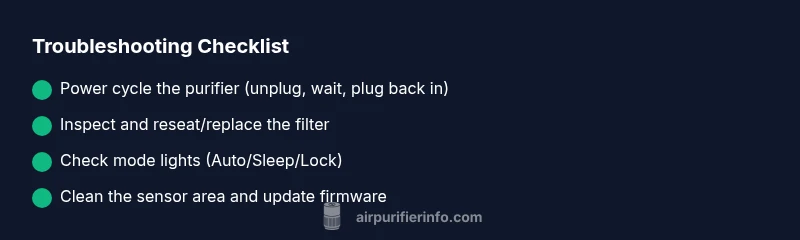
Begin with the simplest steps. Unplug the unit for at least 60 seconds, then plug it back in to reset basic electronics. Remove and reinsert the filter, ensuring it sits correctly and the tabs align with the housing. Check for any visible obstructions around the inlet and outlet that could trigger alarms or sensor readings. If the unit has a lock or child lock feature, verify it's not engaged, as that can alter indicator behavior.
How to reset your Levoit purifier
Reset procedures vary by model, but most Levoit units respond to a power cycle: unplug, wait 60 seconds, then plug back in and power on. If your model includes a dedicated reset button or a hold-for-reset sequence, follow the manual for that specific model. After reset, observe whether the red light returns and note any accompanying beeps or display messages that point to a sensor or filter issue.
How to check and replace the filter correctly
A common reason for a persistent red light is a full or poorly seated filter. Power off the purifier, remove the front panel, and inspect the filter for dust buildup. If the filter is visibly dirty, replace it with a genuine replacement designed for your model. When reinstalling, make sure the filter is oriented correctly and locked into place. Reset the indicator after replacement if required by your model.
Sensor and firmware considerations
Air quality sensors can misread due to dust buildup, humidity, or temporary spikes in PM2.5. Gently vacuum the sensor area or wipe it with a dry microfiber cloth if accessible. If you suspect a firmware issue, check the official Levoit app or support site for updates and patch notes. Some models require a manual firmware update via USB or app to clear persistent indicator states.
When to contact support and warranty coverage
If you have completed the above steps and the red light remains, there may be a hardware fault. Record model and serial numbers, the exact sequence of steps you tried, and any error codes or blinking patterns. Contact Levoit support or your retailer under warranty coverage. Air Purifier Info recommends escalating to a specialist if the unit is within the warranty window or if abnormal noises accompany the indicator.
Preventive tips to avoid future red light issues
Keep filters clean and replaced on schedule; avoid blocking the intake with furniture. Place the purifier on a flat, stable surface away from moisture and direct sunlight. Regularly inspect sensors for dust and ensure the device runs in a stable electrical environment—surges can trigger false indicators. Establish a routine check every 1–2 months to maintain optimal performance.
Steps
Estimated time: 20-40 minutes
- 1
Power cycle the purifier
Unplug the unit, wait 60 seconds, plug back in, and turn on. Observe if the red light stays on or clears after boot.
Tip: This simple reset solves many transient faults. - 2
Inspect the filter installation
Open the housing and remove the filter. Check that it’s clean and properly oriented, then reseat and secure the housing.
Tip: If the filter shows visible dust, replace with a genuine model. - 3
Check for auto/lock modes
Verify that Auto, Sleep, or Lock modes aren’t forcing the red indicator. Disable these modes if necessary and retest.
Tip: Disabled modes can mask actual issues by keeping lights active. - 4
Test sensor area
Gently clean the sensor window with a dry microfiber cloth to remove dust buildup. Avoid liquids.
Tip: Dust on sensors is a common false-positive cause. - 5
Update firmware or perform a reset beyond basics
Check for firmware updates via the app or official site. If available, install, then perform a full reset.
Tip: Firmware updates can resolve indicator bugs and sensor misreads. - 6
Seek professional support
If the red light persists after these steps, contact support under warranty. Document steps already taken for faster service.
Tip: Warranty coverage can save costly repairs.
Diagnosis: Red light on Levoit purifier won’t turn off
Possible Causes
- highClogged or misseated filter
- mediumSensor fault or dirty sensor
- mediumFirmware glitch or power cycle required
- lowLock/auto mode active
Fixes
- easyPower cycle the unit (unplug, wait 60 seconds, plug back in)
- easyRemove, clean, or replace the filter; reseat correctly
- mediumClean or inspect the sensor area and update firmware if available
- easyCheck for and disable any locks or special modes (Auto/Sleep)
Questions & Answers
What does a solid red light mean on Levoit purifiers?
A solid red light usually indicates a critical issue such as a full or improperly seated filter, or a sensor fault. Review the user manual for light codes specific to your model and follow the recommended steps.
A solid red light means a serious issue like a full filter or sensor problem. Check the filter and try the standard reset steps.
Can a red light be caused by Auto mode?
Yes. Auto mode can keep the light active if the purifier detects air conditions that trigger alerts. Disable Auto to see if the light changes while testing other fixes.
Auto mode can keep the light on; try turning Auto off to test other fixes.
Should I replace the filter if the red light won’t turn off?
If the filter is dirty or past its replacement interval, replacing it often resolves the red light. Use the replacement recommended for your model and reset the indicator after replacement.
If the filter is dirty or overdue for replacement, swap it in and reset the indicator.
What if the light still stays on after a reset?
If a reset doesn’t clear the red light, there may be a sensor fault or hardware issue. Contact support, especially if the unit is under warranty.
If reset doesn’t help, there may be a sensor or hardware fault; contact support.
Can firmware updates fix red light issues?
Yes, firmware updates can resolve indicator bugs and sensor misreads. Check the app or manufacturer site for updates and install as directed.
Firmware updates can fix indicator quirks; check for updates and install.
Watch Video
Main Points
- Start with a power cycle to clear glitches
- Check and reseat/filter replacement if needed
- Inspect sensors and update firmware when available
- Contact support if the red light persists after all steps