How to Get Red Light Off an Air Purifier: Troubleshooting Guide
Learn step-by-step troubleshooting to turn off the red light on your air purifier. Identify causes, reset sensors, replace filters, and prevent future alerts with expert guidance from Air Purifier Info.


Goal: turn off the red light on your air purifier. Start by identifying the indicator cause: sensor alert, filter replacement, or system fault. Steps typically include powering off, unplugging, resetting the device, replacing a clogged filter, and confirming the status via the display. If the red light persists after standard resets, consult the manual or contact support. This guide covers common causes and fixes for how to get red light off air purifier.
Why the red light on your air purifier matters
A red indicator on an air purifier is a built-in safety signal. It alerts you that something may be affecting performance or air quality, from a dirty filter to a sensor fault. According to Air Purifier Info, red lights are not cosmetic; they are a direct communication from the device about its current health. The Air Purifier Info team found that most red-light alerts are resolved through a small set of maintenance steps, not wholesale replacement. Understanding what triggers the red light helps you act quickly and safely, preserving indoor air quality for your family. In short, a red light prompts a targeted check rather than a guesswork fix, which saves time and reduces frustration.
Common red-light causes you should check first
Red lights on purifiers can be triggered by several common issues. The most frequent are a dirty or overdue filter, which restricts airflow and triggers a replacement alert. A dust-laden sensor or sensor miscalibration can also register a fault, lighting the red indicator even when airflow seems normal. Some models show red when the purifier detects very high particulate levels in the room, requiring you to verify room conditions and fan speeds. Incorrect filter type or improper installation can confuse the unit’s logic and cause a false alert. Finally, power-related problems or a minor fault in the control board may illuminate the red light until reset.
How to read your purifier's indicators and icons
Most devices use a consistent set of symbols: a green power light indicates normal operation, amber often signals a maintenance reminder, and red signals an error or critical alert. Some models differentiate between red for a critical fault and a red blink for a temporary sensor warning. Your manual will map each icon to a specific action (for example, replace filter, clean sensors, or run a self-test). If you’ve misplaced the manual, you can usually find a model number on the back or bottom of the unit and search online for the icon legend. Understanding these indicators helps you prioritize the right actions without guesswork. Air Purifier Info recommends keeping a quick-reference guide with your purifier to speed troubleshooting.
Quick checks before deeper troubleshooting
Before diving into deeper steps, perform quick safety and setup checks. Unplug the purifier, then plug it back in to reset the power state. Confirm the filter is seated correctly and not dislodged during maintenance. Check for visible obstructions around the intake and exhaust that could impair airflow. If your model supports a reset function, perform a soft reset by holding the reset or power button for a few seconds after re-connecting power. These precautions prevent misdiagnosis and ensure the device isn’t displaying a false alert.
Step-by-step troubleshooting: reset, power cycle, and sensor cleaning
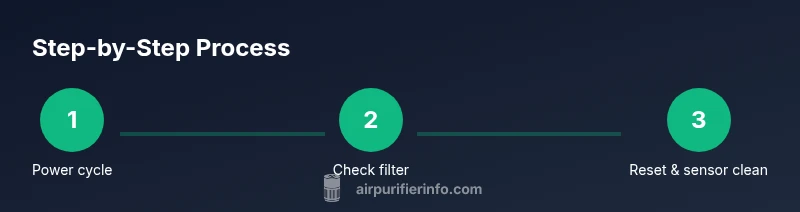
A structured approach yields reliable results. Start with a full power cycle: unplug, wait 60 seconds, plug back in, and power on. If the red light remains, inspect and replace the filter if it looks dirty or reaches its recommended replacement interval. After replacing, run a reset to clear stored fault codes. Next, clean accessible sensors with a dry microfiber cloth; avoid liquids near electronic sensors. Re-seat any removable components and test operation at low speed to observe whether the indicator resets. If the unit persists, consult the user manual for model-specific diagnostics or contact support for guidance. Air Purifier Info notes that most red-light issues resolve with these steps, not a costly service call.
How to replace or clean the filter correctly
Filter maintenance is the most common fix for red-light alerts. Start by locating the filter compartment, removing the used filter, and inspecting its condition. If it’s darkened, torn, or overly clogged, replace it with the exact filter type recommended by the manufacturer. When reinstalling, ensure the filter is aligned with the notches and sits firmly in place. After replacement, reset the purifier and run a test cycle to verify the light status. Avoid using generic or incompatible filters, as improper fit can cause ongoing alerts.
Sensor maintenance: reducing false alerts
Sensors are sensitive to dust and油 residues; keeping them clean reduces nuisance red alerts. Gently wipe accessible sensors with a dry microfiber cloth; avoid rubbing or applying liquids to sensor surfaces. If your model allows, use a soft brush to remove stubborn dust from small crevices. Check for firmware updates or self-test options in the menu that recalibrate sensors after cleaning. If the purifier uses a remote or app for sensor data, verify that sensor readings align with real-room conditions to avoid misinterpretation.
When to contact support or replace the purifier
If you have followed the standard maintenance steps and the red light persists, it may indicate a deeper fault in the control system or sensor array that requires official troubleshooting. At this point, refer to the manufacturer’s warranty and contact support with your model number, serial, and a description of the steps you took. If the device is older or unreliable after repeated resets, replacement might be the most cost-effective option. Air Purifier Info recommends evaluating long-term maintenance costs versus the benefits of upgrading to a newer model with improved sensors and energy efficiency.
Best practices to prevent red-light alerts in the future
Proactive maintenance is your best defense against recurring red lights. Create a simple schedule: inspect the filter every 1–3 months, clean sensors every 6–12 months, and perform a full reset after any filter change or service. Use the purifier in a well-ventilated space with consistent airflow to minimize false sensor readings. Keep the device away from moisture and avoid blocking airflow with curtains or furniture. Regular firmware updates where available can also improve sensor accuracy and reduce false alerts. Following these practices helps maintain clean air and a reliable indicator system.
Tools & Materials
- Replacement air purifier filter(Check model-specific filter type and rating; replace at the manufacturer’s recommended interval)
- Microfiber cleaning cloth(Lint-free for sensors and exterior surfaces)
- Isopropyl alcohol wipes(For stubborn grime on non-sensitive surfaces; avoid sensor areas)
- Soft brush(Gently dislodge dust from vents and internal openings)
- Manufacturer’s manual (digital or print)(Model-specific diagnostics and icon maps)
Steps
Estimated time: 25-40 minutes
- 1
Power cycle the purifier
Unplug the unit, wait 60 seconds, then plug it back in and power on. This clears transient faults and refreshes the control board. If the unit uses a power switch, turn it off for 10 seconds and back on to reset the power state.
Tip: A full power cycle fixes many temporary sensor glitches and should be your first action. - 2
Check the filter and replace if needed
Open the filter compartment and inspect the filter. If it looks dark, clogged, torn, or near the recommended replacement interval, install the exact replacement filter for your model.
Tip: Always use the manufacturer-approved filter to ensure correct fit and sensor readings. - 3
Reset after maintenance
Once your filter is replaced, perform a reset to clear maintenance reminders and fault codes stored in the system. Hold the reset or power button for 5–10 seconds, then release and observe the display.
Tip: If your model lacks a dedicated reset, a full power cycle can achieve a similar result. - 4
Clean accessible sensors
Gently wipe the accessible sensors with a dry microfiber cloth. Do not spray liquids directly on sensors or interfaces. Allow any cleaned surface to dry before powering the unit back on.
Tip: Be careful not to disturb small connector pins or vent openings during cleaning. - 5
Re-seat components and test
Reassemble any removed panels or guards and secure them. Turn the purifier on at low speed and monitor whether the red light reappears during a short run.
Tip: Testing at low speed minimizes noise while you confirm the fix. - 6
Check for model-specific diagnostics
If the red light persists, use the model’s diagnostic menu (if available) to run self-tests and error codes. Refer to the manual or the manufacturer’s support site for guidance.
Tip: Document any error codes to share with support for faster resolution. - 7
Consider service or replacement
If diagnostics indicate a control, sensor, or motor fault, weigh repair costs against replacement. A newer model may provide better efficiency and longer-term reliability.
Tip: Compare total ownership costs over 3–5 years when deciding between repair and replacement. - 8
Implement preventive maintenance
Set a routine for filter checks, sensor cleaning, and firmware updates. This proactive plan reduces the likelihood of future red-light alerts.
Tip: Consistency is key; small, regular tasks prevent bigger issues later.
Questions & Answers
What does a red light mean on an air purifier?
A red light typically signals an alert such as a dirty filter, sensor issue, or system fault. Check the manual for exact icon meanings and follow the recommended steps.
A red light usually means an alert like a dirty filter, sensor problem, or fault, and you should consult the manual for the exact meaning.
Should I replace the filter when the red light comes on?
Often yes, especially if the indicator shows filter replacement; verify the icon in your manual to confirm. Replacing the filter typically resolves airflow or sensor alerts.
Yes, the red light often means the filter needs replacement. Check the manual and replace as advised.
How do I reset my purifier to clear the red light?
Most models reset by holding the reset or power button for 5–10 seconds after turning off. If needed, perform a full power cycle.
Hold the reset button for several seconds after powering off to reset the device.
What if the red light stays after resetting?
If it persists, check for additional faults or icons in the manual, run diagnostics if available, and contact support if needed.
If the red light remains after reset, check for other faults and contact support if needed.
Can cleaning the sensors fix false red alerts?
Yes, gently cleaning accessible sensors with a dry microfiber cloth can reduce false alerts. Avoid liquids near sensors.
Yes, cleaning the sensors can fix false alerts; use a dry cloth and be gentle.
Are red lights a safety risk?
Red lights indicate issues but are typically safe to troubleshoot using the manual steps. If the unit becomes hot or smells burning, stop use and seek professional help.
Red lights signal a problem, but troubleshoot with the manual. If you notice overheating, stop using it.
Watch Video
Main Points
- Identify the red-light cause before acting.
- Follow model-specific steps in order for best results.
- Regular filter and sensor maintenance prevents future alerts.
- Use manufacturer-approved parts for reliability.
- If in doubt, consult official support and manuals.