Levoit Air Purifier Not Working? Step-by-Step Troubleshooting
If your Levoit air purifier won’t work, this troubleshooting guide covers power checks, filter maintenance, error codes, safety steps, and when to contact support to restore clean air quickly.


Power issues or a clogged filter are the most common reasons a Levoit air purifier won’t power on. Start by unplugging and inspecting the power cord and outlet, then check the indicator lights for clues. If the filter is clogged or the unit overheats, clean or replace the filter and allow it to cool before retrying. If it still won’t run, reset the device.
Why Levoit Not Working: The Most Common Causes
According to Air Purifier Info, the majority of Levoit not-working units stem from basic power or filtration issues rather than complex component failures. The first clues are often visible on the LED indicators or audible beeps. A power outlet that isn’t supplying electricity, a damaged power cord, or a blocked internal fuse can prevent startup. More commonly, a clogged or worn filter triggers a safety shutdown to protect the motor, sensors, and fan. Environmental factors, like placing the unit in a cramped space or near heat sources, can also cause the purifier to heat up and shut down. Understanding these usual suspects helps homeowners triage quickly without disassembling the unit.
If you’re dealing with intermittent operation, noisy fans, or a unit that runs briefly then stops, document any error codes shown by the LED panel. This documentation helps with quick diagnosis if you need to reach support. For many Levoit models, a reset or a simple filter replacement resolves the issue, especially when the problem is caused by a block in airflow or a sensor reading out of range. The goal is to confirm the simplest fixes first, then rule out maintenance-related causes.
Additionally, the Air Purifier Info team notes that consistent maintenance is a strong predictor of long-term reliability. Regular filter changes, cleaning of intake grills, and avoiding moisture or direct sunlight on the device can prevent common failures. By pairing routine care with fast power checks, homeowners can minimize downtime and maintain a healthier indoor environment.
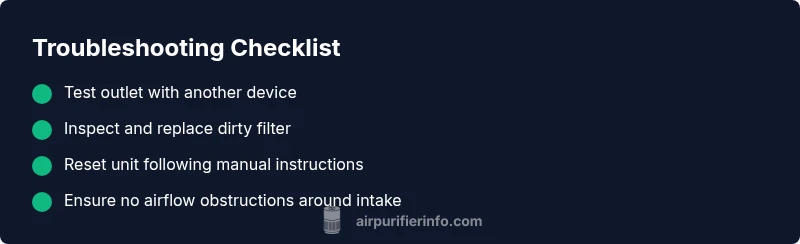
- Look for obvious signs of damage to the power cord or plug.
- Check whether the outlet is live by testing another device.
- Inspect the filter for clogs and replace as needed.
- Ensure the unit isn’t mounted or placed where airflow is restricted.
- If the unit shows error codes, consult the user manual for exact meanings.
Overall, most Levoit not-working issues resolve with simple, user-accessible steps in under 30 minutes when approached methodically.
Steps
Estimated time: 15-30 minutes
- 1
Check power and outlet
Unplug the device, inspect the power cord for any cuts or kinks, then plug into a known-good outlet. If the outlet is controlled by a wall switch, ensure it is on. Turn the purifier on and observe the LED indicators for any change.
Tip: Always start with the simplest test—power and outlet—before opening the unit. - 2
Inspect and replace the filter
Open the housing according to the model’s manual and remove the old filter. Check for visible debris on the intake and around the seal. If the filter is saturated or clogged, replace with an exact or compatible replacement.
Tip: Use the manufacturer-recommended filter type to preserve airflow and safety features. - 3
Reset the device
With the unit unplugged, wait 60 seconds, then plug back in and power on. If there’s a reset button, press and hold it as directed in the manual. Observe whether the indicators normalize.
Tip: Resetting can clear transient sensor faults and restore normal operation. - 4
Check for airflow obstructions
Ensure the purifier isn’t blocked by furniture, curtains, or walls. Leave at least a few inches of clearance on all sides to allow free airflow and prevent overheating.
Tip: Proper placement improves performance and reduces heat buildup. - 5
Review error codes and settings
Note any flashing lights or error codes and compare with the user manual. Some codes indicate sensor faults or airflow restrictions that require specific actions.
Tip: Document codes to speed up support calls. - 6
Seek professional or warranty support
If the unit still won’t operate after basic fixes, contact the manufacturer’s support or your retailer under warranty terms. Provide model, serial number, purchase date, and a summary of what you tried.
Tip: Warranty service can be faster when you provide a clear symptom log.
Diagnosis: Levoit air purifier won’t power on or shows intermittent operation, LED indicators flash irregularly, or device overheats and shuts down
Possible Causes
- highPower inlet/outlet issue (loose connection, tripped breaker)
- highClogged/compromised filter causing safety shutdown
- mediumFaulty power cord or plug
- highIncorrectly installed filter or severely clogged airflow
- lowControl board or sensor failure
Fixes
- easyTest the unit on a known-good outlet and reseat the plug; try a different outlet if needed
- easyUnplug, remove and inspect the filter for debris; clean if possible or replace if saturated
- easyInspect power cord for visible damage; replace if frayed or bent
- easyReset the purifier according to the manual (often holding the power button 3–5 seconds or unplugging for 60 seconds)
- mediumIf error codes persist after basic fixes, contact support with model/serial, purchase date, and a short description of symptoms
Questions & Answers
Why won’t my Levoit air purifier turn on even when plugged in?
Most often it’s a power or filter issue. Check the outlet and cord, then inspect the filter for clogs. If needed, perform a reset before trying again.
Usually it’s power or filter related. Verify the outlet, inspect the cord and filter, then reset and retry.
How do I reset a Levoit air purifier?
Refer to your model’s manual, but common steps include unplugging for 60 seconds, replugging, and holding the power button for several seconds. This clears temporary sensor faults.
Unplug for a minute, replug, then hold the power button to reset.
What should I do if the LED indicators show an error code?
Note the code and consult the manual for its meaning. Many codes indicate filter, airflow, or sensor issues that can be resolved by maintenance or a reset.
Write down the code and check the manual to identify a fix, often maintenance or reset solves it.
How often should I replace the filter to prevent issues?
Follow the manufacturer’s schedule, typically every 6-12 months depending on use and environment. A dirty filter is a common cause of poor performance.
Replace the filter on the timer recommended by the manual, usually every 6 to 12 months.
Is it safe to operate the purifier with a clogged filter?
Operating with a clogged filter reduces airflow and can trigger overheating or faults. Replace promptly and ensure proper seating.
No—clogs block airflow and can cause faults. Replace the filter and reseat it properly.
When should I contact support or claim warranty?
If basic fixes don’t restore operation, contact customer support with model/serial, purchase date, and a summary of attempts. Check warranty terms for coverage.
If fixes don’t work, contact support with your model details and what you’ve tried.
Watch Video
Main Points
- Check power first and test multiple outlets.
- Replace a clogged filter to restore airflow.
- Reset after basic fixes to clear faults.
- If unresolved, contact support with model details.