How to Protect Air Filter from Water: A Practical Guide
Learn proven steps to shield your air filter from water, condensation, and leaks. This educational guide covers placement, moisture control, maintenance, and replacement strategies for healthier indoor air.


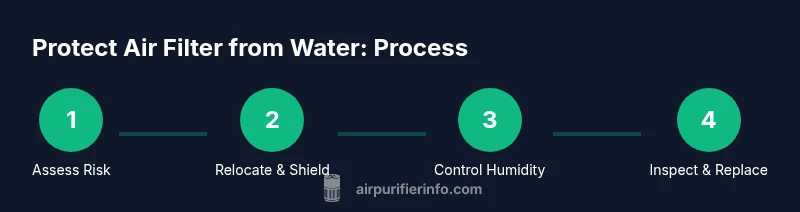
This guide shows how to protect air filters from water and moisture using smart placement, moisture control, and routine checks. You’ll learn how to identify risk points, choose moisture-resistant housings, and implement a practical maintenance plan to reduce water contact with purifiers and extend filter life.
Understanding why water exposure damages air filters
If you’re wondering how to protect air filter from water, understanding how moisture harms filter media is the first step. Water exposure can degrade the media, promote mold growth, and compromise seals, reducing efficiency and airflow. In this guide, we break down practical steps to minimize water contact, from placement to maintenance. According to Air Purifier Info analysis (2026), keeping filters dry dramatically extends their life and maintains strong indoor air quality. The most common water threats are leaks, spills, condensation, and high humidity. By recognizing these risks, homeowners and renters can implement simple, reliable protections that fit real living spaces.
Water-related risks explained
Moisture can reach filters through several pathways: leaks in plumbing or appliance connections, spills from nearby kitchens or bathrooms, condensation on cool surfaces, and humidity that drives moisture into the purifier housing. Even small amounts of water can compromise filter media and encourage mold growth, which not only reduces filtration efficiency but can also worsen indoor air quality. Understanding these risk points helps you design a practical protection plan that you can implement without special tools.
Common water entry points in homes
Water can reach air filters via several everyday routes: basement or laundry room leaks, rain-driven splash near exterior walls, condensation on windows in cold weather, humid bathrooms, and even spills during cleaning if purifiers sit too close to sinks. Check around the purifier for gaps in seals, ensure intake and exhaust paths stay dry, and keep cords and outlets elevated away from potential water exposure. A quick visual inspection after heavy rain or a spill can catch problems before they cause damage.
Immediate steps to protect air purifiers during rain or floods
When a storm is forecast or a flood threat exists, take proactive measures: unplug devices, move purifiers away from windows or basements, and cover them with a breathable guard or shield to reduce splashes while still allowing airflow. Keep a box fan or dehumidifier nearby to maintain air dryness in the room. If you notice any water intrusion, stop use immediately and dry all surfaces before reusing the unit. These steps reduce the risk of water entering the purifier and damaging the filter media.
Safe placement and layout tips to minimize water risk
Place air purifiers on elevated, dry surfaces away from sinks, bathtubs, and exterior doors that could leak or flood. Use a drip tray or a washable mat beneath the unit to catch incidental water and crumbs. Ensure cords are routed to avoid puddles and use grommets or weatherstripping to seal potential gaps where water could seep in. A well-placed purifier is less likely to encounter spills or condensation from nearby activities.
Choosing moisture-resistant filter housings and designs
When selecting units or accessories, look for moisture-tolerant housings, gasket seals, and housings with tight-fit lids. Some designs offer splash guards or rain-protected intakes for use near windows, while others include moisture-resistant filters or dual-seal systems. Remember that not all filters are created equal—prioritize products with proven water resistance and easy dry-out procedures. Always follow manufacturer guidelines for exposure to humidity and water.
Maintenance routines that reduce water-related risks
Establish a routine that includes regular visual checks for condensation, leaks, and moisture buildup around the purifier. Clean dust and debris from the exterior, wipe down surfaces after accidental spills, and inspect seals every few months for wear. Use desiccants or a dehumidifier in humid spaces to keep ambient moisture in check. Keeping the environment drier and cleaner reduces the chance of water reaching the filter media.
Dealing with condensate in humid climates
In humid climates, condensation on surfaces near the purifier can drip onto the unit. Use a dehumidifier or moisture absorbers in the room, and ensure the purifier is never directly over a water source. If you notice persistent dampness, move the purifier to a drier spot and reassess the room’s ventilation. Consistent moisture control protects both the unit and the air you breathe.
After water exposure: drying, inspecting, and replacing filters
If water contact occurs, power down and unplug the unit, remove the filter, and inspect the housing for moisture. Dry all components thoroughly before reassembly and replace any filter that shows visible wetness, swelling, or mold growth. Do not reuse a water-exposed filter. Document the incident and review placement and drainage to prevent recurrence.
Smart home practices to monitor humidity and leaks
Install humidity sensors near purifier locations and set up alerts for high humidity or leaks. Regularly check for condensation on windows and surfaces, and keep an entry log of water-related events in your home. These proactive practices help you catch moisture problems early and protect your air filters over time.
Tools & Materials
- Screwdriver (Phillips head, compatible with unit fasteners)(Have a set of sizes on hand and a magnetic screwdriver if possible)
- Microfiber cloths(Soft, lint-free cloths for drying and wiping surfaces)
- Moisture meter or hygrometer(Used to monitor room humidity near the purifier)
- Dehumidifier or desiccant packs(Helps reduce ambient moisture around the purifier)
- Replacement filter cartridges(Have spares on hand in case of water exposure)
- Drip tray or splash guard(Optional; useful under units near sinks or windows)
Steps
Estimated time: 45-60 minutes
- 1
Unplug and inspect
Power down the purifier and unplug it from the outlet. Do a quick exterior inspection to spot any obvious water droplets, spills, or condensation on the housing and around the intake and exhaust—address these immediately to prevent seepage.
Tip: Never operate the unit with visible moisture; running moisture into the electronics can cause failure. - 2
Relocate to a dry spot
Move the purifier away from windows, sinks, and areas prone to splashes or leaks. Choose a high, stable surface so accidental spills won’t reach the unit.
Tip: Use a small raised platform if the surface tends to collect water after rainfall. - 3
Check for ingress points
Examine hoses, gaskets, and seals for wear or gaps. Tighten fittings if needed and replace any damaged seals to prevent moisture from seeping into the housing.
Tip: Keep spare seals on hand and replace them in pairs to ensure a complete seal. - 4
Dry and sanitize exterior
Wipe the exterior with a dry microfiber cloth. If you suspect moisture inside the housing, gently air-dry the exterior before opening any panels following manufacturer instructions.
Tip: Avoid using liquid cleaners on the unit’s electronics unless specified by the manufacturer. - 5
Improve room moisture control
Set up a dehumidifier or place desiccants in the room to reduce ambient moisture. This lowers the risk of condensation on the purifier itself.
Tip: Keep humidity monitoring visible so you can respond quickly to spikes. - 6
Enhance protection with accessories
If your environment frequently experiences spills or rain, consider splash guards or water-resistant covers designed for your model.
Tip: Ensure covers allow adequate airflow and don’t trap heat, which could harm the purifier. - 7
Schedule regular checks
Create a routine to inspect seals, hoses, and the filter area every 1–3 months, depending on use and humidity. Early detection prevents costly damage.
Tip: Document findings to track wear over time. - 8
Prepare for emergencies
Have a plan for water events such as leaks or floods. Know where to unplug, where to move the unit, and how to quickly dry the area.
Tip: Keep a lightweight, portable dehumidifier handy for quick response. - 9
Plan replacement after exposure
If the filter shows moisture exposure, swelling, or mold, replace it promptly. Do not reuse a water-exposed filter.
Tip: Keep replacement filters accessible but stored in a dry location.
Questions & Answers
What causes water exposure to air filters?
Water exposure occurs from leaks, spills, condensation, and high humidity. These can wet the filter media and promote mold growth, reducing filtration efficiency and airflow.
Water exposure comes from leaks, spills, condensation, and humidity. It wets the filter and can lead to mold and poorer filtration.
Can water-damaged filters be saved?
In most cases, water-damaged filters should be replaced. Water can cause microbial growth and irreversible damage to the media, reducing its effectiveness.
Water-damaged filters should usually be replaced because moisture can cause mold and reduced filtration.
Should I replace the filter if water exposure occurs?
Yes. Replace the filter if it has been exposed to water. Also inspect the housing for moisture and correct any leaks or condensation sources before reusing.
Yes, replace the filter after exposure and check the housing for leaks.
How can I prevent water from entering during storms?
Move the purifier away from potential water sources, unplug during severe weather, and use breathable protective covers to minimize splashes while allowing airflow.
Move units away from water sources, unplug in storms, and cover them with breathable guards.
Are there moisture-resistant air filters?
Some filters and housings are designed to tolerate higher moisture, but always follow the manufacturer’s humidity and installation guidelines. Look for configurations that emphasize seals and airflow.
Some filters are designed to tolerate moisture, but always follow guidelines and check seals.
What should I do after a flood affecting an air purifier?
Power off and dry the area, inspect the unit for any moisture intrusion, and replace exposed filters. Consider a professional check if the unit sustained significant water contact.
After a flood, dry the area, inspect for moisture, and replace exposed filters. Seek professional help if needed.
Watch Video
Main Points
- Identify water risk points around your purifier
- Use dry placement and moisture control strategies
- Inspect seals and housings regularly
- Replace any water-exposed filters immediately
- Monitor humidity to prevent recurring moisture