How to Check Air Purifier: A Step-by-Step Guide
Learn how to check your air purifier for filter life, airflow, and sensor accuracy with our practical, step-by-step guide to keep your indoor air clean and safe.


Today you’ll learn how to check an air purifier for performance, filter life, and safety indicators. This quick guide covers visual inspections, filter status, airflow checks, and sensor readings, plus when to replace parts. By following these steps, you’ll confirm your purifier is clean, functioning, and delivering clean air. Start with model basics and safety precautions.
Why checking your air purifier matters
Maintaining a healthy indoor environment starts with ensuring your air purifier is doing its job. Regular checks help verify filtration effectiveness, airflow, and sensor accuracy. The Air Purifier Info team notes that neglecting routine checks can lead to reduced air quality, higher energy use, and unexpected device failures. In this guide, we’ll cover how to check an air purifier for performance, how to read indicators, and practical steps you can take to keep it running optimally. Whether you own a compact desk purifier or a whole-room unit, a consistent check routine can extend filter life, improve allergen reduction, and support pet dander control. By learning how to check air purifier components—filters, pre-filters, fans, and sensors—you’ll protect your investment and your family’s health. The process is straightforward and safe when you follow manufacturer instructions and observe basic precautions. We’ll use everyday terms, concrete examples, and checklists you can reuse in future maintenance.
According to Air Purifier Info, regular checks also help you confirm that your purifier continues to meet your air-quality goals, especially in homes with pets, dust-prone rooms, or seasonal pollen. This is about proactive care, not reactive fixes. A well-executed check routine reduces the chance of surprising downtime and keeps your air cleaner long-term.
Before you start: safety and preparation
Safety first. Unplug the unit before touching any internal parts and place it on a stable surface away from water or heat sources. Have the user manual on hand because many models differ in how you access the filter, open the housing, and reset indicators. Gather essential tools: a soft cloth, a flashlight, a mirror or smartphone for tight corners, and replacement filters if the check reveals a worn element. This preparation minimizes guesswork and speeds up the process. If you’re unsure about any step, consult the manual or manufacturer support. A quick safety check should also note hot surfaces, exposed wiring, or signs of moisture and avoid operating the unit until issues are resolved.
With safety covered, set a clear plan for inspection and testing. A calm, well-lit area helps you spot dust buildup or loose components. If you have pets, keep them away during the operation to reduce distractions and prevent curious interruptions. A tidy workspace makes it easier to keep track of screws and springs and prevents small parts from getting lost during reassembly.
Visual inspection and exterior checks
Begin with the outer housing. Look for dust around intake and outlet grills, seals, and edges. Wipe surfaces with a dry or slightly damp microfiber cloth only; never spray liquids into the unit. Inspect indicator lights and digital readouts; most modern purifiers display status like 'normal', 'restricted', or a filter-life percentage. Check for loose panels, cracks, or signs of moisture. Examine the cord and plug for wear or damage. If grills are clogged or airflow feels blocked, move furniture away from the unit to improve ventilation. A clean exterior contributes to accurate diagnostics and longer sensor life. This step gives you a baseline for the purifier’s condition and helps avoid misreads caused by surface dust.
Inspecting the filter and filter-life indicators
Open the filter compartment following the manual’s instructions. Remove the filter and compare its appearance with the replacement reference. If your purifier has a filter-life indicator, note the percent remaining or the replacement interval. Confirm the indicator can be reset after a filter change; if not, plan to consult the manual for the correct procedure. Check the pre-filter or secondary filters for lint, pet hair, or smudges. A heavily soiled filter reduces airflow, increases energy use, and can trigger alarms. If the filter is worn or very dirty, plan for replacement rather than attempting to wash it. Replacing a filter is often faster and safer than trying to refresh a used HEPA element; always follow the manual for washable types.
Assessing airflow and sensor readings
With the unit unplugged, reassemble the cover and then perform a post-clean test run. Listen for unusual noises like grinding or rattling, which may indicate loose parts or a failing fan. Observe the airflow from the intake to the outlet on a neutral surface. If you notice weak suction, blocked airflow, or peculiar smells, the filter or housing may be obstructed. For models with built-in sensors, check the live readings for PM2.5, VOC, or other indices and verify they respond to a known air-quality change (e.g., after vacuuming or opening a window). If readings stay static or drift unpredictably, the sensor or calibration may need service. Some models include a calibration mode in the settings; consult the manual if calibration steps exist.
Cleaning pre-filters and exterior components
Many purifiers include a washable pre-filter. Remove it and clean by vacuuming or rinsing according to the manufacturer’s guidance; let it dry completely before reinstalling. Clean vents and behind grills to remove dust clusters; wipe the interior casing with a soft cloth. Avoid harsh cleaners that may leave residues or damage plastics. While cleaning, inspect seals and gaskets for wear and replace if necessary. A clean pre-filter reduces the main filter’s load and improves overall efficiency. Ensure all pieces are completely dry before reassembly to prevent moisture from reaching electrical components.
When and how to replace filters
Follow the manufacturer’s guidance for replacement timing, which varies by model and usage. If the filter-life indicator shows diminished capacity, replace accordingly. Use only compatible filters to preserve airflow and energy efficiency. After replacement, reset filter-life counters according to the manual to ensure accurate future readings. If you can’t obtain an exact replacement, contact the brand or retailer for a compatible option. Proper replacement maintains filtration efficiency and helps you meet air-quality goals while minimizing energy waste.
Recording results and setting a maintenance schedule
Create a simple log noting the date of checks, filter status, and any issues observed. Include notes about pets, smoke exposure, or allergens to understand how your environment affects purifier performance. Set a cadence: quick monthly checks, deeper quarterly reviews, and a full replacement assessment every 6–12 months. Use reminders on your phone or calendar to stay consistent. A written routine makes troubleshooting easier and helps communicate upkeep to others in the household. Air Purifier Info recommends a reusable checklist for multiple models to simplify ongoing maintenance.
Common mistakes and troubleshooting tips
Common mistakes include skipping safety steps, failing to reset indicators after replacement, and using water on non-washable filters. Never spray cleaners into the intake or around electrical components. Don’t force a loose panel or bend delicate sensors. If performance seems off, re-check the filter and reseat the cover. If issues persist, consult the manual or customer support. Remember, incorrect cleaning or calibration can void warranties or cause damage.
What to do if performance seems off and next steps
If a purifier still underperforms after a check, start with a fresh filter and run the device through a basic diagnostic cycle per the manual. Clean the pre-filter and verify the power supply. If readings remain abnormal, contact customer support or a certified technician. For persistent sensor drift or motor noise, servicing or replacement may be necessary. Always revert to the user manual for model-specific troubleshooting steps and warranty details. A systematic approach helps you determine whether maintenance is needed now or if it can wait until the next service window.
Tools & Materials
- User manual for your air purifier(Model-specific instructions for opening the case and replacing the filter.)
- Replacement filter (if needed)(Use only compatible filter types as specified by the manufacturer.)
- Soft microfiber cloth(For exterior cleaning; avoid abrasive materials.)
- Flashlight or phone light(Illuminates hard-to-see areas inside the unit.)
- Small screwdriver(Only if your model uses screws to access the filter housing.)
- Replacement pre-filter (optional)(If your purifier has a washable pre-filter and it appears worn.)
Steps
Estimated time: 30-45 minutes
- 1
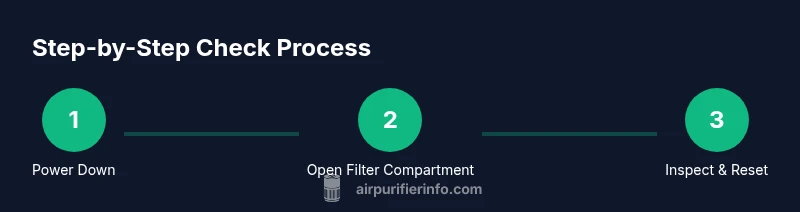
Power down and unplug
Ensure the unit is completely powered off and disconnected from power before touching any internal components. This prevents electric shock and protects sensitive sensors. If the unit is warm, wait a minute for it to cool before opening.
Tip: Always unplug first, even if you think you’ll only wipe the exterior. - 2
Access the filter compartment
Follow the manual to access the filter housing. Remove any screws or latches and gently lift the filter out. Note the orientation so the new filter installs correctly.
Tip: Keep track of screws and small parts on a clean workspace. - 3
Inspect the current filter
Check for signs of wear, such as discoloration, tears, or a strong odor; these indicate replacement is needed. If there’s a filter-life indicator, read its value before removing the filter.
Tip: If you’re unsure, err on the side of replacement to maintain filtration efficiency. - 4
Check filter-life indicators and reset
If your model has a filter-life indicator, record the remaining life and perform a reset after installing a new filter per the manual. Calibration ensures future readings stay accurate.
Tip: Resetting on the wrong model can skew future maintenance timing. - 5
Test airflow and sensor readings
Reassemble the cover and power the unit on. Check for steady airflow and listen for unusual noises. Verify sensor readings respond to a simple air change, like opening a window or turning on a vacuum.
Tip: A sudden change in readings after a known air change confirms sensor responsiveness. - 6
Clean exterior and pre-filters
Remove and clean any washable pre-filters and exterior grills. Dry completely before reassembly to prevent moisture from reaching internal electronics.
Tip: Water-dry time should be at least a few hours depending on climate. - 7
Reassemble and run a test
Place the unit back on a stable surface, reattach panels securely, plug in, and run for 15–20 minutes to verify normal operation. Check for leaks or loose components during the test.
Tip: Take a moment to recheck that all parts are seated properly before leaving it running.
Questions & Answers
Why should I check my air purifier regularly?
Regular checks help ensure filtration efficiency, sensor accuracy, and safe operation. They also catch issues before performance declines, protecting indoor air quality.
Regular checks help ensure your purifier runs safely and efficiently and catches issues early.
How often should I replace the filter?
Follow the manufacturer’s guidance or the filter-life indicator. Replacement timing varies by model and usage, but indicators make the decision clearer.
Follow the manual or the indicator for replacement timing.
Can I clean a HEPA filter instead of replacing it?
Some HEPA filters are washable, but most are not. Always check the manual before attempting cleaning and avoid washing unless explicitly recommended.
Check the manual before washing—most HEPA filters aren’t washable.
Is it safe to unplug and handle the unit while it’s running?
No. Always unplug and wait for any moving parts to stop before opening or handling the internal components.
Never handle a live device; unplug first.
What should I do if the purifier makes loud noises after cleaning?
Unplug the device, inspect for loose parts or misaligned panels, and reseat the filter. If noises persist, consult the manual or customer support.
Turn it off and check for loose parts; contact support if it keeps making noise.
What if the indicator shows a fault or error?
Consult the manual for fault codes, reset steps, or service procedures. If the issue persists, contact customer support or a technician.
Follow the fault code guidance in the manual and reach out if it won’t clear.
Watch Video
Main Points
- Check air purifier status regularly to protect indoor air quality
- Follow the manual for filter life indicators and replacement
- Unplug before any internal inspection and reassemble carefully
- Maintain a clean exterior and pre-filter to maximize performance
- Keep a simple maintenance log for consistency and troubleshooting