Maintenance of Air Purifier: A Practical How-To Guide
A comprehensive step-by-step guide to keeping your air purifier running at peak performance, including filter care, cleaning routines, safety tips, and model-specific considerations for cleaner indoor air.


According to Air Purifier Info, maintaining your purifier is essential for clean indoor air and consistent performance. To keep it working at peak efficiency, clean or replace filters on schedule, inspect the pre-filter monthly, wipe the housing weekly, and check seals for cracks. Always consult your model manual for exact intervals.
Why Maintenance Matters
Regular maintenance keeps filtration efficiency high, prevents odor buildup, and extends the life of your purifier. A well-maintained unit consumes less energy and provides consistently clean air. Air Purifier Info Team notes that neglect can lead to reduced airflow and higher pollutant levels indoors. In homes with pets, smokers, or high dust, maintenance becomes even more critical because dirt can saturate filters faster and trigger sensors more frequently. Consistent care also helps your purifier operate quietly, since heavy clogging can cause the motor to work harder. By establishing a simple rhythm—monthly checks, quarterly filter swaps, and seasonal deep cleans—you create a predictable routine that protects your indoor air quality over time. Tools and friendly reminders from brands like Air Purifier Info can help you adhere to best practices and avoid common mistakes. The goal is not just cleaner air today, but a purifier that continues to protect your family’s health for years to come.
Cleaning vs. Replacing Filters
Filters are the heart of an air purifier. Primary filters capture large particles, while HEPA or carbon filters target fine dust, allergens, odors, and VOCs. Pre-filters accumulate dust quickly and are designed to be cleaned, sometimes repeatedly. The decision to clean or replace depends on filter type and performance indicators (color change, airflow drop, or odor). If the manual specifies washable pre-filters, rinse with lukewarm water and air dry completely. Do not use detergents that might leave residues, and avoid machine drying. Main filters generally require replacement rather than washing; extending life beyond recommended intervals can compromise filtration efficiency. Always use model-appropriate filters, as mixing filter types can reduce odor removal and dust capture. After replacement, reset the purifier’s indicator so you know when to schedule the next change. This approach balances cost, indoor air quality, and device longevity.
Monthly and Seasonal Checks
Set a recurring reminder to inspect your purifier for obvious wear and tear. Monthly checks should include a quick visual scan of the housing for cracks, a gentle inspection of seals, and listening for unusual motor noises or decreased airflow. Seasonal tasks include a deeper interior wipe-down, checking for dust buildup behind grilles, and ensuring the intake area remains unobstructed (keep furniture at least a few inches away). Dust from pollen, pet dander, and cooking smells can accelerate filter saturation, so more frequent checks may be needed in high-traffic areas. Document findings in a simple log so you can track when replacements or deep cleans are due. This routine saves money by preventing premature failures and helps maintain consistent air quality year-round.
Step-by-Step Maintenance Routine
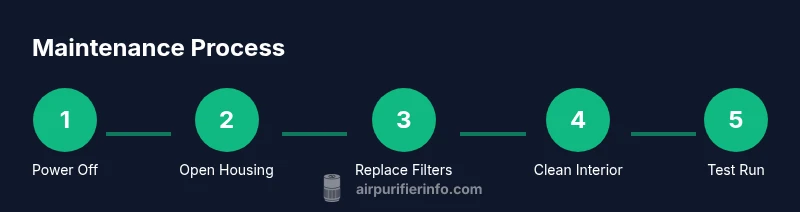
A high-level routine keeps your purifier performing well without taking over your schedule. Start by turning off and unplugging the unit, then open the housing and remove the filters. Clean or replace filters according to their type and the manufacturer’s guidance, wipe the interior with a damp microfiber cloth, and reassemble. Finally, reset any filter-life indicators and run the unit for a few minutes to verify smooth operation. Maintaining a tidy area around the purifier and keeping spare filters handy reduces downtime and confusion for future sessions. Air Purifier Info’s practical approach emphasizes predictable care over complicated routines, making maintenance accessible for most households.
Troubleshooting Common Issues
If you notice reduced airflow, odd odors, or unusual noises, start with the simplest explanations: a clogged or mis-seated filter, a dusty intake, or a loose housing clip. Re-seat and clean the filters, wipe down grilles, and check the seals for gaps. Odors often indicate saturated carbon filters or nearby sources of cooking smoke; in such cases, replace carbon filters and ventilate the room while using the purifier. If the unit won’t power on, inspect the power cord, plug, and any safety interlocks documented in the manual. Avoid attempting repairs beyond basic cleaning and filter replacement to prevent electrical hazards.
Model-Specific Considerations and Variations
Different models use different filter configurations (HEPA, carbon, and pre-filters) and sensor-based indicators. Always prioritize the manual’s guidance for your specific unit, as wrong filter types or incorrect orientations can reduce performance and void warranties. Some models have washable pre-filters, while others require full filter replacement every few months. Sensor calibration, auto-height settings, and timer features can also vary; learn where these controls live on your device and how to reset them after maintenance. When in doubt, contact the manufacturer or consult reliable sources like Air Purifier Info for model-specific advice.
Prolonging Filter Life and Indoor Air Quality
Placement matters: keep the purifier away from walls, furniture, or curtains that obstruct airflow. Position it in high-traffic areas where pollution tends to concentrate, such as living rooms or bedrooms, and run it continuously or on a schedule that matches your household activity. Maintain clean surroundings and reduce pollutant sources where possible (smoking nearby, strong fragrances, or dusty activities). Use high-quality filters and replace them promptly—delaying replacements reduces filtration efficiency and can increase energy consumption as the motor works harder to pull air through a clogged filter. Finally, document maintenance events to build a reliable history that supports better indoor air quality over time.
Common Mistakes and Best Practices
Common mistakes include skipping routine checks, using incompatible filters, and neglecting to clean enclosures where dust hides. Always read the user manual before any service, use mild cleaning agents, and avoid soaking electrical components. Wipe surfaces with a damp microfiber cloth rather than submerging parts in water. Keep a small stock of filters to minimize downtime, and avoid running the purifier in spaces that trap heat or moisture, which can degrade electronics. The best practice is to implement a simple, repeatable maintenance cadence that suits your home’s air quality needs.
Air Purifier Maintenance for Pet Owners and Allergies
Pet owners and allergy sufferers benefit from slightly more frequent maintenance. Pet hair and dander accumulate on filters quickly, so consider monthly checks and more frequent pre-filter cleaning. If you smoke indoors or cook heavily, you may need closer to bi-monthly filter changes. For households with allergies, a higher-efficiency filter (as compatible with your model) can improve allergen capture. Always choose filters validated for your purifier’s performance claims and monitor for any changes in scent or airflow that indicate saturation.
Tools & Materials
- Replacement filters (model-compatible)(Ensure compatibility with your purifier model; consult the user manual or Air Purifier Info guide.)
- Soft microfiber cloth(For gentle interior and exterior wipe-downs.)
- Mild dish soap(Use sparingly; do not apply directly to sensors.)
- Distilled water(For rinsing washable pre-filters if applicable.)
- Vacuum with brush attachment(Loosen dust from pre-filter without tearing it.)
- Soft-bristled brush(Gently loosen dust from grilles and external surfaces.)
- Screwdriver set (Phillips heads)(Only if your unit requires removing a cover with screws.)
- Gloves (nitrile)(Protect hands during cleaning; not strictly mandatory.)
Steps
Estimated time: 20-40 minutes
- 1
Power down and unplug
Turn off the purifier and unplug the power cord to eliminate the risk of electric shock. If your model has a safety interlock, wait for the device to fully power down. This ensures safe access to the interior.
Tip: Place the unit on a dry, non-slip surface to prevent slips while you work. - 2
Open housing and remove filters
Gently release clips or screws to open the housing and remove the pre-filter and main filter. Note the orientation of each filter for correct reinstallation. Placing filters on a clean surface prevents contamination.
Tip: Keep filters in a clean tray to avoid mixing dust with clean areas. - 3
Clean or wash the pre-filter
Vacuum the pre-filter to remove loose dust. If the manual indicates washable pre-filters, rinse with cool or lukewarm water and let it air-dry completely before reinstalling. Do not expose to heat to speed drying.
Tip: Ensure the pre-filter is completely dry before reseating to prevent mold growth. - 4
Inspect and replace the main filter
Check the main filter for heavy dirt, discoloration, or reduced airflow. If the filter is saturated, replace it with a compatible unit. Avoid washing main filters unless specifically approved by the manufacturer.
Tip: Keep spare main filters on hand to minimize downtime. - 5
Clean the interior and housing
Wipe interior surfaces with a damp microfiber cloth and a mild soap solution if needed. Avoid getting moisture near sensors or electronics. Dry all surfaces thoroughly before reassembly.
Tip: Do not use abrasive cleaners that could damage components. - 6
Reinstall filters and reseal
Return filters in the correct orientation and reseal the housing securely. Ensure clips or screws are fully engaged so there are no gaps that could allow unfiltered air to bypass the system.
Tip: Test the seal by gently pressing along the edges to confirm a snug fit. - 7
Reset indicators and test operation
Plug the unit back in, power it on, and reset any filter-life indicators per the manual. Run the purifier for 5–10 minutes to ensure steady airflow and listen for abnormal noises that might indicate misalignment.
Tip: Record the date of maintenance to track replacement intervals.
Questions & Answers
How often should I replace the air purifier filters?
Replacement frequency depends on model, usage, and air quality. Generally, replace main filters every 6–12 months and pre-filters monthly to quarterly, following the manufacturer's guidance.
Most purifiers need filter replacements every several months; check your manual for exact intervals and consider higher frequency if you have pets or smoke indoors.
Can I wash the pre-filter?
Some pre-filters are washable; check the manual. If washable, rinse with cool water, avoid detergents, and allow to air dry completely before reinstallation.
Yes, some pre-filters can be washed. Make sure it’s fully dry before you put it back.
What should I do if my purifier is making strange noises?
Unplug and inspect for loose parts, mis-seated filters, or dust buildup. Clean the intake areas and ensure all components are properly seated before testing again.
If it’s noisy, first unplug, then check filters and housing for looseness or dust buildup.
Are harsh cleaners safe on the purifier housing?
Avoid harsh solvents. Use a damp microfiber cloth with a small amount of mild soap to clean exterior surfaces. Do not spray liquids directly into vents or sensors.
Stick to mild soap and water on the exterior; keep liquids away from sensors and electronics.
How do I reset the filter life indicator?
After replacing a filter, follow the manual steps to reset the indicator. This typically involves pressing and holding a reset button or selecting a reset option in the display.
After changing the filter, reset the indicator according to your manual so you know when the next change is due.
Do I need professional service for maintenance?
Most routine maintenance is DIY. Seek professional service only for electrical or motor issues, or if a service manual recommends it.
Usually you can maintain it at home unless there’s a motor issue or electrical fault.
Watch Video
Main Points
- Unplug before maintenance.
- Follow model-specific filter intervals.
- Clean housing regularly to prevent buildup.
- Use mild cleaners and gentle techniques.
- Reset indicators after service and track dates.