Air Purifier Fan Not Working: Troubleshooting Guide
Urgent, step-by-step troubleshooting for an air purifier fan not working. Learn safety checks, common causes, and maintenance tips to restore airflow and improve indoor air quality fast.


Most often, an air purifier fan not working is caused by a tripped safety switch or a blocked fan. Unplug the unit, inspect the intake and filter for obstructions, and reset or replace a blown fuse as needed. If the unit still won’t run, check the power outlet and try another device to confirm supply.
Immediate safety and quick checks
Safety first: unplug the purifier before you touch any internal parts. This is non-negotiable to prevent shock and accidental startup. If the unit is warm to the touch, switch off power at the wall and wait for it to cool before handling. Visually inspect the power cord for cuts, exposed wires, or loose connections. If you see damage, do not use the purifier until the cord is replaced by a qualified technician.
Next, confirm the outlet is supplying power. Plug a lamp or phone charger into the same outlet to verify it works. If the outlet is dead, try a different socket or reset the circuit breaker. If the purifier has a reset button, press it after addressing obvious obstructions. Finally, inspect the exterior intake grille; if you see large dust clumps or hair, remove them gently with a soft brush or cloth. By starting with these basics, you’ll quickly rule out simple causes and save time.
Likely culprits inside the purifier
In many cases, the fan won’t run because dust and hair accumulate around the intake or on the blade, creating resistance. A clogged or dirty filter can also block airflow and directly or indirectly stall the fan. Remove the filter according to the model’s instructions and inspect for heavy dust buildup on the blades, grill, or motor housing. If the blade spins freely by hand with light resistance, it may simply need cleaning. If you encounter a seized blade or a bent fan, do not force it; misalignment can cause motor damage. Ensure there’s no object lodged inside the housing, such as a loose piece of packaging or a pet hair wad that could jam the fan. Cleaning and reassembly after removing obstructions often restores operation without repairs.
Power, outlet, and circuit checks
Power issues are a frequent cause when a purifier fan won’t start. Start by unplugging and then testing the outlet with another device to confirm it is delivering power. If the outlet is fine, check the purifier’s power cord for cuts or damage; replace if needed. Next, inspect your home’s circuit: a tripped breaker or a tripped GFCI can cut power to the purifier even if the outlet works for other devices. Reset breakers and, if necessary, temporarily move the purifier to a different outlet on a separate circuit to rule out an overloading issue. If you use a surge protector, plug the unit directly into the wall to eliminate protector-related faults.
Filter replacement and airflow testing
A clogged filter is one of the most common reasons for reduced airflow and a non-starting fan. Check the filter’s condition through the intake and replace it with the recommended type from the manufacturer. Don’t force a filter that doesn’t fit—it can create air gaps that allow unfiltered air and block airflow. After replacing, reseal the housing and ensure the filter is seated flush. Then, power up the purifier at low speed and listen for a smooth hum; you should feel a gentle draft near the outlet. If there’s no airflow at all, double-check the filter orientation and the seals around the housing.
Belts, motors, and fan health
If the fan still won’t spin after basic checks, the issue could be motor health or a faulty capacitor. These parts often require professional diagnosis and replacement. Do not attempt to disassemble or test high-voltage components without proper training; risk of electric shock is real. Look for signs of overheating such as a burnt smell or unusual warmth around the motor. If you notice wobbling, strange noises, or a consistent stall, you might have a worn bearing or a bent blade that warrants service rather than DIY repair.
Safe cleaning and maintenance routine
Prevention is the best cure. Create a simple monthly maintenance routine: unplug the unit, wipe down the exterior and intake grills with a damp cloth, and vacuum the surrounding area to reduce dust. Replace filters on a schedule recommended by the manufacturer, not just when you notice reduced airflow. Keep the purifier away from high-humidity areas and ensure at least 6 inches of clearance around all sides for proper airflow. Store extra filters in a clean dry place and label replacements to avoid confusion.
Diagnostic flow in plain language
Symptom: Fan won’t start. Diagnosis flow:
- If the outlet test fails (no power for other devices), then the problem is the power supply; fix the outlet or date the circuit.
- If the outlet is fine but the intake is blocked or the filter is clogged, then the airflow restriction is causing the issue; remove obstructions and replace filters.
- If both power and airflow checks pass but the unit still doesn’t run, suspect internal motor or capacitor failure and contact a technician.
Solutions:
- Easy: clean the intake, replace the filter, reset the purifier.
- Medium: test with a different outlet on a separate circuit; inspect internal wiring per the manual.
- Hard: professional service for motor or capacitor issues.
Step-by-step quick fix guide
Quick-start path to restore operation:
- Unplug the purifier and inspect the exterior for obvious damage.
- Test the outlet with another device to confirm power.
- Open the housing and remove dust from the intake and blades.
- Replace a dirty or expired filter and reseal the housing.
- Reassemble, plug in, and run at a low setting for several minutes.
- If it still doesn’t start, stop and contact support or a technician.
Tip: Work on a cool unit and keep track of screws and parts so you can reassemble accurately.
Quick-start checklist for a non-working purifier fan
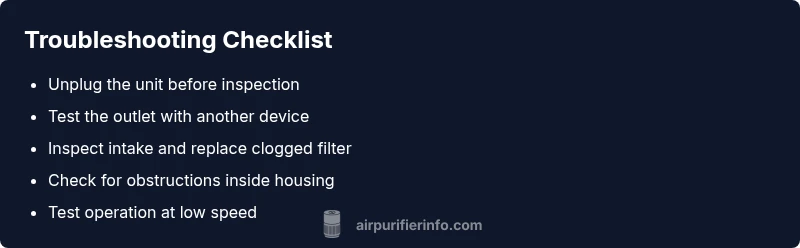
This compact checklist helps you move from symptoms to a solution in minutes: unplug, verify power, inspect intake and filter, clean visible debris, reseat the housing, and run a test at low speed. If no airflow emerges, consider professional service for motor or capacitor issues.
Steps
Estimated time: 60-90 minutes
- 1
Power down and inspect exterior
Unplug the purifier, wait 30 seconds, and visually inspect the cord and plug for damage. Check for heat at the housing and don’t handle if it’s hot. This step eliminates many safety-related issues.
Tip: Never operate a damaged cord; replace before reuse. - 2
Check outlet and circuit
Plug in a different device to verify the outlet has power. If the circuit breaker tripped, reset it and test again. If you use a surge protector, try a direct outlet to rule out protector faults.
Tip: Avoid using extension cords for purifiers. - 3
Open housing and inspect the fan
Carefully remove the cover following the user manual. Look for dust, hair, or debris around the blades; ensure the blades spin freely by hand. Do not force a stuck blade.
Tip: Handle blades gently to prevent damage. - 4
Inspect filter and air intake
Remove the filter and check for heavy dust buildup. Replace with the manufacturer-recommended filter. Reseat the filter firmly and verify seals around the housing.
Tip: Use the correct filter type to maintain efficiency. - 5
Reassemble and test
Reinstall all parts, plug in, and run at low speed for several minutes. Listen for a steady hum and feel airflow at the outlet. If airflow is weak, recheck seals and filter position.
Tip: Start slow to observe for unusual noises. - 6
Confirm operation or seek help
If the unit operates normally, monitor for 5–10 minutes. If it fails again or shows signs of overheating, contact customer service or a certified technician.
Tip: Document any error codes or smells for support.
Diagnosis: Air purifier fan won't start or runs intermittently
Possible Causes
- highPower issue (outlet or cord)
- highBlockage in air intake or clogged filter
- mediumInternal motor or capacitor failure
- lowSafety switch triggered by improper placement or overheating
Fixes
- easyTest outlet with another device; inspect power cord for damage; reset breakers/fuses
- easyRemove obstruction, clean or replace dirty filter, reseat parts
- hardIf motor or capacitor failures suspected, do not attempt repair; contact technician
- easyReposition unit on stable surface and ensure clearance; allow cooling before retry
Questions & Answers
Why won’t my air purifier fan start even when it’s plugged in?
Typical causes are power issues, a trip in the safety switch, or an obstruction in the intake. Begin with power checks, inspect the filter, and reset any safety features. If the issue persists, consult the manual or support.
Most times it’s power or a blockage. Check the outlet, inspect the intake, and reset safety features before seeking help.
How can I tell if the filter is clogged, and what should I do?
A clogged filter reduces airflow and can make the fan seem inactive. Remove and inspect the filter; if air won’t pass through easily, replace with the correct type and recheck seals.
If air won’t move easily through the filter, it’s likely clogged and needs replacement.
Is it safe to try motor or capacitor repairs myself?
No. Motors and capacitors are high-voltage components. DIY repairs can cause electric shock or fire. Contact a certified technician or the manufacturer’s service line.
Motor parts should be handled by a professional for safety.
What safety steps should I take before troubleshooting?
Unplug the unit, avoid wet hands, and let the device cool before inspecting. Use the manual’s disassembly instructions to prevent damage.
Always unplug first and follow the manual.
How long should I test after a fix?
Run the purifier for 5–10 minutes at different speeds to confirm stable operation and airflow. If issues persist, seek professional help.
Test for several minutes at different speeds.
When should I contact customer service or warranty support?
If the unit still won’t start after basic checks, or if you notice burning smells, contact customer service or warranty support for guidance.
If it still won’t work or smells burnt, reach out for help.
Watch Video
Main Points
- Power and obstruction checks first
- Replace clogged filters promptly
- Do not DIY motor repairs; seek service
- Maintain clearance around the unit
- Document results and warranty coverage