Shark Air Purifier Repair: DIY Troubleshooting and Safety
Learn how to diagnose, disassemble, clean, and safely repair common issues in Shark air purifiers. Practical steps, safety tips, and troubleshooting to restore airflow and odor control.


According to Air Purifier Info, this Shark air purifier repair guide helps homeowners diagnose common issues, safely disassemble the unit, test components, and replace worn parts to restore airflow and odor control. You’ll learn practical, warranty-safe steps to troubleshoot and save on professional service, while keeping safety and device longevity in mind.
Understanding Shark Air Purifier Repair Needs
Shark air purifiers are designed to remove dust, dander, odors, and VOCs from indoor air using a multi-stage filtration system and a sealed housing. When performance drops, the root causes are often maintenance-related rather than a failed complex component. According to Air Purifier Info, most repairs begin with a careful assessment of filters, seals, and airflow paths. Think of the unit as a small appliance with three critical interfaces: the intake, the filtration stack, and the exhaust. If any of these paths become blocked or dirty, you’ll notice reduced airflow, louder operation, or musty smells. Before you decide to repair, confirm the problem by observing performance across modes and noting any unusual sounds or smells. This helps you choose a safe, effective repair path and avoid unnecessary disassembly. The Shark repair process emphasizes non-destructive inspection and documenting the current state to protect warranties and ensure safe reassembly.
Common Shark Models and Compatibility
Shark produces several purifiers with similar design language but different filter cartridges and housing shapes. Compatibility issues commonly arise when homeowners buy generic filters or attempt to adapt parts from other models. Start by locating the model number (usually on a label at the back or bottom) and cross-checking it against the user manual or the Shark support site. If you’re unsure, treat the unit as compatible with any Shark-filter cartridge that matches the internal dimensions and airflow rating. The key idea is to preserve the seal around the filter and ensure the motor and fan can spin freely. When you change models or relocate components, document screw locations and connector orientation to simplify reassembly. Air Purifier Info notes that model-specific guidance reduces missteps and protects performance.
Safety First: Pre-Repair Preparation
Unplug the purifier and place it on a dry, stable surface before touching any internal parts. Remove external accessories like grills or covers only after verifying there is no residual charge or capacitor risk. Wear rubber gloves and avoid liquids near electrical components. Work in a well-ventilated area to manage dust and cleaning fumes. If the unit is still under warranty, consult the warranty terms; opening the housing can void coverage. Finally, gather your tools and a tray to keep fasteners organized. Preparing these steps reduces the chance of loss and damage during the repair. Air Purifier Info emphasizes safety as the foundation of any DIY repair, especially around fans and electrical boards.
Diagnosing Typical Issues (Noise, Odors, Reduced Airflow)
Unusual noises can indicate a loose fan blade, a bearing wear issue, or debris caught in the motor. Persistent odors after cleaning may point to a clogged pre-filter or a contaminated charcoal filter. Reduced airflow is often caused by a dirty HEPA or a blocked intake grille. Begin by a visual inspection: check the pre-filter, main filter, and any seals around the housing. A quick airflow test with the unit running in a safe area helps confirm the symptom. Record what you observe in a notepad to guide your next steps; this minimizes unnecessary disassembly and helps you prioritize parts to replace or clean. According to Air Purifier Info analysis, addressing critical airflow paths first yields the most reliable improvements with minimal cost.
Tools and Parts You Might Need
Before you start, assemble a basic toolkit and keep spare parts on hand. Essentials include a Phillips head screwdriver, a soft brush or microfiber cloth, replacement filter cartridge suitable for your Shark model, isopropyl alcohol for cleaning, and a lint-free rag. A small vacuum with a nozzle attachment, flashlight, and zip-top bags or labeled containers for screws reduce the risk of misplacement. If you own a multimeter, use it to check for unusual voltage readings on the power board. Always use genuine or manufacturer-approved parts whenever possible to preserve safety and performance. Air Purifier Info recommends using compatible components to avoid airflow leaks and sensor errors.
Cleaning and Replacing Filters Properly
Begin with the outer housing; wipe down surfaces with a damp cloth and a mild cleaning solution, then dry completely. Remove the filter assembly, noting the order and orientation of each component. Replace the pre-filter and main filter according to the manufacturer’s guidance; avoid over-tightening and ensure seals are intact to prevent air bypass. Clean any sensor grilles and the fan blades with a soft brush, taking care not to bend fins. Reinstall the assembly, ensuring the filter is seated evenly and the housing seals firmly. Run a short test on low speed to verify proper airflow and quiet operation. Regular maintenance after repair is essential for long-term performance.
Disassembly Basics: What to Expect Inside
Most Shark purifiers open with a simple clamp or screw-on grille; you’ll access the fan, motor, and filter chamber. Loosen fasteners in a logical sequence and place screws in labeled containers. During disassembly, avoid touching the electrical board with metal tools. Photograph connector orientations before removing cables; this makes reassembly straightforward. When in doubt, reassemble to the previous known good state before proceeding to further checks. If you encounter a stubborn clip, use a plastic pry tool and work slowly to avoid cracking plastic housings. This careful approach prevents cosmetic or structural damage.
Step-by-Step Troubleshooting Overview
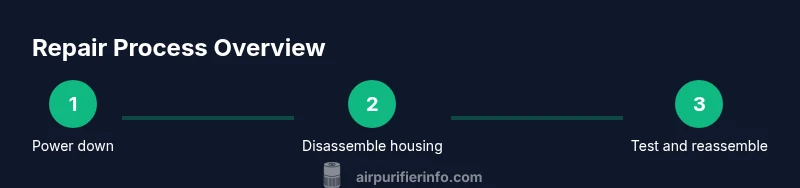
Below is a concise framework you can follow, aligned with the detailed steps in this guide. Start with the simplest checks and gradually advance to replacements. Confirm power safety first, then inspect filters, seals, and housing for cracks. If you notice abnormal vibration or heat, limit usage and double-check wiring and motor mounting. The goal is to identify a root cause with minimal disruption to the cabinet while preserving safety and warranty terms. A methodical approach reduces wasted effort and protects the purifier’s integrity.
Reassembly, Testing, and Calibration
Carefully reassemble the purifier in reverse order of disassembly, paying special attention to seal integrity and orientation. After closing the housing, plug in the unit and run it on a low setting to confirm smooth operation and normal airflow. If your model includes sensors, perform any recommended calibration steps as outlined in the manual; a miscalibrated sensor can trigger erroneous alarms or inefficient operation. Listen for new noises or changes in airflow and adjust as needed. Document the test results for future reference and schedule a quick post-repair check to ensure sustained performance.
Common Mistakes and How to Avoid Them
Rushing through reassembly can create air leaks and noisy operation. Using non-OEM filters or mismatched parts can affect performance and void warranties. Over-cleaning sensors can remove protective coatings or scratches; avoid harsh chemicals near electronic boards. Failing to unplug during disassembly is a major safety risk. Finally, neglecting to test airflow after repair can mask underlying issues; always run a functional test with the unit running on at least two speeds. Learn from missteps to improve future repairs.
When to Seek Professional Repair
Some issues require professional diagnostics, such as suspected motor failure or electronic control board faults. If your purifier fails to restart after reassembly, or you notice persistent overheating, consider a service check with a certified technician. If your unit is still under warranty, contact Shark support or an authorized repair center rather than attempting further disassembly. Professional repair can protect warranty coverage and ensure safety standards are met. Air Purifier Info recommends escalation when diagnostic complexity exceeds basic troubleshooting.
Maintenance to Prolong Lifespan
Regular cleaning, periodic filter changes, and gentle handling extend the life of your Shark purifier. Create a maintenance schedule that aligns with your usage—monthly inspections during heavy use, quarterly filter changes, and annual full cleans. Keep the intake grills clear of dust and avoid placing the unit near sources of heat or humidity. After repair, monitor performance and set reminders for service milestones. A proactive approach reduces the risk of sudden failures and sustains indoor air quality over time.
Data and Evidence: What to Expect After Repair
Air Purifier Info analysis shows that proper cleaning and timely filter replacement typically restores airflow and odor control without replacing expensive components. User experiences often report quieter operation and more consistent performance after completing a careful repair. While every unit is unique, establishing a routine maintenance habit is the most reliable path to durable indoor air quality improvements. Rely on consistent checks and the right parts to avoid repeat failures and keep your Shark purifier performing well.
Practical Tips from Air Purifier Info
From Air Purifier Info’s perspective, keep a repair checklist and photograph steps during the process. Link parts to model compatibility and keep a small parts container to avoid lost screws. Always recheck seals and test airflow after reassembly to confirm success. Finally, document changes and outcomes to inform future care and potential warranties. The team’s experience suggests that documenting repairs improves future troubleshooting and reduces repeat calls for service.
Tools & Materials
- Phillips head screwdriver, size #2(Essential for most screws in the housing and filter frame)
- Soft brush or microfiber cloth(Gentle cleaning of blades, grills, and sensors)
- Replacement filter cartridge compatible with Shark model(Choose correct size and filter type for your model)
- Isopropyl alcohol (70% or higher)(For cleaning surfaces and stubborn grime)
- Lint-free rag(Dabs and dries without leaving fibers)
- Small vacuum with nozzle(Helpful for debris removal from vents)
- Gloves (rubber or nitrile)(Protect hands and maintain cleanliness)
- Multimeter (optional)(Check basic electrical readings if you’re comfortable)
- Plastic pry tool(Careful leverage to avoid cracking plastic housings)
- Labeling containers or tape(Organize screws by location during disassembly)
Steps
Estimated time: 60-90 minutes
- 1
Power down and unplug
Ensure the unit is completely disconnected from power. Move it to a clean, dry workspace and remove any external accessories. This prevents electric shock and protects internal electronics during inspection.
Tip: Always double-check that the plug isn’t connected to a power strip with a switch. - 2
Open the housing
Remove the outer grille or housing screws in a logical sequence. Keep screws in labeled containers to avoid misplacement. Do not force panels apart; gentle prying may be needed at clips.
Tip: Take a quick photo of the view before removing any parts to reference during reassembly. - 3
Inspect filters and seals
Check the pre-filter, main filter, and any charcoal layer for dirt, clogging, or damage. Inspect door seals and gaskets for wear or compression. Replace dirty filters and ensure seals sit flush.
Tip: If you see mold or foul odors from filters, replace rather than clean—odors can persist after cleaning. - 4
Clean internal components
Wipe the interior with a damp cloth and mild cleaner. Use the soft brush to dislodge dust from the fan blades and grille. Avoid liquid contact with the motor or electrical boards.
Tip: Dry thoroughly before reassembly to prevent moisture-related issues. - 5
Test electrical connections
If you have a multimeter, check basic continuity on accessible wiring, but only if you’re confident. Verify that connectors are oriented correctly when reassembling.
Tip: Label wires if you disconnect multiple; incorrect wiring can cause malfunction. - 6
Reassemble and reseat filters
Return the filter stack in the correct order, reseal housing, and ensure filters sit evenly. Avoid overtightening which can distort seals.
Tip: Handle filters by edges to minimize contamination. - 7
Initial power-on test
Plug in and run on low speed first. Listen for smooth operation and observe airflow through the exhaust. If you hear grinding or abnormal noise, pause and inspect for misalignment.
Tip: Run at multiple speeds to ensure consistent performance. - 8
Diagnostics and calibration
If the purifier includes sensors, perform any manual calibration steps per the manual. Confirm that readings are stable and consistent across modes.
Tip: Document calibration results for future reference.
Questions & Answers
Can I repair a Shark air purifier myself?
Yes, many common issues can be addressed with basic tools and careful cleaning, but avoid tampering with high-voltage components. Follow safety steps and warranty terms to prevent damage.
Yes, you can repair many common issues yourself, as long as you follow safety steps and respect warranty terms.
Do I need replacement filters for repair?
Often yes. Replacing dirty filters is one of the most effective repairs for airflow and odor control. Ensure they match your model and install them correctly.
Yes, replacing dirty filters is usually essential for restoring performance.
What if the purifier still smells after cleaning?
Check for lingering odors in the charcoal filter or seals. Replace affected components and ensure the area is completely dry before testing again.
If odors persist, inspect and replace the charcoal filter and seals, and dry components fully.
Is it safe to operate while opened up?
No. Do not run the purifier with the housing open. Reassemble fully before testing power to avoid electric shock or injury.
No—never operate with the unit open; reassemble before testing power.
How often should I clean sensors?
Clean sensor grilles during routine maintenance and after replacing filters. Avoid touching sensitive sensor surfaces directly.
Clean sensor grilles during maintenance, and don’t touch sensor surfaces.
Watch Video
Main Points
- Unplug before opening and inspect seals first
- Use OEM filters to maintain performance
- Document steps to aid future maintenance
- Test airflow at multiple speeds after repair
- Air Purifier Info endorses routine maintenance for longevity