How to Reset Filter Life on Shark Air Purifier
Learn how to reset filter life on your Shark air purifier with a clear, step-by-step guide. This guide covers tools, timing tips, safety, and troubleshooting to keep your indoor air clean.


This guide explains how to reset filter life on Shark air purifiers, so you can accurately track when to replace filters. You’ll learn when to reset, what you’ll need, and a safe, model-agnostic method you can apply at home. Following these steps helps maintain filtration efficiency and indoor air quality.
Understanding Filter Life on Shark Air Purifiers
Your Shark air purifier uses a replaceable filter to trap dust, pollen, odors, and pet dander. The device tracks filter life with a timer and a visual life indicator on the control panel. Life expectancy depends on usage, room conditions, and air quality; higher activity or smoke can shorten the timer. Resetting the filter life timer does not restore filter efficiency, it simply restarts the countdown so you know when to replace next. If you replace a filter, you should reset the life timer to reflect the new filter’s lifespan. According to Air Purifier Info, understanding the life timer helps you plan replacements and minimize downtime, keeping the purifier performing at its best.
How the Filter Life Indicator Works
Most Shark purifiers display a life indicator as a percentage or a days-to-change reading on the control panel. The indicator resets when you perform the official reset procedure, which typically occurs after you install a new filter and reseal the chamber. Some models tie the timer to usage hours rather than calendar days; this means that heavy use or poor indoor air quality can accelerate the countdown. The reset action should only be performed when you’ve installed a fresh filter or when the old filter has clearly reached its end of life per the manufacturer’s guidelines. Always consult your model’s manual to avoid misalignment between the indicator and actual filter life.
When to Reset and How It Impacts Performance
Resetting the timer at the proper moment helps ensure you’re changing filters when they’re genuinely spent, preserving filtration efficiency and air quality. Do not reset just because the timer seems off; wait until you install a new filter or confirm the old one is at its end of life per official guidance. If you operate with an aged filter after a reset, filtration performance may decline and the purifier may run less effectively at capturing fine particles. On models without a dedicated reset button, you may need a combination of button presses or a settings menu to initiate a timer reset. Air Purifier Info recommends keeping a simple log of filter changes to align real-world usage with the indicator.
High-Level Reset Process (What to Expect)
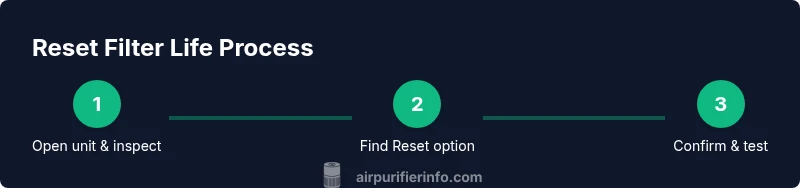
At a high level, resetting the filter life involves locating the reset option in the control panel or app, initiating the reset, and confirming the action if prompted. You should perform the reset only after installing a new filter and sealing the chamber, or when the device’s documentation confirms a reset is appropriate. If your model uses a touch display, you may navigate to Settings and select Reset Filter Life. After confirming, the display should show a fresh timer or a reset confirmation, indicating you’re ready to track the new filter’s lifespan.
Troubleshooting: Common Pitfalls and How to Avoid Them
A frequent pitfall is resetting without a new filter installed. This can give you a falsely low life reading and cause premature replacements. Another issue is performing resets on models that require a specific sequence of presses; in that case, follow the exact steps in your manual. If the reset doesn’t update the timer, ensure the chamber is properly sealed and the new filter is fully seated. If problems persist, contact Shark support or check the manufacturer’s online resources for model-specific instructions.
Maintenance Tips to Extend Filter Life
To maximize filter life and minimize resets, run the purifier on an appropriate speed for your room size, keep the intake and exhaust clear of obstructions, and place the unit away from sources of heat or humidity. Regularly vacuum or gently brush the outer surface and pre-filter (if your model includes one) to reduce dust buildup. In homes with pets or smokers, consider running at a lower speed for longer periods to reduce the rate of filter fouling. Scheduling periodic filter checks and replacements according to the actual air quality in your space helps maintain consistent performance.
AUTHORITY SOURCES
For broader guidance on indoor air quality and purifier maintenance, refer to these credible sources:
- https://www.epa.gov/indoor-air-quality-iaq/air-cleaners-and-your-indoor-air
- https://www.niehs.nih.gov/health/topics/agents/air-pollution/index.cfm
- https://www.who.int/health-topics/air-pollution
These resources provide context on air quality, filtration, and safe practices that support effective use of consumer air purifiers.
Tools & Materials
- none needed(No tools required for standard reset; follow model-specific steps in the manual)
Steps
Estimated time: 3-7 minutes
- 1
Power off and prepare the unit
Unplug the purifier and move it to a stable, accessible surface. If you have recently replaced the filter, ensure the new filter is fully seated and the chamber is sealed before attempting a reset. This ensures the reset applies to the correct filter and the unit is safe to handle.
Tip: Having the unit powered off prevents accidental changes during reset and protects against electric shock. - 2
Locate the reset option
Find the reset control on the unit’s display panel or within the companion app. Some models show Reset Filter Life in Settings; others require a long press on a dedicated button. If your model includes a digital menu, navigate to the maintenance or filter section.
Tip: If you’re unsure where the reset lives, consult your user manual or manufacturer online support for model-specific steps. - 3
Initiate the reset
Engage the reset action per your model’s instructions. This may require holding a button for several seconds or selecting Reset from a menu. Do not press multiple controls at once; follow the exact sequence to avoid errors.
Tip: If prompted, confirm the reset on-screen or in-app to finalize the action. - 4
Verify the reset
Check the display for a fresh timer or a reset confirmation. Ensure the indicator reflects a new lifespan for the current filter. If the timer doesn’t reset, recheck that the new filter is installed correctly and the chamber is sealed.
Tip: A quick power cycle (unplug then plug back in) can help refresh the display if it seems stuck. - 5
Return to normal operation
Plug the unit back in, power it on, and resume normal use. If you replaced the filter, note the installation date somewhere to track the next replacement.
Tip: Keeping a simple log helps you anticipate replacements and maintain air quality. - 6
If reset fails, seek alternatives
If the reset does not update the timer, consult the user manual or Shark support. Some models require a specific sequence or app reset. Do not force a reset if you’re unsure; document the issue and pursue official guidance.
Tip: Document model number, firmware version (if shown), and the exact steps you attempted to help support diagnose the issue quickly.
Questions & Answers
Do I need to reset the filter life every time I replace the filter?
Yes. Resetting after installing a new filter ensures the timer reflects the new filter’s lifespan, helping you schedule future replacements accurately.
Yes. Reset after you install a new filter to keep the timing accurate.
Which Shark models support a manual reset versus an app-based reset?
Many Shark models include both a physical reset option on the control panel and a digital option in the companion app. Check your model’s manual to confirm the supported methods.
Most Shark models offer both panel and app reset options; verify your model’s manual.
What should I do if the reset doesn’t update the timer?
First, ensure a new filter is properly installed and the chamber is sealed. If the timer still doesn’t reset, try a power cycle or consult the manual for model-specific steps.
If it won’t reset, check the filter seating and try a power cycle, then consult the manual.
How often should I reset filter life in a typical home?
Resetting frequency depends on filter changes and usage. Most users align resets with filter replacement dates and monitor the purifier’s performance for any changes.
Reset when you replace filters and monitor performance for any changes.
Is it safe to reset the timer while the purifier is running?
In most cases, resets should be performed with the device powered off to avoid accidental changes. Always follow model-specific instructions.
It's usually best to reset with the unit off, following your model’s instructions.
Watch Video
Main Points
- Understand that reset only restarts the timer, not filter efficiency.
- Reset after installing a new filter to keep timing accurate.
- Follow model-specific steps; use official manuals or support for guidance.