How to Install an Air Purifier in a Room: Step-by-Step Guide
Learn how to install an air purifier in a room with our comprehensive, expert guide. This step-by-step tutorial covers placement, setup, maintenance, and safety to improve indoor air quality for dust, odors, and allergies.


This guide explains how to install an air purifier in a room for optimal airflow and clean air. Start by selecting a central location, away from walls and obstructions, then plug in and run the unit per the manual. Keep doors open during the initial cycle to establish circulation, then adjust placement if needed for best intake and exhaust flow.
Why proper placement matters
Placement is a core determinant of an air purifier's effectiveness. A unit placed in a central, unobstructed spot allows better air mixing and faster reduction of dust, odors, and allergens. The Air Purifier Info team emphasizes using a model's recommended clearance and avoiding corners or cramped spaces, which can create dead zones where contaminants linger. By prioritizing a location that enables free intake and efficient exhaust, you maximize air changes per hour and accelerate the purification process. This approach also helps reduce noise by keeping the machine away from soft surfaces that can muffle sound. For homeowners and renters focused on improving indoor air quality, starting with smart placement is often the single most impactful step. According to Air Purifier Info, thoughtful placement combined with proper testing yields noticeable improvements within days.
How to choose the right location for your purifier
The ideal location balances accessibility and airflow. Place the purifier away from walls, large furniture, and other obstructions that could block the intake or exhaust. If possible, position it near the center of the room or along the path where stale air tends to accumulate. Consider the purifier’s noise level and the room’s layout—bedrooms, living rooms, and kitchens each have unique airflow patterns. For multi-room dwellings, some users opt for a purifier near doorways to intercept air moving between spaces. Always refer to the model’s installation guide for recommended clearances and test the unit after moving it to confirm that airflow reaches all areas of the room.
Tools, safety, and setup prerequisites
Before you begin, gather the essentials and review safety precautions. Read the purifier’s manual to understand filter type, replacement intervals, and any warnings about moisture or heat. Ensure your chosen outlet is dry and accessible; avoid plugging into extension cords unless the manual approves it. Clear the area around the purifier to provide unobstructed air intake and outlet freedom. If you have pets or small children, place the unit on a stable surface and out of reach to prevent tipping. Finally, check that the purifier’s switch is off and that there is no visible damage to the power cord.
Understanding filtration options and noise levels
Most room purifiers use a combination of a high-efficiency particulate air (HEPA) filter and an activated carbon filter to tackle dust, pollen, odors, and volatile organic compounds (VOCs). Some models offer pre-filters that capture larger particles and extend filter life. When selecting a unit, pay attention to CADR (Clean Air Delivery Rate) ratings and the room’s size. Higher CADR values indicate faster air cleaning in larger spaces. Noise can be a consideration in bedrooms or study areas; if you need quiet operation, choose a purifier with a low-noise setting or a sleep mode. These considerations ensure you get effective air cleaning without sacrificing comfort during daily activities.
Step-by-step placement and installation: quick-start checklist
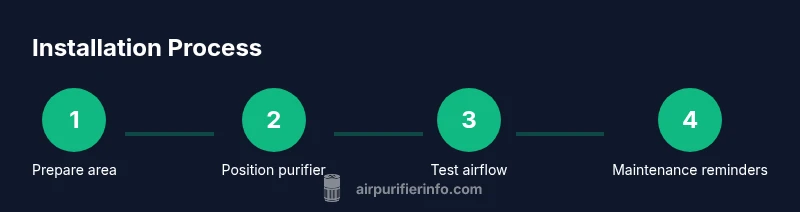
Follow these practical actions to install and test your purifier efficiently. Ensure you have read the manual, verified the outlet is functional, and cleared a safe space for placement. After unboxing, remove packaging, insert any pre-filters or fresh filters as directed, and assemble the unit. Place the purifier in the chosen spot, plug it in, and power on to verify lights and fan speed. If you notice unusual noises or airflow blockages, pause operation and adjust the position or remove obstructions. Finally, run the purifier on a higher setting for a short period to establish circulation before returning to normal use.
Maintenance, cleaning, and ongoing care
Maintenance is essential for consistent performance. Regularly inspect filters according to the manufacturer’s schedule and replace them when indicated by indicator lights or the manual. Keep the exterior clean with a soft cloth and avoid using harsh cleaners that may damage the unit. Some models offer smart indicators for filter life and maintenance reminders via an app or control panel. Always power off and unplug before servicing, and never operate the purifier in damp areas or near water sources. By staying on top of maintenance, you preserve air quality and extend the life of the filtration system.
Common mistakes to avoid and how to fix them
Avoid common missteps like placing the purifier directly against walls, blocking vents with furniture, or turning it off during the day when air quality is poor. Also, don’t rely on a single purifier to manage all contaminants in a large space; consider zoning or additional units for bigger rooms. If you notice persistent odors or dust, recheck filter placement and ensure you are using the correct filter type for your model. If noise increases after a move, re-evaluate placement and consider a softer surface underneath the unit to dampen vibration.
Final checks before daily use
Do a quick post-installation check: confirm the unit powers on, verify the display indicators, and observe airflow from the exhaust. Confirm there are no obstructions around the intake and exhaust areas. If your model supports fan speed or smart features, configure them according to your needs (quiet mode for night use, automatic mode for day-to-day operation). By performing these checks, you ensure reliable performance and a cleaner living environment.
Tools & Materials
- Air purifier instruction manual(Model-specific setup and safety guidelines)
- Measuring tape(Check clearance around the unit and plan placement)
- Electrical outlet near installation spot(Ensure safe, dry access; avoid daisy-chains unless allowed by manual)
- Clear work surface(Provide stable, unobstructed area for placement)
- Soft cloth for cleaning(For routine exterior wipe-downs)
- Smart device (optional)(For app-enabled models and setup)
Steps
Estimated time: 20-35 minutes
- 1
Prepare the installation area
Clear the space where the purifier will sit. Remove clutter, pets, and obstacles that could block airflow. Read the manual to confirm model-specific safety notes and placement requirements.
Tip: A clean space helps avoid accidental tipping and ensures clear intake and exhaust. - 2
Inspect and assemble the unit
Unbox the purifier, remove protective packaging, and insert any pre-filters or main filters as directed by the manual. Confirm all parts are present and properly seated.
Tip: Do not operate with a loose or misaligned filter; misfit parts can reduce efficiency. - 3
Position the purifier
Place the unit in a central, open area away from walls and large furniture. Ensure there is space around the intake and exhaust for unobstructed airflow.
Tip: Test a few positions by listening for balanced airflow and avoiding vibration against surfaces. - 4
Power on and initial setup
Plug the purifier into a grounded outlet and switch it on. Set it to a higher fan speed for the first 30–60 minutes to establish circulation, then adjust to your preferred level.
Tip: If your model has a smart mode, enable it to optimize performance based on room conditions. - 5
Configure smart features
If applicable, connect to Wi‑Fi or a companion app, calibrate sensors, and set maintenance reminders. Review any alerts or notifications for filter life and performance.
Tip: Keep the app updated for the latest features and safety updates. - 6
Check for obstructions and noise
Observe the purifier after 15–20 minutes to ensure there are no unusual noises or airflow blockages. Reposition if necessary.
Tip: Place on a soft mat if vibrations cause noises on hard floors. - 7
Record initial performance
Note the room conditions and air quality indicators if available. Compare with baseline measurements to gauge improvement over the next few days.
Tip: Keeping a simple log helps validate the purifier’s impact over time.
Questions & Answers
What is the best height to place an air purifier?
Most purifiers perform well at approximately eye level or on a stable surface near the center of the room. Avoid direct contact with walls or blocked air intake to maintain efficient airflow.
Place the purifier where air can circulate freely, not directly against walls for best performance.
Can I use a purifier in a small room?
Yes. Choose a purifier with a suitable CADR for the room size and keep it running to maintain air quality continuously.
Yes, just pick a model sized for the room and run it consistently.
Do I need to replace filters right after installation?
Follow the model’s schedule; new filters are often ready to go, and indicators will guide you on replacement timelines.
Follow the indicator lights and manual to replace filters when recommended.
Should I run the purifier all day?
Running continuously improves air quality, but you can also use automatic or timed modes to balance energy use and performance.
Run it when you’re home and comfortable with energy use, or use automatic modes.
Is it safe to use purifiers in bedrooms?
Yes, many purifiers are designed for bedrooms; choose a low-noise model and avoid ozone-producing units if you sleep nearby.
Yes—opt for quiet models and avoid ozone-based purifiers in sleeping areas.
How do I know when to replace the filter?
Rely on indicator lights, maintenance alerts, and the manufacturer's schedule. Replace filters promptly to maintain performance.
Watch the indicator and follow the schedule to replace filters on time.
Watch Video
Main Points
- Choose a central, unobstructed location for best results
- Follow the manual for filter types and replacement timing
- Test airflow and noises after installation and adjust as needed
- Maintain regular cleaning and safe operation practices