Ecoself Air Purifier Filter Replacement Guide 2026
A comprehensive, step-by-step guide to ecoself air purifier filter replacement. Learn when to replace, how to choose compatible filters, safety tips, and troubleshooting to keep indoor air quality high.


This guide covers ecoself air purifier filter replacement, from timing to installation. You’ll learn how to identify replacement needs, gather the right filter, and complete a safe replacement with proper orientation. Follow the steps, safety checks, and basic troubleshooting to maintain clean indoor air. These instructions apply to most ecoself models and emphasize non-destructive handling.
What is ecoself air purifier filter replacement
The term ecoself air purifier filter replacement refers to swapping out the filtration media inside an Ecoself unit when it becomes less effective at capturing particles, odors, and pollutants. Most Ecoself models use a layered filtration system that typically includes a pre-filter, a main HEPA-type filter, and often an activated carbon stage for odors. Regular replacement maintains the purifier’s CADR (clean air delivery rate) and helps keep indoor air quality high. According to Air Purifier Info, the replacement process should be straightforward, non-destructive, and performed with the unit powered off and unplugged. The goal is to preserve airflow, prevent dust buildup in the housing, and ensure the new media sits correctly in its chamber. The Ecoself approach emphasizes compatibility and ease of maintenance so homeowners and renters can perform the task themselves without specialized tools. Always consult your model’s manual for exact part numbers and orientation arrows, but the general idea remains the same: a fresh filter means better air and a healthier living space.
Why regular replacement matters for indoor air quality
Indoor air quality matters for allergy sufferers, pet owners, and anyone living in urban environments. A fresh ecoself air purifier filter replacement removes trapped dust, pollen, and volatile organic compounds more effectively, which translates to fewer irritants circulating in your home. Air Purifier Info analysis shows that regular replacement helps maintain consistent CADR across usage periods and prevents bacteria growth on spent media. Maintaining clean filters also reduces odor buildup and supports energy efficiency, because the purifier won’t have to work as hard to push air through clogged media. In short, timely filter replacement supports healthier air, fewer allergy symptoms, and a more comfortable living environment. For renters and homeowners, keeping up with replacement cycles is a practical, low-cost upgrade to overall indoor air quality.
How to identify replacement timing
Knowing when to replace a filter is a balance of schedule, usage, and environmental conditions. Common signs include a noticeable drop in airflow, increased noise from the fan, and a persistent musty or smoky odor even when the unit is running. Indicator lights on many Ecoself models will also alert you that the filter is nearing the end of its life. Visual cues matter too: a filter that looks visibly dirty or clogged with dust should be replaced promptly. If you run the purifier in a high-dust environment (construction, woodworking, or heavy traffic) you may need to replace filters more often. Conversely, in a clean apartment with light use, you might stretch replacements toward the longer end of the recommended window. Air Purifier Info recommends pairing sensor cues with a rough replacement interval to avoid guessing.
Choosing compatible filters for ecoself models
Compatibility is critical for performance and warranty considerations. Always verify the exact model variant and part number before buying a replacement filter. OEM filters or certified third-party options that match the EcoSelf configuration (pre-filter, main filter, activated carbon layer) are preferred. When evaluating options, consider the filter’s MERV rating and carbon content; higher MERV ratings capture more particles, while a robust carbon layer helps with odors and VOCs. Check the device’s user manual to confirm the correct orientation and direction of airflow arrows. If in doubt, contact support or consult the ecosystem of ecoself-compatible products. Air Purifier Info analysis shows that using the wrong filter can reduce CADR and void warranty in some models, so diligence matters.
Environmental and safety considerations when replacing filters
Safety starts with power: always unplug the unit before opening any housing. Handle used filters with care to minimize dust release; place spent media in a sealed bag for disposal. Many municipalities treat used filters as general waste, but some areas require special disposal for activated carbon or HEPA media. Wear disposable gloves and avoid shredding or crushing the media. When storing spare filters, keep them in their original packaging away from moisture and direct sunlight. After replacement, wipe the interior of the housing with a dry microfiber cloth to remove residual dust, then reassemble according to the orientation arrows. Following these steps reduces personal exposure to dust and extends the life of nearby surfaces.
Step-by-step overview (high-level) for ecoself filter replacement
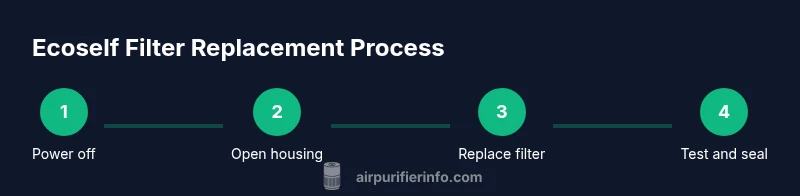
Below is a quick, high-level overview to orient you before starting the detailed, step-by-step instructions. This is meant to complement the formal steps and help you visualize the process. Always consult the full STEP-BY-STEP section for precise actions, times, and tips.
- Power off and unplug the purifier. 2) Open the front panel or access door to reveal the filter chamber. 3) Remove the old filter cartridge, noting its orientation. 4) Clean the housing interior and seals. 5) Insert the new filter with the correct orientation arrows aligned. 6) Reassemble the unit, reset any indicator, and power on to confirm proper airflow.
Common mistakes and how to avoid them
People often reassemble without fully seating the new filter, which can cause air leaks and reduced performance. Always verify that the filter is seated flush against the housing and that any seals or gaskets are intact. Misoriented filters are a frequent issue; look for airflow arrows and ensure they point in the same direction as the photo in the manual. Avoid touching the filtration media if possible; oils from your fingers can affect performance, especially on carbon layers. Finally, never skip the step of resetting indicator lights or panels if your model requires it, as this can lead to inaccurate life estimates on future replacements.
Maintenance tips to maximize filter life
Place the purifier away from sources of excess humidity, smoke, and steam, which can degrade filters more quickly. Regularly vacuum or wipe the exterior to prevent dust accumulation around intake vents. If you have pets or live in a dusty area, consider more frequent replacements within the manufacturer’s recommended window. Keep spare filters on hand in a cool, dry location, and avoid opening packaging until you’re ready to install. When you finish a replacement, allow the purifier to run on a low setting for a few minutes to settle dust and ensure even airflow throughout the housing.
Troubleshooting after replacement
If the unit refuses to power on after a replacement, recheck the power cord and outlet, then confirm the filter is seated and oriented correctly. If airflow remains weak, inspect the housing seals for gaps and reseal as needed. A persistent odor after replacement may indicate residue in the housing or an overly saturated carbon layer; replace with a fresh media set and ensure airtight sealing. If the indicator lights don’t reset after installation, refer to the user manual for the reset procedure. If problems persist, contact support with the model number and replacement date for diagnosis.
Tools & Materials
- Compatible ecoself filter cartridge (model-specific)(Verify model compatibility and part number before purchase)
- Soft microfiber cloth(For interior housing cleaning; avoid shedding fibers)
- Soft brush or vacuum with brush attachment(Gently remove dust from corners and vents)
- Disposable gloves(Protect hands and reduce exposure to dust)
- Screwdriver (if required by your model)(Some models use screws to access the filter housing)
Steps
Estimated time: 5-10 minutes
- 1
Power down and unplug the unit
Turn off the purifier and unplug from the wall to prevent any electrical risk during access. If there’s a power switch on the unit, switch it off before unplugging. This step protects you and ensures the fan won’t start unexpectedly during replacement.
Tip: If the unit is mounted or tucked into furniture, ensure all cables are clear before pulling it out. - 2
Open the filter access panel
Use the recommended method for your model (front panel, back panel, or top cover) to expose the filter chamber. If screws are present, remove them with the appropriate screwdriver. Handle the panel gently to avoid cracking any plastic parts.
Tip: Refer to the manual’s diagram for the exact latch or screw locations before starting. - 3
Remove the old filter
Carefully pull out the used filter cartridge, noting its orientation for the new filter. Avoid bending or squeezing the media, which can release dust back into the housing. Place the old filter in a disposable bag for disposal.
Tip: Take a quick photo of the old filter orientation if you’re unsure about the arrows on the new one. - 4
Clean the housing and seals
Wipe the interior surfaces with a dry microfiber cloth to remove dust. Check seals or gaskets for damage and replace if needed. A clean seal ensures the new filter sits correctly and air does not leak around the edges.
Tip: Do not use water or cleaners inside the filter chamber unless the manual permits it. - 5
Install the new filter
Insert the new filter with the correct orientation, aligning any arrows on the filter with the chamber marks. Push firmly so it seats flush against the housing. If you feel resistance, back up slightly and re-seat.
Tip: Double-check that you hear a light click or see a secure fit, depending on your model’s design. - 6
Reassemble and test
Reattach the access panel and secure any screws. Plug the unit back in, power it on, and run on a low setting to verify smooth operation and airflow. If your model has a reset or filter life indicator, reset it according to the manual.
Tip: Observe for any unusual noises or leaks; if detected, power down and re-check filter seating.
Questions & Answers
How often should I replace the ecoself air purifier filter?
Replacement timing varies with usage and environment, but most setups require a new filter every 6-12 months. Always refer to the indicator and your model’s manual for model-specific guidance.
Most users replace their Ecoself filter every 6 to 12 months, guided by the unit’s indicator and manual.
Can I use non-OEM ecoself filters?
Using non-OEM or uncertified filters may reduce performance or affect warranty. Only use filters that are certified compatible with your specific ecoself model.
Only use certified compatible filters to protect performance and warranty.
What if the unit won’t start after replacement?
First, confirm the filter is seated correctly and the unit is properly plugged in. If it still won’t start, check the power outlet and, if needed, reset the device according to the manual.
If it won’t start, recheck seating and power, then reset per the manual.
Is it safe to wash a carbon filter?
Carbon filters are typically not washable. Washing can reduce adsorption efficiency. Replace with a fresh carbon filter rather than washing.
Carbon filters usually aren’t washable—replace instead.
How should I dispose of used filters?
Seal the used filter in a bag and dispose of it with general household waste, following local regulations. If the filter contained hazardous materials, follow local guidelines.
Seal and dispose of the old filter per local rules.
Watch Video
Main Points
- Use the correct ecoself filter model for your unit.
- Always unplug before starting replacement.
- Verify the filter seats and seals properly.
- Set a regular replacement schedule based on usage.