Can You Run an Air Purifier 24/7? A Homeowner's Guide
Can you run an air purifier around the clock? Learn how continuous operation affects energy, filters, noise, and air quality, plus practical steps to maintain clean air 24/7.


Yes. In most cases you can run an air purifier continuously if the unit is rated for 24/7 use, you maintain filters, and monitor energy and noise. See our full guide for setup and maintenance details.
What running an air purifier continuously means for your indoor air
Running an air purifier around the clock changes how you experience indoor air quality. Rather than brief bursts of filtration, continuous operation creates a steady baseline of clean air, especially helpful for households with allergies, pets, or high dust. The Air Purifier Info team notes that 24/7 use helps maintain consistent removal of fine particles and odors, reducing peak exposure events. If you’re considering this approach, you’ll want a purifier designed for continuous duty, with durable filters and energy-conscious operation. Think about your daily routines, bedtime noise tolerance, and whether you need auto-sensing to adjust output automatically. In homes with infants or elderly residents, constant filtration can provide a quiet, reassuring level of air quality. Of course, continuous use also means ongoing costs—filters, electricity, and potential wear on components—so plan accordingly.
Core benefits of 24/7 purification
Continuous purification keeps air more consistently clean, lowering the chance of irritants lingering after a period of high activity. With 24/7 operation, you may experience steadier reductions in dust, pet dander, and smoke odors. The effect is most noticeable in spaces with steady occupancy or poor ventilation. The key benefit is stability—air quality doesn't spike and crash with brief bursts of filtration. For allergy sufferers, this can translate into fewer symptomatic days. However, to realize these benefits, you need a purifier with appropriate CADR relative to room size, proper filtration stages, and a design that minimizes energy waste during idle periods. The Air Purifier Info team emphasizes pairing continuous use with periodic checks of filters and seals to maintain efficiency. When chosen thoughtfully, 24/7 purification becomes a practical, low-maintenance part of daily life rather than a reactive fix after dust storms.
How air purifiers operate: filtration, CADR, and more
Air purifiers draw room air through a series of filters: a pre-filter catching large particles, a HEPA filter capturing fine particles, and often an activated carbon stage for odors and VOCs. The speed at which air moves through the device—its CADR (clean air delivery rate)—determines how quickly the air is refreshed. When run continuously, some purifiers are equipped with auto modes that adjust output based on sensors for PM2.5 or VOC levels; this helps balance cleanup with energy use and noise. It's worth noting that not all models are equally suited to 24/7 operation. Cheaper units with low-grade filters may clog faster and require more frequent replacements, diminishing returns. Air Purifier Info recommends choosing a unit with a robust filter system, a straightforward replacement schedule, and a fan that remains reliable under constant use. Also, remember that placement matters; proper airflow paths prevent dead zones and ensure consistent performance.
Important factors before you commit to constant operation
Before you leave a purifier running nonstop, assess your living space and personal tolerance. Continuous operation will consume energy, even if modestly, and this should align with your budget and energy-use priorities. Look for units with energy-efficient motors, auto-off timers when no one is home, and filters with longer life in continuous mode. Check whether the model has an automatically resetting filter indicator and a low-power standby state for idle times. Consider safety: ensure cords are unobtrusive, outlets are in good condition, and the purifier is not placed behind furniture or against walls where airflow is blocked. If anyone in the home suffers from asthma or chemical sensitivities, continuous filtration can meaningfully reduce irritants—but it’s still wise to pair it with broader indoor-air strategies like regular cleaning and good ventilation. The Air Purifier Info team suggests balancing continuous use with periodic air-quality checks to know when to adjust settings.
Selecting the right size of purifier for 24/7 use
Size matters when you plan to run a purifier nonstop. Choose a model whose recommended room size aligns with the actual room, and consider a buffer—living rooms and bedrooms benefit from a device slightly larger than the bare minimum to handle peak carbon and dust loads. A unit with a higher CADR will refresh air faster and let the purifier run at lower settings, reducing noise and energy use while maintaining cleanliness. If you live in a multiroom home, you may opt for a purifier that supports multi-room coverage or select a model for each high-traffic space. The Air Purifier Info guidance emphasizes prioritizing models with well-documented filter life estimates in continuous operation and easy-to-find replacement filters. Remember also to assess whether the purifier’s intake and exhaust paths are unobstructed in central locations rather than tucked into corners.
Energy consumption: estimating cost for continuous use
Continuous use has energy implications, but you can manage them with a plan. Instead of chasing exact wattages, estimate energy cost by considering peak usage times, idle energy, and seasonal changes in indoor air quality. Look for energy descriptors on the label, and favor models with energy-saving features like Auto mode that reduces output when air quality is good. In practice, you’ll likely notice a modest increase in electricity costs if you run 24/7, but the savings from reduced indoor pollutants may offset this, especially in polluting environments. The Air Purifier Info analysis suggests monitoring your monthly energy bill and air-quality improvements to assess whether continuous use is worth the cost for your household.
Filter life and replacement cadence under constant operation
Constant operation can shorten filter life if the purifier works at maximum speed continuously. However, many models designed for 24/7 use have filters rated for longer life when used sensibly. Set up a predictable cadence for replacements based on hours of operation and indicator warnings. Regular inspections of door seals, gaskets, and housing can prevent bypass leaks that reduce effectiveness. When you run nonstop, it’s especially important to replace pre-filters and carbon stages at the recommended intervals; neglecting these steps reduces overall performance and can create odors or reduced airflow. The Air Purifier Info team emphasizes using high-quality replacement filters and avoiding counterfeit parts to preserve performance over time.
Noise levels and how to manage comfort
Noise is a common concern with 24/7 operation, particularly in bedrooms or offices. Many purifiers offer a Sleep or Quiet mode that lowers fan speed while keeping filtration active. If you need near-silent operation, look for models with multiple speed settings, a well-sealed housing, and a design that minimizes vibration. For night use, place the purifier away from beds and consider a model with a timing feature that reduces output during late hours. Using auto mode to dial back output when air quality is acceptable can help you maintain comfort without sacrificing cleanliness. The goal is a balance between quietness and effective cleanup.
Placement and room dynamics for best results
Strategic placement ensures continuous operation delivers on its promise. Position the purifier where air can flow freely, away from obstacles, and not directly into walls or furniture. Elevate units on stands if possible to reduce floor-level stagnation, and keep intake and exhaust unobstructed by curtains or belongings. In larger rooms, you may use multiple smaller purifiers in key zones instead of one large unit. For bedrooms, a purifier near the sleeping area often yields the most noticeable benefits for allergy relief. The Air Purifier Info team recommends testing airflow with a simple observation—notice how quickly a visible dust pile settles when the purifier runs, and adjust location accordingly.
Setup steps for constant operation
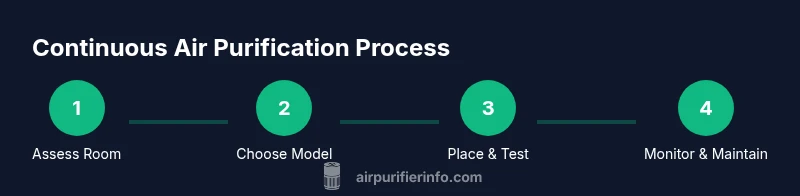
If you’re setting up a purifier for continuous use, start by verifying that the filter is clean and correctly installed. Place the unit on a stable surface with clear space around it. Connect to a reliable power source, and enable any Auto or Night modes. Program a schedule if your routine requires lower activity while you’re away, or keep Auto mode active for uninterrupted filtration. Ensure the unit has proper seals and is not generating unusual noises, which could indicate a loose part. Finally, perform a brief test run of 15–20 minutes to confirm air flow and noise levels are acceptable.
Maintenance routines that keep performance steady
Establish a simple maintenance calendar to keep performance steady. Dust off exterior surfaces monthly, check seals, and replace filters per the manufacturer’s guidance. Keep a spare set of high-quality filters, and store them in a cool, dry place to maintain effectiveness when you need to swap them. Clean the intake and exhaust grills to prevent clogging, and periodically verify that the unit is level and unobstructed. If you rely on a purifier in a pet-filled home, schedule more frequent carbon filter changes to address odors. The Air Purifier Info team notes that consistent maintenance is key to sustainable continuous use.
Common scenarios and how to adapt (bedrooms, living rooms, offices)
Different rooms present different challenges for 24/7 operation. In bedrooms, prioritize quiet performance and a stable night routine. In living rooms, focus on odor removal and dust reduction during gatherings. In home offices, balance energy use with rapid air refresh so you remain productive. For apartments with shared walls, consider models with neighbor-friendly noise ratings and proper placement to minimize disruption. Air Purifier Info recommends tailoring the clean-air plan to each space, using multi-purifier setups if necessary, and re-evaluating room measurements as you reorganize.
Tools & Materials
- Replacement filters (as recommended for your model)(Have spare filters on hand; check compatibility with your model)
- Microfiber cloth(For exterior cleaning and seals)
- Measuring tape(For verifying room size and airflow needs)
- Energy-use estimator or bill estimates(Optional tool to track costs over time)
- Smart plug or timer (optional)(For scheduling on/off or Auto modes)
Steps
Estimated time: 60-90 minutes
- 1
Assess room size and CADR fit
Begin by measuring the room and comparing it to the purifier’s recommended coverage. Choose a unit with a CADR that comfortably matches or exceeds the room size. This ensures effective filtration even when operated continuously. If in doubt, select a model slightly larger than the minimum requirement.
Tip: Aim for a buffer of 15–25% room coverage to handle peak activity. - 2
Check 24/7 suitability of the model
Verify that the purifier is explicitly rated for continuous operation and has replaceable filters designed for frequent use. Auto modes and sensors help manage energy use while maintaining air quality. Read the manual to confirm continuous operation guidelines.
Tip: Look for models with auto-sensing and easy-to-find replacement filters. - 3
Position for optimal airflow
Place the unit in an open area with clear space around all sides. Avoid corners or behind furniture that block air intake or exhaust. Elevate if possible to improve air mixing in the room.
Tip: Test airflow by watching for dust movement and adjust placement if you notice stagnant air. - 4
Install fresh filters and seal check
Before turning on, ensure the filters are correctly installed and seals are intact. A tight seal prevents bypass leakage and maintains filtration efficiency. Run the purifier for a short period to verify smooth airflow.
Tip: Check for any rattling or unusual sounds during initial run. - 5
Connect power and set modes
Plug the purifier into a reliable outlet and enable Auto or Sleep modes as needed. If you’ll be away during the day, program a schedule or use a timer to balance energy use with continuous cleaning.
Tip: Use a timer or smart plug to manage energy and noise during off-hours. - 6
Establish a continuous-use routine
If you plan nonstop operation, set an initial schedule for at least a week and monitor air quality indicators. Adjust fan speed upward or downward to maintain comfort while keeping air clean.
Tip: Document air-quality trends to know when to recalibrate settings. - 7
Run a short test period
Run the purifier for 15–20 minutes to confirm airflow and noise levels are acceptable in the chosen space. Make any necessary adjustments before committing to long-term use.
Tip: If you hear unusual noises, power down and inspect components. - 8
Monitor air quality and energy use
Track PM2.5 or VOC readings and energy usage over time. If air quality remains high but energy use climbs, switch to a lower setting or adjust Auto mode.
Tip: Regularly review sensor readings to ensure ongoing benefits. - 9
Schedule routine maintenance
Set reminders for filter changes and checks of seals, hoses, and grills. Clean exterior surfaces monthly to prevent buildup that can impact airflow.
Tip: Keep spare filters on hand to minimize downtime. - 10
Evaluate noise tolerance
If noise becomes an issue, try Sleep or Eco modes, relocate the unit, or add a second purifier with a lower noise profile for balance.
Tip: Use soft furnishings to help dampen sound if needed. - 11
Reassess room configuration
After a few weeks, reassess room layout and adjust purifier placement or number of units if air quality varies by area or occupancy.
Tip: Re-measure room size if you make major changes to space layout. - 12
Review overall costs and benefits
Compare perceived air quality improvements with energy and filter costs. Decide if 24/7 operation remains worth it for your environment and budget.
Tip: If costs outweigh benefits, consider targeted filtration in high-use zones instead.
Questions & Answers
Can I leave an air purifier on all day without harming it?
Yes, if the unit is designed for continuous operation and you perform regular maintenance. Follow the manufacturer’s guidance for filter changes and ensure proper placement for airflow.
Yes—use a model rated for continuous operation and keep up with maintenance to protect the unit.
Will running continuously save me money on energy bills?
Continuous operation increases energy use compared with sporadic use. You can manage costs by using Auto modes, scheduling, and ensuring filters don’t clog, which keeps efficiency high.
It can raise energy costs, but smart settings and good maintenance help balance the impact.
How often should filters be replaced with 24/7 use?
Follow the manufacturer’s replacement interval and indicators. In constant use, monitor for accelerated clogging and replace filters sooner if performance drops.
Check the filters regularly and replace as advised by the model’s guide.
Is it safe to run a purifier around pets?
Yes, most purifiers tolerate pets well; using a purifier with a carbon stage helps with pet odors. Maintain filters and ventilation to ensure air remains healthy for animals.
It’s generally safe with proper maintenance and good airflow.
Should I turn the purifier off at night?
Many models include a Sleep or Night mode to reduce noise while continuing filtration. Turn off only if you need complete silence and you don’t mind reduced filtration for those hours.
You usually don’t have to; use Night mode for quieter operation.
Are ozone-generating purifiers safe for indoor use?
Avoid ozone-generating units indoors. They can irritate airways and worsen respiratory conditions. Stick to HEPA and activated carbon stages.
No—avoid devices that generate ozone indoors.
Watch Video
Main Points
- Choose a purifier rated for continuous use.
- Match unit size to room with a comfortable buffer.
- Use Auto or Sleep modes to balance quiet and clean air.
- Schedule regular filter changes and maintenance.
- Monitor energy use and air quality to optimize continuous operation.