Air Purifier for Sleep: A Step-by-Step Guide
Learn how to pick and use an air purifier to improve sleep quality by removing dust, allergens, and odors. This guide covers features, noise levels, placement, and maintenance for nighttime comfort.


To improve sleep, choose an air purifier with strong CADR for your room size, quiet operation under 25-30 dB, and true HEPA filtration. Look for night mode, auto-mode, and easy maintenance. Place the unit away from walls, in a location that doesn't disrupt sleep, and run it continuously through the night for consistent air quality.
Why sleep quality matters for indoor air
According to Air Purifier Info, sleep quality is closely tied to the air you breathe in your bedroom. Pollutants like dust, pollen, pet dander, and cooking odors can irritate airways, trigger coughing, or worsen allergies—often without you noticing. Cleaner air can reduce nighttime irritations, shorten time to fall asleep, and improve the depth of rest. In practice, this means choosing a purifier designed for quiet operation, effective filtration, and easy nightly use that fits your routine. It also helps to pair filtration with routine cleaning and minimizing source pollutants, such as reducing indoor smoke or strong household chemicals near the sleeping space.
How air purifiers reduce nighttime pollutants
Air purifiers work by pulling room air through a series of filters to capture particles and, in many models, adsorb odors and gases. True HEPA filtration traps a wide range of particles, including dust, pollen, pet dander, and smoke particles. Activated carbon or other adsorbents help reduce cooking odours and VOCs. While many purifiers target particles, models with a layered approach deliver the broadest nighttime relief. Air Purifier Info analysis shows that combining true HEPA filtration with activated carbon filtration addresses both particulates and common odors in typical bedrooms, which often translates to less coughing and fewer awakenings.
Key features for sleep-oriented purifiers
When shopping for a purifier that supports sleep, prioritize models that offer quiet operation (low decibels in night mode), true HEPA filtration, and an activated carbon stage. Look for a dim or off display, automatic speed adjustments, and timers so the unit doesn’t run louder than necessary. Energy efficiency matters for overnight use, so compare wattage and annual energy use. A compact footprint that fits on a dresser or at the foot of the bed can maximize air circulation without crowding the room. Finally, ensure the purifier is ozone-free and has washable pre-filters to extend overall filter life.
How to size your purifier for a bedroom
Begin by measuring your bedroom: length × width × height to estimate volume, then compare it to the purifier’s recommended room size. Purifiers designed for your room will clean air more effectively and reduce the time needed to reach a comfortable air quality level. If you share your space, consider a slightly larger model to accommodate higher occupancy or pets. Always verify CADR ratings for smoke, pollen, and dust to ensure the unit is appropriate for your specific needs, especially if you experience allergies or asthma.
Placement and running schedule for sleep
Position the purifier so air can circulate unimpeded—ideally in a central location, away from walls and large furniture that could block airflow. Avoid placing the unit directly on the bed or in a footpath where it could be knocked over or disturbed during sleep. For nightly use, keep the purifier running throughout the night and, if available, enable night or sleep mode to minimize noise and light. If noise becomes noticeable, experiment with the lowest effective speed that maintains clean air.
Maintenance and filter care
To maintain sleep-quality performance, follow the manufacturer’s filter replacement schedule and inspect pre-filters monthly. Vacuum or rinse pre-filters if recommended, and replace HEPA and carbon filters when airflow or odor control seems reduced. Keeping the exterior clean reduces dust buildup that can circulate back into the airflow. Store spare filters in a clean, dry place and label them with replacement dates to simplify upkeep.
Allergy and asthma considerations
For people with allergies or asthma, prioritize purifiers with a true HEPA filter and a high CADR for the most relevant pollutants (dust, pollen, and pet dander). A purifier that runs continuously reduces allergen load during sleep, potentially decreasing morning symptoms. Check product claims for asthma-friendly certifications and avoid devices that emit ozone or produce irritating byproducts. Always combine purification with a clean sleeping environment and regular laundry of bedding.
Pet dander, odors, and smoky nights
Pet dander and cooking odors can linger in bedrooms. If you have pets, choose a purifier with strong particulate filtration and a carbon stage that targets odors. For households exposed to smoke or wildfire season, prioritize higher CADR ratings for smoke and a sealed-room performance, and maintain filters more frequently. Keep windows closed during high-pollen days or smoky conditions to maximize purifier effectiveness, and pair filtration with routine house cleaning.
Quick-start night setup checklist
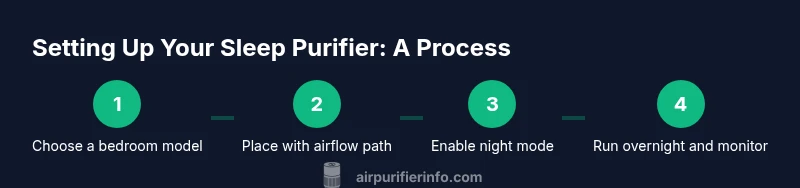
- Select a bedroom-appropriate purifier with night mode and true HEPA. 2) Place it in a central location with at least a short unobstructed air path. 3) Turn on night mode and run overnight. 4) Check the display dimming and ensure the unit auto-adjusts to room activity. 5) Schedule filter changes and set monthly reminders. 6) Track morning symptoms and adjust placement or speed if needed.
Practical tips for a calmer bedroom environment
Keep air clean without stressing the space: reduce near-bed clutter, use fragrance-free products, and keep vents unobstructed. Pair the purifier with a humidifier to stabilize room moisture if your air feels dry, but avoid excessive humidity that can encourage mold. Finally, establish a bedtime routine that includes consistent sleep times and a clean sleep environment to maximize the benefits of your air purifier.
Tools & Materials
- Air purifier (true HEPA, suitable for bedroom)(Choose a model rated for your room size; prioritize low noise and night mode)
- Measuring tape or room dimensions log(Record length, width, and height to estimate room volume)
- Replacement filters for the model(Have on hand according to the replacement schedule)
- Soft microfiber cleaning cloth(Use for exterior dusting without scratching surfaces)
- Surge protector or power strip(If you need to run multiple devices at night nearby)
Steps
Estimated time: 30-60 minutes
- 1
Unbox and inspect the purifier
Carefully remove the unit from its packaging and check for any shipping damage. Read the quick-start manual and confirm model compatibility with your room size. This step helps prevent surprises later and ensures you understand essential features like night mode and filter access.
Tip: Take photos of the packaging and labeling in case you need support from the retailer. - 2
Choose the ideal placement
Place the purifier in a central location in the bedroom with at least a couple of feet of clearance on all sides. Avoid placing it behind doors, between furniture, or directly beside the bed to guarantee optimal airflow and comfortable noise levels.
Tip: Test a few locations by running the unit at night to compare perceived noise. - 3
Power up and enable sleep mode
Plug in the purifier and turn it on. Activate night or sleep mode if available; this typically reduces fan speed and dims indicators to minimize disruption during sleep. Verify that the unit maintains adequate airflow without being loud.
Tip: If your room is especially quiet, consider leaving the display off or dimmed to avoid light disturbance. - 4
Set an overnight running schedule
If the purifier offers timers, set it to run through the night and auto-adjust to room activity. If no timer is available, plan to leave it on for 7-8 hours, then switch off in the morning. Consistency matters for maintaining cleaner air while you sleep.
Tip: Use auto-mode if your purifier has it to maintain stable air quality with minimal manual adjustments. - 5
Maintain filters and airflow
Check and replace filters as recommended by the manufacturer. A clogged filter reduces airflow and cleanliness, so adhering to the schedule is essential for nighttime performance.
Tip: Vacuum or rinse pre-filters if the model supports it to extend filter life. - 6
Monitor and adjust as needed
Observe how you feel after a few nights: fewer allergies, less nasal congestion, or smoother sleep? If you still wake up with symptoms, try relocating the purifier or increasing night mode duration.
Tip: Keep a simple sleep-quality log to track changes over time.
Questions & Answers
Can an air purifier really improve sleep quality?
Yes. By removing dust, pollen, and odors, a purifier can reduce nighttime irritants that wake you or cause coughing. Consistent use as part of a broader sleep routine often leads to easier sleep onset and fewer awakenings.
Yes. Purifiers can reduce nighttime irritants, making it easier to fall asleep and stay asleep when used regularly.
What decibel level is quiet enough for a bedroom?
Look for models with a dedicated night or sleep mode that operates around the lower end of the range, typically designed to be unobtrusive while maintaining effective filtration.
Choose a purifier with a night or sleep mode that runs quietly so it doesn't disrupt sleep.
How often should I replace filters?
Replacement frequency depends on usage and environmental factors, but many true HEPA filters require replacement every 6-12 months. Always follow the manufacturer’s recommendations for your model.
Most true HEPA filters need replacement every several months to a year, depending on use and air quality.
Should I run the purifier all night?
Running the purifier through the night is beneficial for steady air quality, especially in bedrooms with allergies, pets, or odors. Use night mode to minimize disturbance.
Yes, running it all night helps maintain clean air for better sleep.
Where is the best place to put a purifier in a bedroom?
Place the purifier in a central location with a clear airflow path, away from walls and bed clutter. Avoid placing it directly on the bed or in a corner where air circulation is blocked.
Put it in a central location with open airflow, not on the bed or in a blocked corner.
Are ozone-generating purifiers safe for bedrooms?
Avoid ozone-generating purifiers in sleeping areas. They can irritate the lungs and worsen respiratory symptoms for sensitive sleepers.
No—avoid ozone-generating purifiers in bedrooms.
Can a purifier help with pet-related allergies?
Yes, a purifier with true HEPA filtration can reduce pet dander in the air, which may lessen symptoms for allergy sufferers.
A HEPA purifier can help reduce pet dander and related symptoms.
What other steps enhance sleep besides filtration?
Pair purification with a clean sleep environment: regular laundry of bedding, reduced moisture, consistent sleep times, and avoiding strong fragrances near the bed.
Combine air purification with a clean, consistent sleep routine for best results.
Watch Video
Main Points
- Choose a bedroom-appropriate purifier with true HEPA and night mode.
- Place the unit to maximize airflow and minimize sleep disturbance.
- Run the purifier consistently through the night for best results.
- Follow a regular maintenance schedule to sustain performance.
- Monitor sleep symptoms and adjust placement or settings as needed.