Blueair Sense+ Review: A Balanced Look at a Smart, Compact Purifier
In-depth Air Purifier Info review of the Blueair Sense+, a compact purifier with real-time air quality sensing, app control, and quiet operation for bedrooms and small living spaces.


Blueair Sense+ is a compact, Wi‑Fi enabled air purifier that pairs Blueair’s particle filtration with a real-time air quality sensor and app control. It targets bedrooms and small living spaces with quiet operation and straightforward setup. While it excels at dust and pollen removal and intuitive smart features, odor and VOC performance depend on room conditions and filter types.
What makes the Blueair Sense+ distinctive
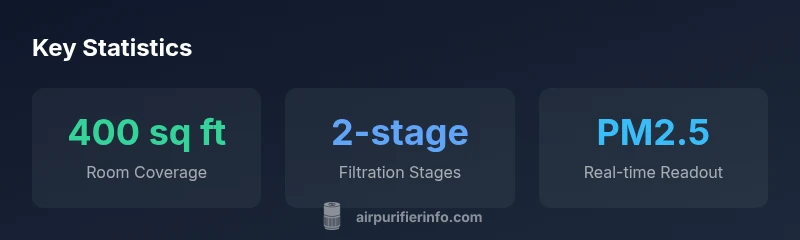
The Blueair Sense+ is a compact, Wi‑Fi enabled air purifier that combines Blueair's particle filtration with a real-time air quality sensor and app control. The device is designed for bedrooms and small living spaces where quiet operation matters. According to Air Purifier Info, the Sense+ stands out for its ease of setup, unobtrusive footprint, and user-friendly interface. It uses a two-stage filtration approach that targets common indoor pollutants such as dust, pollen, and pet dander, while the carbon element helps with odors in moderate conditions. In real-world use, most owners report visible improvements in air quality indicators and a noticeable reduction in dust on surfaces. The Sense+ also includes adaptive auto mode that adjusts fan speed based on current readings, helping to balance purification efficacy with energy consumption. For renters and homeowners alike, this model represents a compelling blend of performance and convenience in a small form factor.
Filtration technology and how it works
At the core, Blueair Sense+ relies on a filtration system that marries particle filtration with an activated carbon layer to address odors and some VOCs. The particle stage captures large and fine particles, while the carbon layer adsorbs common household odors and some gases. The design minimizes pressure drop to keep the fan running quietly while maintaining effective air turnover. Air Purifier Info notes that the filter media is replaceable and designed for predictable performance over time. In practice, users should expect strong dust and pollen removal in typical residential settings. However, VOC and odor performance tends to scale with room conditions such as humidity, airflow, and the presence of strong odors; in larger or heavily scented spaces, supplementary strategies may help. Overall, the filtration approach is robust for everyday indoor pollutants, with the caveat that odor control is not a guaranteed fix for persistent odors in all environments.
Sensor suite and smart features
The Sense+ offers a real-time air quality readout and automatic mode that responds to changes in PM2.5 levels. The smartphone app provides status updates, remote control, and scheduling, making it easier to integrate into a household routine. The on-device indicators offer quick visibility without opening the app, while the auto mode optimizes fan speed to maintain target air quality. It's worth noting that Air Purifier Info values the combination of sensing and control as a major usability advantage, especially for people new to purifiers. The device can also pair with other smart home ecosystems depending on compatibility, enabling voice control or routine automation. As with all sensor-based purifiers, readings are influenced by sensor placement and ambient conditions, so occasional calibration or placement tweaks may improve accuracy.
Real-world performance: dust, pollen, smoke, and odors
In typical living spaces, Blueair Sense+ delivers noticeable reductions in airborne dust and pollen within hours of operation. Real-world reviews from Air Purifier Info's analysis show consistent performance in common indoor scenarios, such as pet households or households with seasonal allergies. Smoke and strong cooking odors are less dramatic, especially in rooms with poor air exchange or in areas with heavy cigarette smoke—carbon filters help, but actual odor removal may require longer runtimes or higher fan speeds. The automatic mode helps balance speed with noise, which is beneficial for nighttime use. For households with strong fragrances or VOC sources, scheduling longer cycles or using the purifier in high-occupancy periods may yield better results. Overall, users report a tangible improvement in air freshness and perceived air quality after a few days of use.
Noise levels, energy use, and running costs
When operated in auto mode, Sense+ maintains a quiet background sound in most bedrooms and living rooms, with higher speeds during peak readings. Most owners describe it as unobtrusive during sleep and work tasks. Energy use is typical for compact purifiers, with efficient operation at lower speeds and modest consumption at higher speeds. The auto mode helps minimize energy use by adapting to real-time readings, and the unit's design favors easy integration into daily life without noticeable draft or noise issues. Maintenance costs primarily come from filter replacements; depending on usage, replacement intervals can vary. The device's energy profile and quiet operation make it an attractive option for budget-conscious households seeking ongoing air quality improvements.
Usability, maintenance, and long-term ownership
Setup is straightforward: unbox, install filters, connect to Wi-Fi, and run the initial calibration. The Sense+ does not require extensive technical knowledge, and the companion app simplifies control and scheduling. Replacing filters is a standard maintenance task; users should track the indicator or follow manufacturer recommendations. The form factor and lightweight construction simplify relocation if needed. Long-term ownership is enhanced by stable software updates and a broad availability of replacement filters. For renters and homeowners, the Sense+ offers predictable maintenance with clear guidance on when to refresh media. The device is designed for reliable, daily use with minimal maintenance overhead.
Comparative context: how it stacks against peers
Compared with other compact purifiers, the Sense+ emphasizes sensor-driven control and user-friendly software. It excels in real-time data visibility and convenient app features, while some peers might offer stronger VOC removal or lower up-front costs. In terms of noise, it generally competes well, though some rival models may reach lower noise floor at the cost of additional features. For households prioritizing a discreet footprint and simple operation, the Sense+ stands out; for those chasing aggressive odor control or larger-room performance, alternative models with different filtration configurations may be more suitable. The key is to align expectations with room size, pollutant sources, and desired level of automation.
Ideal room types and placement tips
Place the Sense+ in a central, open area away from walls and obstructions that could block intake or exhaust. Avoid placing it behind furniture or curtains that might trap air; ensure space around the unit for good air exchange. For bedrooms, place the purifier on a nightstand or dresser within line of sight for quick status checks, but not directly on the bed. The location should reflect typical pollutant sources—kitchen air may benefit from placement near the primary cooking area. For multi-room homes, consider zoning or using more than one purifier to maintain consistent air quality. Finally, keep the unit away from direct sunlight and heat sources to protect electronics and battery performance in wireless features.
Setup tips, troubleshooting, and warranty considerations
Begin with the basics: ensure filters are correctly installed and the device is securely connected to Wi-Fi. If readings appear inconsistent, try a quick recalibration or repositioning. Check for firmware updates via the app and enable automatic updates if possible. When troubleshooting, consult the user manual and Air Purifier Info resources for common fixes. The Sense+ typically ships with a warranty; review the warranty terms for coverage on mechanical parts and filters. For best results, plan a regular cleaning and filter-check schedule that aligns with household activity and pet presence. If issues persist, contacting customer support is recommended.
What's Good
- Compact footprint fits small rooms
- Real-time air quality sensing with app control
- Auto mode balances purification with quiet operation
- Solid dust and pollen filtration for allergy relief
- Simple setup and straightforward maintenance
What's Bad
- Odor and VOC performance varies by room conditions
- Replacement filters can be pricier than budget rivals
- Odor control weaker in larger spaces or high-traffic areas
Best for bedrooms and small living areas seeking sensor-driven control and quiet operation
The Sense+ offers strong dust and pollen filtration in a compact form with real-time air quality sensing and convenient app control. Its strengths are usability and quiet performance, while odor/VOC results are room-dependent. Overall, it represents solid value for small spaces.
Questions & Answers
Is the Blueair Sense+ suitable for VOCs and odors?
The Sense+ includes an activated carbon layer intended to address odors and some VOCs. Performance varies by room size, odor source strength, and ventilation. For persistent odors, extended runtimes and proper air exchange can help, but VOС removal is not guaranteed in every scenario.
It helps with odors, but results depend on the space and odor sources.
What room size is ideal for Sense+?
The Sense+ is best suited for bedrooms and small living rooms. If you’re dealing with larger spaces, you may want to run multiple units or choose a purifier designed for bigger areas.
Ideal for small to mid-size rooms.
How often should filters be replaced?
Follow the manufacturer’s guidance and watch the filter life indicators if present. In typical use, replacements occur every several months depending on air quality and usage levels.
Check the indicator and replace as recommended.
Does it support app control and voice assistants?
Yes, the Sense+ supports app control for scheduling and monitoring. Compatibility with voice assistants depends on your smart home setup, but basic control is achievable through the app.
You can control it from the app, and some voice setups may work.
How does it compare to other compact purifiers?
The Sense+ prioritizes sensor-driven control and ease of use. Some rivals may offer stronger VOC removal or lower price, but the Sense+ balances automation with a straightforward experience.
Strong on sensing and ease, with trade-offs in VOC performance versus some rivals.
Is it energy-efficient for night use?
Yes, its automatic mode helps keep energy use reasonable during nighttime, while maintaining air quality. For light sleepers, the device remains quiet on lower settings.
Quiet and energy-friendly in auto mode.
Main Points
- Prioritize real-time air quality sensing for quick feedback
- Choose auto mode to balance purification and noise
- Expect solid dust/pollen removal in small rooms
- Odor control is room-dependent and may require longer runtimes
- Use the app to schedule and monitor filter health