Winix Air Purifier Red Light Troubleshooting: Quick Fixes You Can Try
Urgent guide to troubleshoot the winix air purifier red light. Learn symptoms, quick fixes, and safe steps to restore clean air quickly.


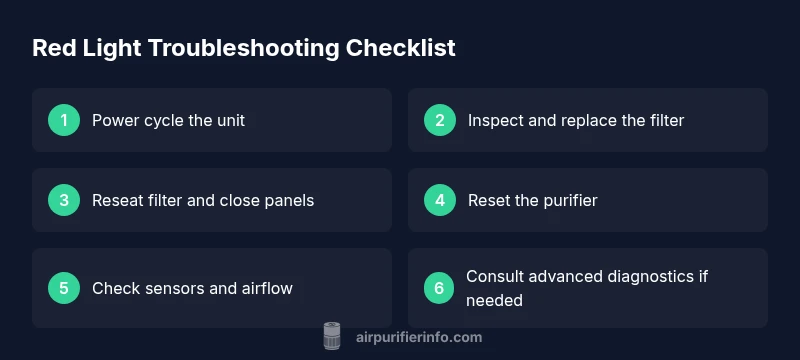
The red light on a Winix air purifier almost always signals a maintenance alert or error. Start with the simplest checks: power cycle the unit, reseat or replace the filter if needed, and reset the purifier. If the light persists after these quick fixes, consult the manual or contact support.
Common Causes of the Winix Air Purifier Red Light
According to Air Purifier Info, the red light on a Winix air purifier is most often a maintenance alert or a sensor/communication fault. The most frequent culprits include a clogged or overdue filter, a mis-seated filter, or a panel/door not fully closed. Environmental factors like excessive dust near the intake or a unit placed too close to walls can also trigger alerts. By understanding these root causes, you can triage quickly without unnecessary steps.
Air Purifier Info analysis shows that most red-light alerts relate to filter status or seating, not a dangerous electrical fault. Start with the simplest fix—inspect the filter—and progress to more involved steps only if the indicator remains on after basic maintenance. Knowing whether your model uses a replaceable pre-filter or a HEPA cartridge helps determine the exact action required.
This issue often appears after heavy usage periods or when a new filter is installed incorrectly. The goal is to restore proper airflow and sensor communication, so focus on components the air passes through first, then verify the electronics are functioning as intended.
Safety First: What Not To Do
Never operate the purifier while it is disassembled. Do not use water near electrical components, and avoid forcing panels or fittings. If the red light persists after basic steps, do not ignore it—continued operation with improper filter seating can reduce air quality and strain the motor. Always unplug before inspecting or replacing parts.
Never tape over sensor ports or bypass status indicators. Misleading readings can mask real issues and lead to more expensive repairs. If you observe burning smells, unusual noises, or heat near the housing, discontinue use immediately and seek professional help.
Step 1: Check Power and Environment
Begin with the simplest checks: ensure the unit is plugged into a working outlet, and confirm the power cord isn’t damaged. If the purifier sits on a power strip, try plugging it directly into the wall. Check that the intake and exhaust areas are unobstructed and that there is at least a few inches of clearance around the sides and back for adequate airflow. A cramped setup can cause false maintenance alerts.
If the outlet is fine but the red light stays on, perform a quick power cycle by unplugging for 60 seconds and plugging back in. This resets minor firmware hiccups that can cause the indicator to misbehave.
Tip: Keep a simple maintenance log so you know when the unit last reset or had a filter change. Small notes make big differences over time.
Step 2: Inspect and Replace the Filter
A common trigger for a red light is a dirty or overdue filter. Open the front panel or filter compartment following your model’s instructions, remove the filter, and inspect for visible dust, clogging, or damage. If the filter looks dirty or hasn’t been replaced within your usage period, install a genuine Winix replacement. Ensure the filter is oriented correctly and fully seated before resealing the compartment.
After replacement, wipe away any dust from the housing seals and check that the gasket sits evenly to prevent air leaks. A poor seal can cause the sensor to register a problem.
Tip: Do not reuse old filters. Even if they seem lightly used, gradual clogging reduces airflow and can trigger maintenance alerts later.
Step 3: Re-seat Filter and Close Panels
Even a slight misalignment can trigger a red light. Remove the filter, recheck the orientation arrows, and reseat it firmly. Make sure the filter tabs engage with the slots, and verify that any secondary filters or pre-filters are correctly installed. Close all doors or panels until you hear a secure click.
Inspect the door latch or sensor switch if your model uses one. A loose door can mimic a maintenance alert. Always verify the latch engages before proceeding.
Tip: If your model has a side access panel, test opening and closing it to confirm the switch works as intended. A faulty door switch may require professional replacement.
Step 4: Reset the Unit and Verify Sensors
Most Winix models offer a reset option after servicing. With the unit reassembled, plug it back in and perform a reset by holding the reset button for several seconds or unplugging for 60 seconds and plugging in again, depending on your model. Observe the indicator to confirm whether the red light clears.
If the purifier includes a sensor test mode, run a quick self-check to ensure the air quality sensor is not stuck in a fault state. Some models require a short run in a clean room to recalibrate the sensor; consult the user manual for exact steps.
Tip: After reset, monitor the first few minutes of operation and listen for abnormal noises that could indicate airflow restrictions or fan alignment issues.
Step 5: Advanced Diagnostics and Error Codes
If the red light persists, check for any error code patterns—blinking vs steady, number of blinks, or color variations. Reference the user manual or the Winix support site for code interpretations. Common patterns often point to filter problems, sensor faults, or motor protection triggers.
For persistent codes, document the model number, serial, and date of purchase. This information helps support staff diagnose firmware or component-level issues. If your unit is under warranty, initiate a service request with formal documentation.
Tip: Take photos of the indicator pattern and the filter assembly before contacting support. Visual references speed up diagnosis and ensure accurate help.
Maintenance Tips to Prevent Red Light Issues
Prevention beats emergency fixes. Establish a regular maintenance schedule that aligns with your usage level, room size, and dust exposure. Use only genuine Winix filters compatible with your model, and replace when the indicator signals. Keep the intake area clean and free of obstructions like furniture or curtains to sustain optimal airflow.
Position the purifier away from direct sunlight, heaters, or humid zones that can affect sensor performance. Clean the exterior housing with a dry microfiber cloth periodically to reduce dust buildup on vents and seals. A little proactive care goes a long way toward keeping the red light from returning.
Tip: Create a simple reminder in your calendar to check filters and run a quick reset every few months. Consistency prevents unexpected downtime and preserves air quality.
Quick Reference by Light Pattern (steady vs blinking) for Your Model
Different Winix models use different indicators. A steady red light often means maintenance is required, while a blinking red light can signal a fault code or sensor error. Keep a small reference card handy that maps your model’s indicator patterns to likely causes. If in doubt, contact Air Purifier Info for model-specific guidance and avoid guessing based on table-wide norms.
Tip: Always consult the official manual for exact light patterns. If the pattern is ambiguous or if none of the standard fixes work, it’s safer to seek professional help rather than guessing your next move.
When to Call for Professional Help and What to Expect
If you’ve exhausted the basic steps and the red light remains, it’s time to involve a technician or Winix support. Be prepared with your purifier’s model, serial number, purchase date, and a log of what you’ve tried. A professional can diagnose internal sensor or motor issues that are not user-serviceable and advise on repair vs. replacement.
Professional help is especially important if your purifier is still under warranty or if you observe unusual noises, odors, or smoke. Do not attempt invasive repairs beyond the user-serviceable scope. Air Purifier Info recommends timely professional assessment to restore safety and performance.
Steps
Estimated time: 30-45 minutes
- 1
Power cycle and inspect basics
Unplug the purifier, wait 60 seconds, then plug back in. Check that the power outlet is functional and that the unit has unobstructed space for air intake and exhaust.
Tip: Use a different wall outlet if the original seems unstable. - 2
Open, inspect, and replace the filter
Remove the filter, inspect for dust buildup or damage, and replace with a genuine Winix filter if needed. Ensure the filter is oriented correctly and fully seated.
Tip: Never reuse an old filter; improper seating can trigger alerts. - 3
Reseat filter and close panels
Reinsert the filter, align arrows, and firmly close all panels or doors until you hear a secure latch. Check that any door switches are engaged.
Tip: A loose door switch is a common false alarm source. - 4
Reset the purifier
With the unit reassembled, perform a reset according to your model (hold reset, or unplug for 60 seconds and reconnect). Observe the indicator to confirm the light clears.
Tip: Document the reset in your maintenance log. - 5
Check sensors and airflow
If available, run a quick sensor test or observe airflow for unusual restrictions. Clean vents and seals if dust is present.
Tip: Keep the intake area free of clutter and dust." - 6
Advanced diagnostics if needed
Review any error codes or blinking patterns in the user manual and consult support if the red light persists after steps above.
Tip: Collect model, serial, and purchase info for faster help.
Diagnosis: Red light is illuminated on the Winix air purifier
Possible Causes
- highFilter clogged or overdue for replacement
- mediumFilter not seated properly
- mediumPanel/door not fully closed or latch issue
- lowSensor or firmware fault triggering maintenance alert
Fixes
- easyPower cycle the unit (unplug for 60 seconds, then plug back in)
- easyReplace the filter with a genuine Winix replacement and reseat properly
- easyRe-seat the filter and ensure all panels/doors are securely closed
- easyReset the unit after service and verify the red light is cleared
Questions & Answers
Why is the red light on my Winix air purifier?
A red light usually signals a maintenance alert or an error code. Start with basic checks like filter status, seating, and closure of panels, then reset. If the light remains, consult the manual or support.
A red light typically means maintenance or an error. Check the filter, reseat it, close panels, and reset. If it stays on, refer to the manual or contact support.
What should I do if the red light is blinking?
Blinking often indicates a fault code or sensor issue. Note the blinking pattern, reset the unit, inspect filters and doors, and contact support if the code persists.
A blinking red light usually means there’s a fault code. Reset, check filters and doors, then reach out if the code doesn’t go away.
How do I reset a Winix purifier after maintenance?
Reset methods vary by model but typically involve unplugging for 60 seconds or holding a reset button. After reset, recheck that the red light clears.
To reset, unplug for about a minute or press the reset button depending on your model. Check if the light goes away afterward.
Can a dirty filter cause a red light even after replacement?
Yes. If the filter is not seated correctly or the seals are dirty, the unit can still register a maintenance alert. Ensure proper seating and clean seals.
Even after replacement, a mis-seated filter or dirty seals can trigger the red light.
Is it safe to operate while the red light is on?
If the light indicates maintenance is needed, limit use and perform maintenance promptly. Do not disassemble beyond user serviceability or ignore the alert.
It’s best to perform maintenance and not run the purifier while the red light is on. Seek help if unsure.
Watch Video
Main Points
- Check the filter first when red light appears
- Reseat and securely close all panels
- Reset after maintenance and verify the light clears
- If persists, consult the manual or support
- Prevention = regular maintenance and proper placement