How to Reset a Winix Air Purifier: A Practical Guide
Learn how to reset a Winix air purifier with a clear, model-friendly process. Unplug, wait, and use the correct reset sequence to clear faults and restore clean air.


To reset a Winix air purifier, unplug the unit, wait 30 seconds, plug it back in, and follow the on-device reset sequence if prompted. This quick reset clears common fault indicators and restores normal operation. In this guide, you’ll learn how to reset winix air purifier across common models, plus tips to avoid future resets.
Understanding why a reset helps
Resetting a Winix air purifier is often the quickest way to clear minor fault indicators and return the device to normal operation after events like power glitches, filter changes, or sensor glitches. The Air Purifier Info Team notes that resets can resolve ghost error codes without replacing parts. For homeowners and renters, this simple step can save time and keep indoor air quality steady. Before you reset, recognize that some issues require more than a reset, such as dirty filters or blocked air intakes; a reset will not fix physical obstructions. If you see an error code flash, note the exact pattern and check the manual for its meaning. Air Purifier Info emphasizes safety: unplug before inspecting any internal components, and never insert objects into the intake.
Preparing to reset: model differences and precautions
Not all Winix purifiers use the same reset method. The basic idea is consistent, but manufacturers vary by model family and firmware. Start by locating your unit’s model family in the user manual or on a label on the back or underside of the purifier. The Air Purifier Info analysis shows older models typically rely on a physical reset button or a brief power cycle, while newer units may use on-screen prompts or app-based controls. Safety first: unplug the purifier before removing any panels or touching internal areas; never reset with wet hands or while the device is mounted or resting on an unstable surface. Have your manual handy, and if you don’t have it, check the manufacturer’s website for the exact reset steps for your specific model.
The standard reset procedure (no manual) for most Winix purifiers
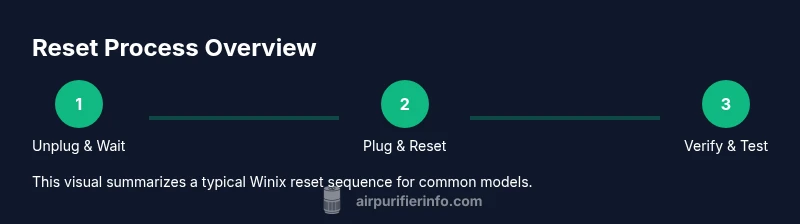
Most Winix purifiers that follow the common design respond to a simple power-cycle and a on-device reset prompt. Unplug the unit from the wall outlet and wait at least 30 seconds to clear residual power. Reconnect the power and watch for any flashing lights or a reset message on the display. If your model has a dedicated reset button, press and hold it for 3–5 seconds until the lights flash or the display returns to normal. If there is no reset button and no display, a normal power cycle often suffices. In many cases, the purifier will complete the reset automatically within a minute.
Reset with model-specific steps: button, LED indicators, or app
Some Winix models require a slightly different sequence. For panel-button models, press and hold the reset button (or the filter-change button) for 5 seconds until you see a reset indicator. For models with LED indicators, you may need to press a combination of buttons (for example, power plus a dimming button) or follow a guided reset on the screen. Wifi-enabled units can also offer an app-based reset option; consult the app’s help section to initiate a device reset remotely. If you encounter a blinking pattern, refer to the user guide; the pattern often communicates the issue and whether a reset is appropriate.
Troubleshooting when the reset doesn't work
If a reset fails to clear the fault, verify the basics: ensure the filter is properly seated and clean, confirm there’s no obstruction around the intake or outlet, and check that the unit has stable power. Clear any debris from the air path with a soft cloth or brush; replace or clean the pre-filter as needed. If the error reappears, the problem may be sensor-related or a more serious fault that requires service. In that case, contact Winix customer support or a qualified technician. Note any error codes, model family, and firmware revision to speed up assistance. The Air Purifier Info Team also recommends documenting the steps you took for future reference.
Maintenance habits to reduce future resets
To minimize the need for resets, perform routine maintenance. Replace filters on schedule, vacuum or wipe the exterior monthly, and keep the surrounding area free of dust and obstacles. Place the purifier on a stable surface away from walls or heavy fabrics to ensure proper airflow. Use high quality replacement filters recommended by Winix, and avoid using third-party parts that can affect sensor readings. Regular checkups can prevent avoidable fault indicators and extend the device’s life.
Safety and warranty considerations
Never attempt internal repairs or open the case unless you are trained. Resetting the device as intended should not void the warranty, but improper handling or modifications can. If your unit shows signs of damage such as burning smells, unusual noises, or visible damage, discontinue use and contact support. Keep your proof of purchase and refer to the warranty terms when seeking service. The Air Purifier Info Team emphasizes following the manufacturer’s guidelines to protect both your device and your home's air quality.
Tools & Materials
- Owner’s manual for your Winix purifier model(Locate model family and reset instructions.)
- Stable power outlet(Have a nearby outlet in good condition.)
- Soft microfiber cloth(For cleaning dust from the unit if needed.)
- Pen and notebook(Record reset steps and any codes observed.)
- Timer or clock(To time the 30-second wait during resets.)
Steps
Estimated time: 10-15 minutes
- 1
Identify model family and reset method
Check the user manual or label on the purifier to confirm the exact reset sequence for your model. Note whether you need a physical reset button, a combination of buttons, or an app-based option. This step avoids wasted attempts on the wrong procedure.
Tip: If you’re unsure, photograph the control panel labels for reference. - 2
Power down and unplug
Disconnect the purifier from the wall outlet and remove any nearby accessories. This prevents electrical arcing and ensures the unit isn’t actively running while you reset. Wait at least 30 seconds after unplugging to allow residual power to clear.
Tip: Use a timer to ensure the full 30-second interval. - 3
Reconnect power and prepare the reset
Plug the purifier back in and observe any immediate prompts. If your model has a dedicated reset button, prepare to press it as directed. If there’s an on-screen prompt, be ready to follow the sequence exactly as shown.
Tip: Have the manual handy in case the device asks for a specific confirmation. - 4
Initiate the reset
Press and hold the reset button for 3–5 seconds or follow the screen/app prompts to initiate the reset. Look for LED flashes or a reset message indicating the operation is complete. Do not remove power during this step.
Tip: If there’s no visible indication, wait up to 60 seconds for the unit to settle. - 5
Confirm reset completion
Ensure the display returns to normal or the LED indicators show standard operation. If there’s a pattern of blinking lights, consult the manual for fault codes and next steps.
Tip: Take a quick photo of the indicators for future reference. - 6
Test purifying function
Run the purifier on a higher fan setting for 5–10 minutes and listen for normal airflow. Confirm there are no unusual smells and that the lights behave as expected.
Tip: If airflow remains weak, check filters or consider cleaning the intake area. - 7
Record the reset and plan future maintenance
Note the date, model family, and any error codes observed. Schedule the next filter replacement and routine cleaning to prevent recurring faults.
Tip: Keep a simple log so you can spot repeating patterns over time.
Questions & Answers
What triggers a Winix purifier to need a reset?
Common triggers include error codes, sensor faults, or after filter replacement; resetting clears minor faults and restores normal operation.
Winix purifiers may need a reset after errors, sensor faults, or after you replace the filter.
Is it safe to reset a Winix purifier while it's running?
Reset should be performed after turning off and unplugging the unit unless the manual specifies otherwise. Do not reset if you notice unusual behavior while powered.
It's safest to reset after turning off and unplugging the purifier.
What should I do if a reset doesn't fix the issue?
Check the filter seating and cleanliness, inspect for blockages, and verify power stability. If the fault persists, contact customer support with model and error details.
If a reset doesn't fix it, check the filter and power, then contact support.
Can I reset Winix models via a mobile app?
Some newer models offer app-based resets; refer to the app’s help section to initiate device reset remotely if your model supports it.
Some models let you reset via the app; check your model's features.
How long should a reset take to complete?
Most resets complete within a minute; longer resets may indicate a deeper fault or sensor issue requiring service.
Usually under a minute, but if it takes longer, troubleshoot further.
Do resets affect warranty?
Resetting per the manual typically does not void the warranty, but improper handling or modifications could affect coverage.
Resetting correctly should not void the warranty.
Watch Video
Main Points
- Identify model-specific reset steps to avoid errors
- Unplug, wait 30 seconds, then initiate reset as directed
- Check filters and airflow before assuming a fault is cleared
- Document resets and schedule regular maintenance