What app do you use for Levoit air purifier: VeSync explained
Learn which app controls Levoit air purifiers and how VeSync works. This guide covers compatibility, setup steps, privacy tips, and best practices for renters and homeowners.


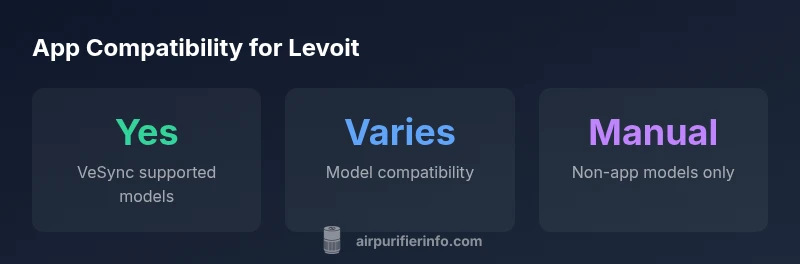
Most Levoit air purifiers with smart features use VeSync for app control. VeSync lets you turn the purifier on/off, adjust fan speed, set schedules, and monitor real-time air quality on iOS and Android. Models without Wi‑Fi or app compatibility require manual control. Always verify model compatibility before purchase to ensure app access.
How to identify if your Levoit purifier is app-enabled
To determine which app to use, start by checking whether your model supports Wi-Fi and app control. If you own a newer Levoit purifier, the most common app is VeSync, which connects the device to your phone for remote control and monitoring. According to Air Purifier Info, the VeSync app remains the standard for Levoit purifier control when models are app-enabled. If you search the product listing for explicit references to VeSync, you are likely dealing with an app-enabled model. If the purifier operates only via manual controls, there is no app to install. To address the question in plain terms: what app do you use for levoit air purifier? The answer is typically VeSync, but always verify model compatibility before you buy or connect a device.
Verifying compatibility: model ranges and app requirements
In the Levoit lineup, app support varies by model family. Most app-enabled devices are designed to pair with VeSync and require an active VeSync account. Practically, you should locate the model name on the device or packaging and cross-check the official Levoit specs or VeSync listing. Air Purifier Info analysis shows that app compatibility is highest among the newer Core Smart and Smart+ families, while older non-smart lines omit app features altogether. For renters or homeowners evaluating a purchase, the critical step is to confirm VeSync availability in the technical specs or quick-start guide, which will state whether setup via the app is possible. If VeSync is listed, expect features like on/off control, schedules, and real-time status to be accessible once you pair the device. If not, you may rely on manual controls or consider upgrading to a model that supports VeSync or another compatible app ecosystem.
VeSync app basics: account setup and device pairing
Getting started with VeSync is straightforward, but a few details matter for a smooth experience. Download the VeSync app from the iOS App Store or Google Play, then create an account or sign in. Once you are logged in, choose Add Device and select Levoit from the list of compatible brands. Follow the on-screen prompts to connect your purifier to your Wi-Fi network, usually via a temporary setup mode on the device. After pairing, grant the app the requested permissions (location, notifications, etc.), and give your purifier a recognizable name. The pairing process may involve confirming a code shown on the purifier’s display. If anything fails, try restarting the purifier and your phone, then reattempt pairing. In rare cases, you may need to update the device’s firmware through the VeSync app before it becomes fully controllable.
Features unlocked by the VeSync app
Using VeSync, you gain remote on/off control, scheduling, and real-time air quality feedback, which helps you optimize operation around your daily routine. The app often supports multiple purifiers, so if you own more than one, a single VeSync account can manage all devices. Look for additional features such as firmware updates, push notifications when air quality changes, and energy-use summaries. Some models may show PM2.5 readings, VOC levels, or AQI indexes directly in the app, while others only report basic status. The value of VeSync grows with flexible scheduling and automation, including routines that adjust fan speed during certain times of day or in response to detected air quality changes. Always review the app’s permission settings and notification preferences to avoid battery drain or unwanted alerts.
Practical scenarios: renters vs homeowners
For renters, app control can be a practical way to maintain air quality without constant manual tweaking, especially if you need to adapt settings for different living spaces. VeSync-enabled units can be moved between rooms, but you should ensure reliable 2.4 GHz Wi-Fi coverage or use a Wi-Fi extender. Homeowners with larger spaces or multiple rooms may benefit from grouping devices in VeSync and creating routines that react to outdoor air quality or seasonal changes. In both cases, app control should be paired with good filtration habits—regular filter checks and timely replacements—to maximize the purifier’s effectiveness. If you live in a small apartment, you may start with a single VeSync-enabled model and expand later as needed.
Common pitfalls and how to avoid them
Several issues can hinder app performance. Ensure your phone and purifier are on the same network, preferably a 2.4 GHz band, and that the VeSync app has permission to access location and local network settings. If pairing fails, try a factory reset on the purifier and reinstall the app. Keep the app updated to benefit from bug fixes and security improvements. If a purifier is not appearing in VeSync, confirm the device type and model in the app’s Add Device screen, and check for firmware updates. Finally, be mindful of cloud outages or account lockouts that can temporarily interrupt control, and consider alternate control methods if needed during such events.
Security and privacy considerations for VeSync
Smart devices introduce account-based access, so strong password practices matter. Use a unique, long password for your VeSync account and enable two-factor authentication if available. Avoid linking your account to shared or insecure networks, and keep your app and device firmware updated to reduce vulnerability exposure. Review which data VeSync collects (such as device status, usage patterns, and location) and adjust privacy settings to minimize sharing where possible. If you lend your phone to others, ensure they have limited app permissions or sign out after use. For added peace of mind, regularly review connected devices and remove ones you no longer own.
Maintenance and best practices for app-based control
To maximize the value of VeSync-driven control, establish a routine: set up a weekly check of filter status, schedule periodic firmware updates, and verify that notifications reflect your preferred alerts. Keep your devices linked to a consistent account and document any changes in room arrangements or Wi-Fi networks. Consider creating automation that reduces energy use during the day while maintaining air quality, particularly in spaces with pets or odors. Finally, stay informed about app updates and Levoit model changes through official sources, and adjust your setup if you upgrade purifiers.
Levoit app compatibility overview
| Model Family | App Support | Setup Required | Notes |
|---|---|---|---|
| Smart Core Series (VeSync-enabled) | Yes | Automatic pairing via VeSync app | Supports remote control & scheduling |
| Basic Core Series (non-smart) | No | N/A | Manual control only |
| Smart+ Series (VeSync-enabled) | Yes | Sign in to VeSync; pair device | Real-time status & notifications |
Questions & Answers
Do all Levoit purifiers have VeSync?
Not all Levoit purifiers support VeSync. App compatibility depends on the model and its connectivity features. Always check the product specs or user manual to confirm VeSync support before purchase.
Not every Levoit purifier works with VeSync; verify app compatibility in the product specs or manual.
Can I control multiple purifiers with one VeSync account?
Yes. VeSync typically supports managing multiple Levoit purifiers from a single account, allowing centralized control and monitoring.
Yes. You can manage several Levoit purifiers from one VeSync account.
What should I do if VeSync can’t find my purifier?
Ensure the purifier is in setup mode, the phone is on the same 2.4 GHz network, and the app has the necessary permissions. If needed, restart devices and retry pairing.
Check setup mode, network, and permissions; restart and retry pairing.
Is VeSync required for basic purifier functions?
For basic on/off and manual adjustments, VeSync is not required. App control adds convenience but is only available on compatible models.
VeSync adds convenience, but basic functions work without it on non-smart models.
Are there privacy risks using VeSync?
VeSync uses account-based access and may collect device status and usage data. Use strong passwords, enable two-factor authentication, and review privacy settings.
There are privacy considerations; protect your account with strong passwords and enable extra security features.
Can I use voice assistants with Levoit purifiers?
Some VeSync-enabled models integrate with voice assistants via VeSync. Check your model's compatibility with Google Assistant or Alexa.
Some VeSync models work with voice assistants; verify compatibility for your model.
“VeSync can greatly enhance daily use of Levoit purifiers when the model supports app control; always confirm compatibility and firmware updates before relying on features.”
Main Points
- Verify VeSync availability before purchasing Levoit purifiers.
- VeSync enables remote control and scheduling on supported models.
- Non-smart models require manual operation.
- Maintain account security with strong passwords and updates.
- Use the app to optimize energy use and air quality across spaces.