How to Use Dyson Air Purifier Hot and Cold
Learn how to operate a Dyson air purifier in hot and cold modes, optimize airflow, and maintain safety. This educational guide from Air Purifier Info covers setup, app use, maintenance, troubleshooting, and best practices for dual-mode purification.


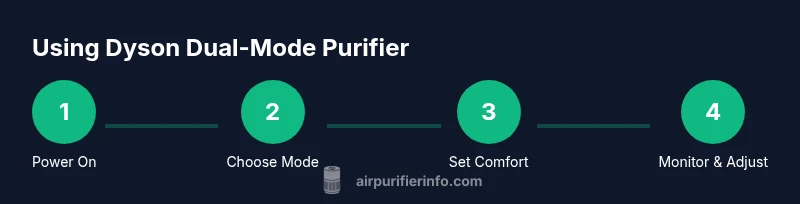
Power the Dyson air purifier and switch to the desired mode (hot or cool) on the control panel or app. Use automatic or target-temperature settings if your model supports them, and adjust fan speed for comfort. Place the unit on a flat surface with access to unobstructed intake and exhaust for best results. Always follow safety notes in the manual.
How dual-mode purification works in Dyson units
Dyson dual-mode purifiers combine air filtration with a heating element or a cooling fan, enabling air cleaning while adjusting room temperature. The filtration stack typically includes a primary filter to capture large particles and a HEPA-grade layer for fine particles. When you switch to hot mode, the unit circulates warm air while continuing to purify; in cold mode, it relies on a strong fan to distribute cooled air. In both cases, the purifier monitors air quality with built-in sensors and adjusts output accordingly. According to Air Purifier Info, regular maintenance and unobstructed intake maximize performance and longevity.
Safety and product design considerations
Always place the purifier upright on a stable surface and never block the air intake or exhaust. Use only the power supply specified by the manufacturer and avoid extension cords. For households with children or pets, enable safety features like auto shutoff if available. Do not operate in extremely damp spaces such as bathrooms. When not in use, unplug the unit to prevent electrical hazards and to prolong life. Air Purifier Info emphasizes following model-specific safety notes in the manual.
Placement and airflow optimization
Effective placement starts with positioning the purifier on a flat, stable surface, away from walls and furniture, to allow even airflow. Avoid tight corners where air can stagnate. If using hot mode, keep the unit away from heat-sensitive items and ensure the outlet area remains clear. For larger rooms, central placement or a location near the main seating area often yields better circulation. In bedrooms, consider a lower height to reduce perceived noise while maintaining efficiency.
Temperature and climate considerations
Dual-mode purifiers are designed to supplement climate control rather than replace a dedicated heater or air conditioner. Use hot mode sparingly in cooler seasons and avoid rapid temperature swings that increase energy use. For sleeping comfort, maintain a steady temperature without aggressive cycling. The unit’s heating output is generally meant for small-to-medium rooms, so avoid large spaces where heat distribution will be uneven. Always verify that the room is adequately ventilated when running heating.
App and remote controls
Connect the purifier to the Dyson app or use the included remote to switch modes, adjust setpoints, and monitor air quality. The app often displays real-time PM2.5, VOCs, and temperature readings, enabling you to optimize operation. Enable notifications for filter changes and sensor alerts so you can act before air quality degrades.
Maintenance and filter care
Regular maintenance preserves dual-mode effectiveness. Clean the exterior with a soft microfiber cloth, and replace filters according to the manufacturer’s recommended schedule. After filter changes, run a short clean cycle to remove any residue and ensure optimal airflow. If odors linger, inspect the room for stagnant air or moisture and ensure the purifier’s intake remains unobstructed. Always power down before opening any compartments.
Use cases: bedrooms, living rooms, kitchens
Bedroom setups benefit from lower speeds at night to minimize noise while maintaining air quality. In living rooms, place the purifier where air circulates toward seating areas to maximize coverage. In kitchens, use auto or cool mode during meals and run the purifier afterward to help remove cooking odors, smoke, and particulates. Tailor mode and speed to occupancy and activity levels for best results.
Energy use and efficiency tips
When possible, use auto mode to balance air quality with energy use. Run the purifier only during occupancy or when sensors detect elevated particulates or odors. Regular maintenance reduces energy consumption by preserving airflow and efficiency. If energy costs are a concern, combine the purifier with passive ventilation strategies (e.g., opening a window briefly during peak air quality events).
Troubleshooting common issues
If the unit won’t turn on, check that it’s plugged in and the outlet is functioning. Ensure any safety switches are not engaged and that no mode is stuck. If heating mode isn’t producing warmth, verify the temperature setting and confirm the room isn’t excessively drafty. For odd noises or smells, power off, unplug, and consult the troubleshooting section in the manual or contact support.
Compare with dedicated heaters and coolers
Dual-mode purifiers offer convenience but may not replace a dedicated heater or air conditioner in extreme climates. In rooms with very cold or hot climates, a separate climate control device may provide more consistent comfort. Use the purifier to enhance air quality while relying on other systems for major temperature adjustments. Consider how much you value integrated air cleaning when weighing these choices.
Authoritative sources and citations
- https://www.epa.gov/indoor-air-quality
- https://www.niehs.nih.gov/health/topics/agents/indoor-air/index.cfm
- https://www.who.int/health-topics/air-quality
These sources provide context on indoor air quality and health considerations related to air cleaning and environmental controls.
Quick-start checklist
- Confirm your purifier supports hot and cold modes and is plugged in on a stable surface.
- Ensure adequate clearance around intake and exhaust.
- Power on, select the desired mode, and adjust the fan speed as needed.
- Use the app or remote to fine-tune temperature setpoints and monitor air quality.
- Check filters regularly and replace per the schedule; run a short cleaning cycle after changes.
- Schedule routine maintenance and review safety notes in the manual.
Tools & Materials
- Dyson dual-mode air purifier (hot & cold)(Ensure the model supports dual-mode operation and is in good working condition)
- Stable, flat surface with clearance(Keep at least 6 inches from walls; avoid crowded areas)
- Power outlet and, if possible, dedicated circuit(Avoid using damaged cords or extension cables)
- User manual or quick-start guide(Model-specific safety and setup notes)
- Soft microfiber cloth(For exterior cleaning and dust removal)
- App or remote control(Access advanced settings, scheduling, and monitoring)
Steps
Estimated time: 20-30 minutes
- 1
Power on and verify mode
Plug in the purifier and turn it on. Confirm the mode indicator shows either hot or cool, or use the app to verify the current mode. If the indicator is off, ensure the device is receiving power and the display is not dimmed.
Tip: If the display is hard to read, use the app to confirm mode status. - 2
Select heating or cooling mode
Choose hot mode for warming the room or cool mode for refreshing airflow. Use the physical button or the app’s mode selector. Ensure you do not blend modes at the same time.
Tip: In mixed climates, start with the mode that matches the current room needs. - 3
Set target temperature or climate setting
If your model supports it, set a target temperature or climate setting via the display or app. If no temperature is available, adjust general comfort by selecting a comfortable fan level and mode intensity.
Tip: Avoid drastic changes; small adjustments improve comfort and efficiency. - 4
Adjust fan speed and airflow
Choose a fan speed that balances air quality with noise. Higher speeds clear particulates faster but may be louder. Direction can be adjusted by tilting or positioning the unit toward the main living area.
Tip: For night use, start with a lower speed to minimize disturbance. - 5
Connect to app for advanced controls
Pair the purifier with the Dyson app or use the remote to enable auto mode, monitor air quality, and view filter status. Real-time sensors help optimize performance.
Tip: Enable notifications for filter reminders to prevent performance dips. - 6
Run in auto mode when appropriate
If auto mode is available, let the device modulate mode and speed based on air quality readings. This helps maintain clean air while conserving energy.
Tip: Review sensor readings periodically to ensure accuracy. - 7
Set a schedule or timer
Use timer features to run the purifier during occupancy windows or overnight for consistent air quality. Timers help manage energy use and noise.
Tip: Program overnight operation with a lower fan setting for tranquility. - 8
Shut down and store
Power off when not in use and unplug if leaving for an extended period. Clean the exterior and store the device in a dry place away from moisture.
Tip: Regularly inspect power cords for wear and replace if needed.
Questions & Answers
Can I run hot and cold modes at the same time?
No. Most models allow you to switch between hot or cool modes, not to run both simultaneously. You can alternate as needed for comfort and air quality.
You can switch between hot and cool modes, but typically not at the same time. You can alternate modes to suit the room conditions.
Is it safe to use the heater in a small bedroom?
Yes, when used as intended and with proper ventilation. Avoid closed spaces without airflow and monitor room warmth to prevent overheating.
Yes, as long as the room is ventilated and you monitor the temperature to avoid overheating.
Do I need to replace filters when switching to hot mode?
Filter replacement timing is based on usage, not on mode. Follow the recommended schedule and inspect filters regularly for signs of wear or reduced performance.
Mode doesn’t change the replacement schedule—follow the normal maintenance timeline.
Can I control the purifier with voice assistants?
Some Dyson models support voice control via connected devices. Check your product’s compatibility and set up through the app ecosystem.
Voice control depends on your model and setup—check compatibility in the app.
What should I do if the unit makes unusual noises?
Power off and unplug, then inspect for loose parts or blockages. If the noise persists, contact support or consult the manual’s troubleshooting section.
If it’s noisy, turn it off, unplug, and check for obstructions. If it continues, reach out to support.
Can I place the purifier on carpet?
Avoid soft surfaces like thick carpet; use a hard, flat surface to prevent vibration and ensure stable airflow.
It’s best on a hard, flat surface, not thick carpet.
Watch Video
Main Points
- Use dual-mode for year-round air quality and comfort
- Position the purifier for optimal airflow and minimal noise
- Leverage app controls for precision and maintenance reminders
- Follow safety guidelines and manufacturer guidance for dual-mode use