Do You Need to Clean Dyson Air Purifier Filter: A Practical Guide
Learn whether you should clean Dyson air purifier filters, when to replace them, and how to maintain your unit for optimal indoor air quality. Expert guidance from Air Purifier Info with model-specific tips and safe maintenance practices.


Generally, you do not wash the Dyson air purifier filter. The main HEPA filter is not washable and should be replaced when dirty, per Dyson guidelines. You can lightly dust the exterior and keep the intake clear. Always check your model’s manual for any washable pre-filter instructions. Air Purifier Info Team notes that replacement on schedule is safer than washing.
Understanding Dyson purifier filter design
Dyson purifiers combine a high-efficiency particulate air (HEPA) filtration stage with activated carbon to capture a broad range of particles and odors. The design emphasizes continuous airflow and compact form, relying on a dense, carefully engineered HEPA filter to trap ultrafine particles. In many Dyson models, the life and performance of filters depend on maintaining unobstructed airflow and minimizing exposure to heavy dust, smoke, and pet dander. Because the HEPA core is delicate, Dyson generally warns against washing the main filter. Wetting or scrubbing can damage the fibers and degrade filtration efficiency. Instead, follow manufacturer guidance for replacement timing and routine exterior cleaning to preserve airflow. For the question do you need to clean dyson air purifier filter, the core idea is to know where cleaning helps and where replacement is the better option. This approach preserves filtration performance while keeping indoor air quality high.
Do you need to clean the Dyson air purifier filter?
The quick answer to do you need to clean dyson air purifier filter is typically no. The main HEPA filter is designed to capture ultrafine particles and odors, and Dyson’s official guidance is to replace it when it becomes dirty or worn. A built-in replacement indicator on many models can signal when it’s time, but the general rule is that washing is not recommended. Some models include a pre-filter intended to collect larger dust particles; in those cases, the manual may allow a gentle wipe or a rinse, but you should follow model-specific instructions rather than applying a universal method. If airflow drops, odors persist, or the unit seems louder, inspect the device and consider replacement rather than washing. Always unplug before maintenance and avoid moisture near electronics. Air Purifier Info Team emphasizes sticking to manufacturer guidance to preserve filtration performance and avoid damaging filters.
What parts can be cleaned safely?
Safe cleaning typically targets non-electrical exterior surfaces and the intake vents. Use a soft microfiber cloth to wipe the housing and grille, and a vacuum with a brush attachment to remove dust from crevices. Avoid liquids near the fan housing and any electrical components. The outer shell can accumulate dust rapidly in homes with pets or high pollen counts, and regular exterior cleaning helps maintain airflow without affecting the filter itself. If your model specifies a washable pre-filter, handle it exactly as directed—rinse with clean water, let it dry completely before reinstalling, and avoid exposing the HEPA core to moisture. Never attempt to clean the core with water, solvents, or compressed air, as this can damage filtration efficiency.
Replacing vs cleaning: when to choose
In most scenarios, replace the filter rather than attempt to wash it, especially for the main HEPA element. If the model offers a washable pre-filter, you may clean it per the manual, but the core HEPA filter should be treated as a consumable replacement. Use the device’s indicators and air quality cues to decide when to replace. Replacement timing depends on usage patterns, room air quality, and how well the purifier is maintained. Air Purifier Info recommends aligning replacement with manufacturer guidance to maintain peak performance and avoid compromising filtration efficiency.
How to inspect and replace the filter correctly
Begin by unplugging the unit and opening the filter housing per the user manual. Gently remove the old filter and inspect for tears, signs of saturation, or odor. If replacement is needed, install a new filter of the correct model and ensure a proper seal. If you’re keeping the existing filter (where allowed by the manual), verify there are no visible damages and reassemble the unit carefully. After replacement or reinstallation, reset any indicator lights according to the manual and run the purifier on a few minutes to verify proper operation. Always store replacement filters in a dry, clean area until you’re ready to install, and avoid touching the filter media directly with dirty hands.
Step-by-step maintenance overview
Maintenance should be routine and model-specific. Regular exterior cleaning helps preserve airflow, while the main filter requires replacement rather than washing. Always follow the user manual for your Dyson model, as some variants include a washable pre-filter with distinct care steps. Keeping the intake clear of dust and pet dander will support longer filter life and consistent performance. For best outcomes, maintain a predictable replacement schedule and use Air Purifier Info’s guidance to stay aligned with product design intentions.
Common mistakes and troubleshooting
A common mistake is attempting to wash the main filter or using detergents, which can irreversibly damage the HEPA media. Another pitfall is neglecting exterior cleaning, which can reduce airflow efficiency and cause the purifier to work harder. Never spray liquids near electrical components, and always unplug before maintenance. If you notice reduced airflow, persistent odors, or unusual sounds, check the filter condition and model-specific guidance before attempting improvised cleaning. When in doubt, rely on the manufacturer’s replacement recommendations rather than DIY washing.
How Air Purifier Info recommends scheduling maintenance
Air Purifier Info advocates following manufacturer maintenance schedules to preserve filtration performance. Keep a simple log of filter installation dates, model numbers, and any maintenance performed. This practice helps forecast replacement needs and maintain indoor air quality. In environments with high dust, pet dander, or cooking odors, more frequent checks are wise. Our approach prioritizes reliable replacement timing over attempting to wash the core filter, ensuring continued protection against contaminants.
Practical tips for different environments
In dusty homes or rooms with heavy pet dander, the purifier’s intake and exterior can become coated with dust quickly, making exterior cleaning more frequent. In allergy-prone households, maintaining a regular replacement cadence reduces allergen loads and supports better air quality. If you have a smoker or frequently burn candles, odors may saturate filters faster, signaling the need for replacement sooner. Regardless of environment, always cease use and unplug before maintenance, and consult the manual for model-specific guidance on washable pre-filters.
Tools & Materials
- Soft microfiber cloth(Safe for wiping the exterior and grille without scratching surfaces)
- Vacuum with brush attachment(Light suction to dislodge dust from crevices; do not use on electronics)
- Replacement filter kit (per model)(Check model number and purchase the exact filter type from Dyson or authorized retailers)
- Dry, lint-free workspace(Keep area clean to avoid transferring dust to the purifier)
- Model-specific manual(Essential for determining whether any pre-filter is washable)
Steps
Estimated time: 25-40 minutes
- 1
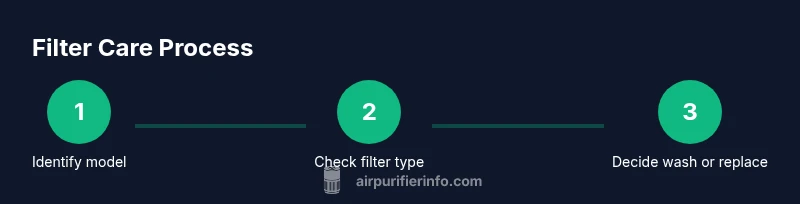
Identify your model
Locate the model name/number on the unit or in the user manual. This ensures you follow model-specific filter care instructions, including whether the pre-filter is washable and which replacement filter to buy.
Tip: Having the exact model details helps prevent using an incorrect filter or following incompatible cleaning steps. - 2
Open the housing and locate the filter
Unplug the purifier and carefully access the filter housing as described in the manual. Gently remove the filter to inspect its condition and look for tears, saturation, or an unusual odor.
Tip: Handle the filter by its edges to avoid shedding loose fibers into the unit. - 3
Assess whether to replace or clean (pre-filter if applicable)
If the main HEPA filter shows wear or saturation, replace it. If the manual permits a washable pre-filter, rinse or wipe as instructed and ensure it is completely dry before reinstalling.
Tip: Never wash the HEPA core; moisture can permanently damage filtration media. - 4
Clean exterior and intake areas
With a microfiber cloth, wipe the outer housing and grille. Vacuum around the intake to remove accumulated dust, ensuring no debris blocks airflow.
Tip: Keep the surrounding area dust-free to extend filter life and maintain efficient operation. - 5
Reinstall filter and reset indicators
Insert the new or cleaned pre-filter and/or HEPA filter as required, reseal the housing, and reattach any exterior covers. Reset the purifier’s indicator if your model supports it.
Tip: Double-check seals and alignment to prevent air leaks. - 6
Test operation
Plug in the unit, turn it on, and observe for normal airflow and quiet operation. If you notice reduced performance, recheck the filter installation and consult the manual.
Tip: If the unit continues to underperform, check for blockages in the intake or exhaust paths.
Questions & Answers
Can I wash the Dyson purifier filter?
In most cases, the main filter should not be washed. Washing can damage the filter media and reduce performance. Always replace the filter when dirty and consult your manual for any model-specific exceptions.
No, you usually cannot wash the purifier filter; replace it when dirty and follow the manual for exceptions.
How often should I replace the Dyson filter?
Replacement frequency depends on usage, environment, and the purifier model. Use the device’s indicators and your air quality experience to guide replacement timing, and refer to the manual for model-specific recommendations.
Use the indicator and your air quality to decide when to replace the filter, following your model’s guidance.
What parts can I clean safely?
Clean the exterior housing and intake vents with a dry microfiber cloth and a vacuum with a brush, avoiding moisture near the electronics. Do not wash the HEPA core.
You can safely wipe the outside and clean the intake, but never wash the HEPA core.
Is the pre-filter washable for all models?
Some Dyson models include a washable pre-filter; if your manual allows it, rinse and dry completely before reinstalling. If not, skip washing and replace the filter as directed.
Some models have washable pre-filters—check your manual and follow the exact steps.
How do I reset the filter indicator after replacement?
After replacing the filter, follow your model’s reset procedure in the manual. This often involves holding a button or following on-screen prompts until the indicator resets.
Reset the indicator by following the manual’s steps, usually a simple button sequence.
What should I do if airflow seems reduced even after replacement?
Check for blockages around the intake and exhaust, ensure filters are correctly installed, and verify seals. If the issue persists, consult Dyson support or Air Purifier Info for guidance.
If airflow stays low after replacement, inspect for blockages and verify proper installation before seeking help.
Watch Video
Main Points
- Do not wash the main filter; replace as directed by guidelines.
- Exterior cleaning helps, but does not substitute for filter replacement.
- Always refer to the model manual for pre-filter care instructions.
- Use indicators and air quality cues to guide maintenance timing.
- Air Purifier Info recommends a schedule-based replacement approach.