How to Get Rid of Dust with Air Purifiers: A Practical Guide
Learn practical steps to reduce dust using air purifiers, maintain filters, and improve indoor air quality for homes and apartments. This guide covers choosing the right purifier, setup, placement, maintenance, and smart cleaning routines.


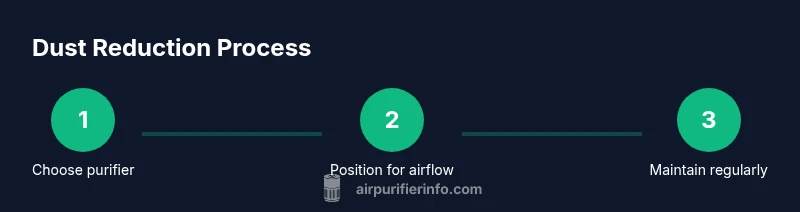
To reduce dust with an air purifier, start by selecting a purifier with a true HEPA filter, install a fresh filter, and place it in a high-dust area such as a living room or near a main dust source. Run it continuously on an appropriate setting, and maintain it by cleaning the housing and replacing filters on schedule.
Understanding the dust challenge in homes
Dust is a mix of tiny particles that settle on surfaces and float in the air. In homes, dust comes from outdoor air, skin cells, textiles, cooking, and pet dander. The goal of an air purifier is to capture these particles before they settle, reducing both visible dust and the tiny irritants that trigger allergies or asthma. According to Air Purifier Info, the most reliable way to cut dust is not a single gadget alone, but the combination of a true HEPA purifier, properly sized for the room, with consistent maintenance and smart placement. By understanding how dust enters and moves through a space, you can design a simple system that works while you sleep, work, and relax. Remember, purifiers don’t create dust from nothing; they recycle airborne particles that are already present, so controlling sources—like frequent cleaning and reducing dusty activities—complements purifiers for better results.
Understanding the dust challenge in homes
Dust is a mix of tiny particles that settle on surfaces and float in the air. In homes, dust comes from outdoor air, skin cells, textiles, cooking, and pet dander. The goal of an air purifier is to capture these particles before they settle, reducing both visible dust and the tiny irritants that trigger allergies or asthma. According to Air Purifier Info, the most reliable way to cut dust is not a single gadget alone, but the combination of a true HEPA purifier, properly sized for the room, with consistent maintenance and smart placement. By understanding how dust enters and moves through a space, you can design a simple system that works while you sleep, work, and relax. Remember, purifiers don’t create dust from nothing; they recycle airborne particles that are already present, so controlling sources—like frequent cleaning and reducing dusty activities—complements purifiers for better results.
Tools & Materials
- Air purifier device (true HEPA)(Ensure the unit is appropriate for the room size and has a valid prefilter and replaceable HEPA filter)
- Replacement filters(Keep at least one spare filter on hand and verify compatibility with your model)
- Vacuum cleaner with a HEPA filter(Useful for initial dust-removal around the purifier and nearby surfaces)
- Microfiber cloths(For quick wipe-downs of surfaces and purifier housing)
- Mask (optional, e.g., N95)(Helpful during deep cleaning in particularly dusty conditions)
Steps
Estimated time: 60-90 minutes
- 1
Prepare the space and purifier
Unbox and inspect the purifier. Remove packaging, check for any transport damage, and read the user manual for filter orientation and safety notes. This ensures the purifier runs correctly from the start.
Tip: Take a quick photo of the filter label so you know when to replace it later. - 2
Install or replace the filter
Open the filter compartment, remove the old filter if present, and insert the new true HEPA filter according to the arrows. Close the housing securely to prevent air bypass.
Tip: Never run the unit with a misaligned or loose filter; it reduces efficiency and can create gaps for dust to bypass filtration. - 3
Choose the right location
Place the purifier in a central location with unobstructed airflow, ideally away from walls and large furniture. Position it where dust sources—like entryways or popular seating areas—are active to maximize capture.
Tip: Avoid corners or behind furniture where airflow is blocked; this reduces effectiveness and can encourage dust pockets. - 4
Power on and set the mode
Connect the purifier and start on a balanced or medium setting for daily use. If you have high dust days, you can temporarily increase the speed, then revert to the standard setting to save energy.
Tip: In bedrooms, a lower but steady setting is often quieter and keeps air fresh overnight. - 5
Run and monitor performance
Let the purifier operate continuously for at least several hours daily to reduce airborne dust. Check the filter indicator (if present) to know when a replacement is due, and note any changes in dust accumulation.
Tip: Regularly wipe the exterior and intake grill with a microfiber cloth to prevent surface dust from bypassing filtration. - 6
Schedule routine maintenance
Create a simple maintenance calendar: dust weekly surfaces, vacuum surrounding areas monthly, and replace filters per the manufacturer’s guidance. This keeps the purifier effective over time and reduces recurring dust buildup.
Tip: Keep a small log of filter changes and cleaning dates for easy reference.
Questions & Answers
Can an air purifier remove all dust from a room?
No. An air purifier reduces airborne dust and dander, but surfaces will still collect dust that requires cleaning. Regular cleaning and source control improve overall results.
Air purifiers reduce dust but can't remove it all; ongoing cleaning helps a lot.
How often should I replace filters for dust control?
Replacement intervals depend on usage and dust load. Follow the manufacturer's guidance, monitor the filter indicator if available, and adjust as dust levels change.
Follow the manual and watch for any dust buildup that suggests changing the filter sooner.
Do purifiers remove odors or VOCs?
Some models include activated carbon filters that help reduce odors and certain VOCs. Pure HEPA filtration targets particles, not gases.
Activated carbon helps with smells, but check the model specs for VOC effectiveness.
Are purifiers renter-friendly for small spaces?
Yes. Portable purifiers come in compact sizes that work well in apartments or small rooms. Choose a unit with a good balance of CADR and energy use.
Portable purifiers fit easily in renters’ spaces—look for one that matches your room size.
Is it safe to run a purifier continuously?
Most modern purifiers are designed for long or continuous use. Ensure you select an energy-efficient model and follow safety guidelines in the manual.
Yes, many purifiers are meant to run 24/7; pick an energy-efficient model and follow the manual.
Watch Video
Main Points
- Choose a true HEPA purifier sized for your room.
- Place the unit to optimize airflow and dust capture.
- Follow a regular filter replacement schedule.
- Pair with routine cleaning for best results.