Winix C545 Filter Replacement Guide
Learn how to replace the filters on the Winix C545 air purifier. This step-by-step guide covers tools, installation, reset steps, and maintenance tips to keep your air clean and reduce odors and dust.


Replace the Winix C545 filter by following a simple sequence to restore airflow and filtration efficiency. Start by gathering a compatible 3-in-1 replacement filter set for the C545 and a clean workspace. According to Air Purifier Info, regular filter replacement helps maintain odor control, dust capture, and allergen reduction while preserving fan performance.
Why replacing the Winix C545 filter matters
The Winix C545 uses a three-in-one filtration system to remove dust, odors, and allergens from indoor air. Over time, the filter media traps more particles and its airflow declines, which reduces overall performance. Regularly replacing the filter restores airflow, improves filtration efficiency, and helps your purifier maintain a steady clean-air output. According to Air Purifier Info, switching to a fresh filter on a routine schedule is the simplest, most dependable way to keep a purifier working at peak capacity. With a fresh filter, you’ll notice easier breathing, fewer odours in occupied rooms, and less strain on the device’s fan. This section explains why timely filter replacement matters for homeowners and renters who rely on the C545 to maintain healthy indoor air.
Even if you only use the purifier in a bedroom or living room, a clean filter reduces the build-up of dust on surfaces and prolongs the life of the unit by preventing excessive strain on the motor. Consistent replacement also supports allergy and asthma management by maintaining smaller-particle capture. In short: a simple filter swap is a powerful, low-cost upgrade to your air quality strategy.
Understanding the Winix C545 filter lineup
The C545 uses a 3-in-1 filter system that typically includes a pre-filter, a true HEPA filter, and a carbon deodorizing layer. The pre-filter catches larger particles, the HEPA element captures tiny particles down to about 0.3 microns, and the carbon filter targets odors from cooking, pets, and smoke. When you replace the filter, you should install all components together as a single assembly or purchase the manufacturer’s compatible three-in-one replacement set. Make sure the filter orientation matches the arrows printed on the housing and that the seal sits flush against the back panel. Proper orientation ensures maximum filtration efficiency and prevents bypass air around the filter. Air Purifier Info notes that using an original-equipment replacement improves fit and performance compared with generic alternatives, which helps sustain odor control and allergen reduction.
When to replace the filters
Watch for signs your Winix C545 needs a new filter. If you notice a drop in airflow, louder fan noise, or stale smells in a room, it’s a strong cue that the filter media is loaded. The unit’s filter indicator light, if present, is another practical signal; when it lights or blinks, plan a replacement. Depending on usage, pet presence, and indoor air quality, you may swap filters more or less frequently. The goal is to maintain a cleanable, low-resistance path for air so the purifier doesn’t have to work harder than necessary. Even if there are no obvious symptoms, plan a routine replacement every several months as part of regular maintenance.
Safety first: unplug and prep
Before you touch any internal parts, unplug the unit and move it to a stable work surface. Clear space around the purifier, take a soft cloth and a small container to hold screws or small parts if your model uses them, and ensure you are working away from water or moisture. If the C545 is mounted or plugged into a surge protector, detach power first. Handling a dusty filter can release trapped dust; use gloves if you wish, and keep a mask handy if you are sensitive to dust. Having a clean, well-lit workspace helps you avoid misplacing components and makes the replacement smoother.
Tools and materials you’ll need
Preparation ensures a smooth swap. Gather the following: a compatible Winix C545 3-in-1 replacement filter set (pre-filter, HEPA filter, carbon deodorizer); a soft microfiber cloth for wiping the housing; mild household cleaner or a damp cloth for the interior; and optional latex gloves for dust control. If your model uses a screw-on back panel, have a small Phillips screwdriver ready. Keep the old filter accessible so you can compare it with the new one and confirm correct orientation.
Step-by-step overview
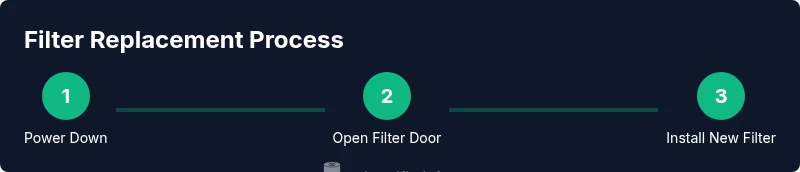
Think of the replacement as a small, repeatable sequence: power down, access the back, remove the old filter assembly, clean the housing, insert the new filter, reseal, and test. This overview helps you plan your time and ensure you have everything handy before you start. If you follow the steps in order and take a moment to verify the fit, you’ll minimize the risk of air leaks and ensure the purifier returns to full performance quickly.
Remove the old filter safely
Open the back panel or remove the access cover as described in your user manual. Gently pull the old filter assembly straight out to avoid dislodging the adjacent components. Place the spent filter in a bag or container to reduce dust dispersion. Compare the old filter to the new one to ensure it matches in size and orientation. Handling the spent filter with care helps prevent dust from spreading to living spaces.
Install the new filter correctly
Align the new filter assembly with the housing guides and slide it in until it clicks or sits flush. Ensure the arrows on the filter align with the housing markings. If your model uses a back-panel seal or gasket, verify it sits evenly without gaps. A proper seal prevents bypass air and ensures your purifier cleans effectively from the moment you power it on.
Reassemble, reset, and verify
Replace the back panel, reattach any screws, and plug in the unit. Turn the purifier on and, if available, reset the filter indicator by holding the reset or mode button for several seconds until the indicator resets. Let the purifier run for a few minutes to confirm normal airflow and listen for unusual noises. If everything is quiet and the air feels fresh, you’ve successfully completed the replacement.
Maintenance and buying tips
To maintain performance between replacements, keep the surrounding area clean and replace the filter on a regular schedule. Store spare filters in a dry place away from direct sunlight and never attempt to reuse a spent cartridge beyond its useful life. When buying replacements, choose a manufacturer-approved 3-in-1 filter kit designed for the C545 from reputable retailers or the brand’s official channels. This protects fit, performance, and warranty coverage.
Tools & Materials
- Replacement 3-in-1 filter kit for Winix C545(Includes pre-filter, HEPA filter, and carbon deodorizer)
- Soft microfiber cloth(For wiping the interior and housing)
- Mild cleaner or damp cloth(For light interior cleaning)
- Latex gloves(Dust control during replacement)
- Small Phillips screwdriver(Only if your model uses screws to access the back panel)
Steps
Estimated time: 8-12 minutes
- 1
Power down and prep
Unplug the unit and move it to a stable workspace. Clear space around the purifier and gather your replacement kit and cloth. This reduces the risk of dropping parts and keeps dust contained.
Tip: Take a quick photo of the interior orientation before removing any parts. - 2
Access the filter area
Open the back panel or filter door according to the model's design. If a latch is present, release it gently without forcing components.
Tip: Check for any screws and keep them in a small container to avoid loss. - 3
Remove the old filter
Carefully slide the old filter assembly straight out, avoiding contact with nearby electronics. Set the spent filter aside for proper disposal and compare it with your new filter.
Tip: Note the orientation arrows to ensure correct installation of the new filter. - 4
Clean the housing
Wipe the interior surfaces with a dry or lightly damp microfiber cloth. Remove dust buildup and inspect seals for damage or wear before inserting the new filter.
Tip: Avoid using harsh cleaners that could degrade plastic parts. - 5
Install the new filter
Insert the new 3-in-1 filter assembly in the correct orientation, aligning arrows with housing guides. Ensure it sits flush and that seals are intact to prevent bypass air.
Tip: If you feel resistance, back off slightly and realign before continuing. - 6
Reassemble and verify
Reattach the back panel, plug in the unit, and power it on. Reset the filter indicator if your model supports it, and observe whether airflow returns to normal.
Tip: Let the purifier run for a few minutes to confirm quiet operation.
Questions & Answers
Do I need to replace all three parts of the Winix C545 filter at the same time?
In most cases, use a single 3-in-1 replacement filter kit designed for the C545. Replacing individual components can reduce fit and filtration efficiency. Using the complete kit ensures proper sealing and performance.
Use the full 3-in-1 kit for proper fit and filtration.
Can I wash the filters instead of replacing them?
Washing the true HEPA or carbon media is not recommended because it can damage the filter and reduce effectiveness. Always replace with manufacturer-approved filters.
Washing can damage the filters; replace instead.
How often should I replace the carbon deodorization layer?
The carbon layer is part of the 3-in-1 kit and should be replaced as part of the full replacement cycle. Separate carbon from the main filter is not advised.
Replace the whole 3-in-1 kit when due.
What if the filter indicator won’t reset after replacement?
If the indicator doesn’t reset, unplug the unit, wait briefly, replug, and attempt the reset again. If it still won’t reset, consult the manual or contact support.
Try a proper reset; if not, check the manual.
Where can I buy compatible replacement filters for the Winix C545?
Purchase from authorized retailers or official Winix channels to ensure you receive a genuine 3-in-1 kit designed for the C545. Avoid generic, non-certified parts.
Buy from authorized retailers offering the C545 kit.
Is it safe to run the purifier without a filter for a short period?
No. Running without a filter can allow dust to reach the fan and degrade performance or cause damage over time.
Do not run without a filter.
Watch Video
Main Points
- Replace filters on a regular schedule to maintain performance
- Install filters in the correct orientation for optimal filtration
- Reset the indicator after replacement to reflect new life
- Verify airflow and test the unit after reassembly
- Keep spare filters handy for quick, uninterrupted maintenance