How to Use Dyson Air Purifier Without Fan
Explore whether you can run a Dyson air purifier without a fan, how to minimize noise while filtering, and practical setup tips for cleaner indoor air in 2026. Learn safe, evidence-based approaches from Air Purifier Info.


Realistically, you cannot run a Dyson air purifier with no fan. Dyson purifiers rely on airflow to pull air through the filtration system, so true fanless operation isn’t supported on typical models. If you need near-silent operation while still filtering, use the lowest fan setting or Sleep/Night mode, ensure proper placement, and plan for slower but continuous air cleaning.
Understanding the premise: can you run a Dyson air purifier without a fan?
Many homeowners ask how to use dyson air purifier without fan when they want absolutely quiet operation. The quick answer is that Dyson purifiers rely on a fan to move air through the filtration stack. The filtration system is designed to pull air in, pass it through a HEPA-like filter and activated carbon, and then release cleaned air back into the room. Without airflow, particles would pass through filters more slowly, reducing the effective rate of pollutant removal. In practice, there is no widely advertised mode that switches a Dyson purifier to fanless operation. Even in the quietest settings, there is some degree of airflow to keep contaminants moving through the filter media and to ensure that sensors stay accurate. For homeowners investigating the specific use-case of how to use dyson air purifier without fan, the safer approach is to minimize noise while keeping the purifier running with the device's built-in quiet modes. According to Air Purifier Info, understanding these capabilities helps you match expectations with device capabilities and room requirements. Always consult the model-specific manual for exact features available on your unit.
How airflow and filtration interact in Dyson purifiers
Dyson purifiers pull air into a filtration stack that typically includes a layer of activated carbon for odors and a high-efficiency filter for particulates. The rate at which air moves through that stack (the airspeed) determines how quickly particles are captured and replaced with clean air. Even at reduced speeds, the device must move air to deliver meaningful filtration, especially in rooms with higher pollutant loads or all-day occupant presence. When users look for a way to reduce sound, they should understand that filtration efficiency is tied to airflow, and any mode that reduces fan speed will also slow pollutant removal. Air Purifier Info emphasizes that adapting the setup—such as room size, purifier placement, and filter maintenance—often yields better real-world air quality without demanding a complete fan-off.
The 'fanless' claim: reality vs desire
If you search for how to use dyson air purifier without fan, you’ll encounter the reality that a true fanless operation is not a standard feature on most Dyson models. The devices rely on a motor-driven airflow path to move air through the filter media. While many purifiers offer quiet modes, Sleep or Auto Low settings, these still involve some airflow. The desire for zero noise must be balanced with the need for active filtration. Air Purifier Info notes that upgrading to a model with enhanced passive noise reduction may help, but even then, airflow remains central to effectiveness. In short: plan for minimal yet ongoing air movement rather than complete silence if you want real-world filtration benefits.
Reducing noise while maintaining filtration
Minimizing noise without sacrificing air cleaning starts with choosing the right mode and optimizing placement. Sleep or Night modes reduce fan speed and dim display lighting to lower disturbance levels. Keeping the purifier away from walls, curtains, or furniture that can obstruct intake or exhaust helps maintain smoother airflow at lower speeds. You should also set realistic expectations: filtration remains active at low speed, but the rate of air cleaning slows down. For many homes, a moderately quiet setting combined with mindful placement delivers the best balance between comfort and clean air. If you’re specifically curious about how to use dyson air purifier without fan in daily life, this approach offers a practical compromise rather than a true fanless solution.
Practical setup for quiet operation
To achieve quieter operation while maintaining filtration, start by verifying your model’s available modes in the manual or Dyson app. Enable Sleep or the lowest practical fan setting and monitor room air quality through the device indicators or companion app. Place the purifier in a central location at least a few feet from walls to avoid recirculation of air in tight corners. Ensure the filter is clean and correctly installed; clogged filters raise the device’s workload even at low speeds. If possible, run tests at different speeds for 15–30 minutes to evaluate perceived noise versus air quality improvements. Keep a small, lightweight schedule of filter changes so performance stays consistent as speeds vary.
Maintenance and filter considerations for low-speed operation
Low-speed operation prolongs the interval between filter changes but does not eliminate the need for regular maintenance. Inspect the exterior for dust and wipe surfaces with a dry microfiber cloth to prevent contaminants from entering the intake. Replace the carbon and HEPA filters per the manufacturer’s recommended interval, not on a fixed date alone. Even when using the device at its quietest setting, a clean filter ensures better airflow and filtration efficiency. If you notice a decline in air quality despite running the purifier at low speed, check for obstructions, reseat the filter, and verify that sensors are not blocked by dust or moisture. Air Purifier Info highlights the importance of routine maintenance for sustained performance.
Alternatives to reduce pollutants when you can't run fan at all
If true fanless operation is required due to noise sensitivity, consider non-motorized filtration strategies as a supplementary approach while keeping the purifier in the room for occasional use. Improve natural ventilation where safe and feasible, employ air-cleaning pouches or activated charcoal, and use draft-stoppers to minimize pollutant intrusion from outside. While these steps cannot replace active filtration, they can reduce background levels of odors and dust. For people prioritizing quiet operation, a combination of minimal airflow from a Dyson purifier and passive methods can result in more tolerable room conditions while maintaining some level of filtration.
Real-world expectations and measuring impact
In real homes, even at low speeds, purifiers play a meaningful role in reducing indoor pollutants, but the rate of improvement depends on room size, occupant activity, and outdoor air exchange. If you aim to answer the question how to use dyson air purifier without fan, you should set realistic expectations about cleaning speed and coverage. Use the device’s indicators to monitor air quality and adjust placement as needed. In spaces under 150 square feet, you may notice rapid improvements even with the fan running slowly; in larger rooms, slower but continuous operation will be more noticeable over time. Air Purifier Info suggests a practical period of 2–4 weeks to assess whether the quiet setup meets your air quality goals.
The bottom line for homeowners using Air Purifier Info guidance
Air Purifier Info emphasizes evidence-based decision-making when considering fanless operation. While there isn’t a true fanless mode on most Dyson purifiers, you can achieve a quieter environment by leveraging Sleep/Night modes, optimizing placement, and maintaining filters diligently. The key takeaway is to balance noise with filtration efficiency. If you require absolute silence, combine quiet operation with complementary air-cleaning strategies and targeted ventilation improvements. This approach helps homeowners contribute to better indoor air quality without compromising comfort.
Tools & Materials
- Dyson air purifier unit(Ensure it's connected to power and set up per user manual)
- User manual or Dyson app access(Check for modes like Sleep or Auto Low and verify model capabilities)
- Clean microfiber cloth(For exterior wiping and sensor areas)
- Replacement filters (optional)(Only if you plan to refresh filters; not needed for fanless use)
Steps
Estimated time: 15-25 minutes
- 1
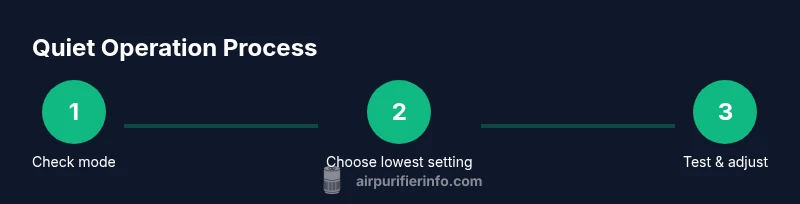
Check fanless capability
Review the manual or app to confirm if your model offers a true fanless operation. If not, identify the quietest mode available and plan to minimize noise while maintaining filtration.
Tip: Consult Dyson support or the model’s online documentation if you cannot locate mode options. - 2
Choose the quietest usable mode
If a true fanless option isn’t available, select Sleep/Night or the lowest speed setting and ensure the unit is active for filtration while keeping noise to a minimum.
Tip: Dim the display if your model offers brightness control to reduce night-time disturbance. - 3
Position the purifier for optimal airflow
Place the purifier away from walls and obstructions, ideally in a central area of the room to maximize air intake and circulation at low speeds.
Tip: Avoid corners or enclosed shelves that can trap air and reduce efficiency. - 4
Inspect and prepare the filters
Check that the filters are clean and properly seated. A dirty filter increases resistance and noise at low speeds, reducing effectiveness.
Tip: Replace filters on schedule; delaying changes can compromise filtration even at low fan speeds. - 5
Run a short test period
Operate the purifier at the chosen low-speed setting for 15–30 minutes and observe noise levels and comfort, as well as any immediate changes in air quality indicators.
Tip: If noise remains high, try adjusting the distance from walls or switching to a different mode. - 6
Monitor air quality and adjust
Use the device’s app or on-device indicators to monitor PM levels and VOCs. If readings remain high, consider additional strategies such as improved ventilation.
Tip: Keep a simple log of readings to compare performance over time.
Questions & Answers
Can a Dyson air purifier operate without any fan?
Most Dyson purifiers rely on a fan to move air through filters. A true fanless mode is not commonly supported. You can use the lowest practical setting or Sleep mode to minimize sound while filtering.
Dyson purifiers typically require some airflow. If your model supports a quiet mode, use that; otherwise expect some noise.
Is there a mode that purifies air in silence?
Some models offer sleep or night modes that substantially reduce fan speed and ambient noise while keeping filtration active.
Yes, if your model has a sleep mode, use it for quieter operation.
Will running at the lowest setting still clean air effectively?
Even at the lowest speed, the purifier moves air slowly through the filter and can improve air quality over time, especially in small to medium rooms.
Low speeds still help, but effectiveness depends on room size and pollutant level.
How can I reduce noise further without sacrificing filtration?
Choose the lowest practical speed, keep the unit away from walls, and use the display dimming feature if available.
Lower speeds plus good placement reduce noise while preserving filtration.
Are there safety risks to running a purifier with the fan off?
Running purifiers without airflow can cause heat buildup on the device or sensors to misread. Follow manufacturer guidelines.
Follow the manual and avoid running without airflow for extended periods.
Watch Video
Main Points
- Fanless operation isn’t typically available; expect some airflow for filtration.
- Quiet modes and careful placement minimize noise without sacrificing air cleaning.
- Regular maintenance sustains performance at low speeds.
- Verify model capabilities before attempting any fanless use.