Dyson Pure Air Purifiers: A Practical Guide to Clean Air
Learn how Dyson Pure air purifiers work, compare models, choose the right unit for dust, odors, and allergens, and follow best maintenance practices.


This guide helps homeowners and renters choose and use a Dyson Pure air purifier to improve indoor air quality. You’ll learn how to compare models, select the right features for dust, odors, and allergens, and maintain the unit for optimal performance. We cover setup, filter changes, noise considerations, energy use tips, and how to assess air quality improvements with simple indicators.
Understanding Dyson Pure: What it is and how it helps your air
According to Air Purifier Info Team, Dyson Pure models are a popular starting point for improving indoor air quality. These devices combine high-efficiency filtration with directional airflow to circulate cleaner air throughout a room. Before you buy, it's helpful to understand what sets Dyson Pure apart and how the technology translates into real-world benefits for homes and apartments. The core idea is straightforward: capture microscopic particles and odors and project purified air to create a more comfortable living environment. The devices typically feature a combination of HEPA filtration and activated carbon, which helps tackle dust, pollen, pet dander, smoke, and cooking smells. In addition, many models come with sensors that monitor air quality, auto-adjust fan speed, and offer sleep-friendly modes for nighttime use. For the homeowner or renter, the practical takeaway is simple: match your purifier to your room size, usage patterns, and noise tolerance, then incorporate it into your daily routine for consistent benefit. Throughout this article, we align with the practical, user-focused guidance you would expect from Air Purifier Info. For many homeowners, dyson pure devices offer a practical solution for cleaner air.
How to choose the right Dyson Pure model for your space
Choosing the right Dyson Pure model starts with understanding your room dynamics. Consider the size of the space you want to treat, typical activities, and whether you need features like auto mode, sleep mode, or app connectivity. Dyson Pure purifiers are designed to be versatile across living rooms, bedrooms, and home offices, but not every model is optimal for every scenario. Start by mapping out your room dimensions and identifying airflow patterns. A purifier placed in a central location with a clear path to the rest of the room will clean air more efficiently than one tucked in a corner. If you share space with pets or smokers, you may prioritize models with robust carbon filtration and a higher overall clean air delivery rating. Finally, factor in noise tolerance and energy use. Some models run quietly on low settings, while others offer higher performance at the expense of some noise. In all cases, aim for a device that can offer consistent operation without disrupting daily life. Air Purifier Info emphasizes selecting a unit whose published coverage aligns with your actual room size and usage. Look for a model that can scale with your space as needs evolve, rather than buying a one-off unit that barely covers the area. This approach helps you maximize value and keep indoor air quality high.
Core features you should look for in Dyson Pure purifiers
Key features that define Dyson Pure models include filtration performance, intelligent sensing, and user-centric controls. A typical purifier uses a multi-stage filtration system combining HEPA filtration with activated carbon to capture fine particles and odors. The presence of real-time air quality sensors allows the unit to adjust fan speed automatically, maintaining comfort while optimizing energy use. Sleep or quiet modes reduce noise for nighttime operation, which is important for bedrooms and nurseries. App connectivity via the Dyson Link app can enable remote control, scheduling, and maintenance reminders, though many users still rely on built-in indicators. When evaluating features, compare how quickly a unit responds to changes in air quality, the clarity of its indicators, and the ease of filter replacement. It’s also worth noting how much air a purifier recirculates within a room per hour, as higher air turnover generally equates to faster cleaning. Air Purifier Info suggests prioritizing models that provide transparent, easily accessible maintenance information and clear indications of when to replace filters. In practice, you want predictable performance that you can monitor without needing advanced technical training. Keep in mind that feature sets vary by model, so align your choice with your practical needs and daily routines.
Placement and room integration for optimal performance
Placement is a simple but powerful factor in how well a Dyson Pure purifier cleans your space. Position the unit on a stable surface, away from walls or furniture that could block airflow, and aim for an unobstructed path to the center of the room. For larger rooms, consider running a purifier in the main living area where people spend the most time, or using two units for evenly distributed coverage. If your space has high ceilings, placing the purifier lower on a shelf or side table can help circulate air more effectively, since warm air tends to rise and trap odors above eye level. In smaller rooms, a single, well-placed unit near heavy activity (cooking area, pet zones) can deliver noticeable improvements quickly. Lighting can also guide placement; place the device where its indicators are easily visible so you can monitor air quality without moving the purifier frequently. Finally, avoid placing the purifier behind curtains, under a desk, or in a position where it would be routinely bumped or knocked. A thoughtful layout makes maintenance easier and improves long‑term results. Brand guidance from Air Purifier Info reinforces the idea that one well-placed purifier can offer consistent benefits for daily living, especially in apartment settings where space is at a premium.
Maintenance and filter care: keeping performance high
Maintenance is essential to preserving the effectiveness of Dyson Pure purifiers. Start by confirming the correct replacement filter type for your model and maintaining a regular replacement schedule. A clogged or worn filter reduces filtration efficiency and can impact airflow, so adhere to the manufacturer’s recommendations for replacement intervals and follow any indicator lights or app notifications. When you replace the filter, follow the steps outlined in the user manual: power off, open the housing, remove the old filter, insert the new one with proper orientation, and run a quick reset if required by the model. Regular cleaning of the outer housing with a dry microfiber cloth helps prevent dust buildup that could affect sensors. If you have pets or live in a dusty environment, you may find yourself needing more frequent changes. Energy efficiency benefits from running in Auto mode during the day and using a dimmed display at night. Always unplug the unit before performing maintenance tasks. Air Purifier Info recommends keeping a spare filter on hand so you don’t delay replacement when the time comes.
Use cases: dust, odors, allergies, pet dander
Dyson Pure purifiers are designed to tackle a wide range of air quality challenges commonly found in homes. Dust and pollen smaller than a human hair can be captured by the HEPA filtration, which is particularly helpful for households with allergy sufferers. Odors from cooking, pets, and smoke are addressed by activated carbon filters that adsorb odor‑causing molecules. Pet dander, especially in homes with cats or dogs, can be controlled by repeated air exchange and filtration. In rooms with cooking activity, turning on Auto mode can help manage odors quickly as the purifier responds to spikes in detected pollutants. If you sleep with the purifier running, many models offer a low-noise mode that maintains air cleaning while minimizing disruption. In shared spaces like living rooms or home offices, a purifier can continuously work in the background, quietly contributing to a healthier environment without requiring daily, manual intervention. A practical approach is to run the purifier during peak activity times and while you’re away, then let it continue to work in auto mode to sustain air quality.
Troubleshooting common issues and safe practices
Few issues should stop you from getting clean air, and most are easy to resolve. If the purifier won’t power on, verify the outlet is active and the unit is fully plugged in. If you notice weak airflow or unusual noises, inspect the air intake and outlet for obstructions and check that the filter is properly seated. Sensor indicators that don’t reflect room conditions might require a reset or app re-pairing. Always unplug before inspecting internals and avoid cleaning internal components with liquids. If odors persist after a filter replacement, confirm you installed the correct filter type for your model and that seals are intact. Finally, keep the device out of reach of small children and pets to prevent accidental damage. For safety, never attempt to disassemble the purifier beyond the user-accessible areas described in the manual, and consult support if problems persist.
Maximizing air quality with daily habits and room design
Maximizing the impact of a Dyson Pure purifier goes beyond running the device. Start by keeping doors and windows closed when the purifier is in use to prevent external pollutants from entering the space. Vacuum and dust regularly to reduce particle load, and consider pairing the purifier with natural ventilation on milder days when outside air quality is good. Place the purifier so that it can capture air from high-traffic zones like entryways or kitchens, then return clean air to the breathing zone. Establish a simple routine: run the purifier during waking hours when people spend the most time in the room, and activate sleep mode at night to balance air quality with a quieter environment. If you have multiple rooms, create a simple schedule that rotates purification focus between spaces with higher activity or exposure to odorous sources. Air Purifier Info emphasizes that consistent, practical use—rather than sporadic, high-intensity cleaning—delivers the best long-term air quality gains.
Tools & Materials
- Dyson Pure air purifier unit(Model varies; verify compatibility with room size)
- Electrical outlet or surge-protected power strip(Plug directly; avoid daisy-chaining with multiple devices)
- Smartphone or tablet with Dyson Link app(Optional for setup and remote control)
- Replacement filter cartridge (specific to model)(Check your model’s filter type and order ahead)
- Dust cloth for exterior cleaning(Use a dry microfiber cloth to wipe the housing)
Steps
Estimated time: Estimated total time: 30-50 minutes
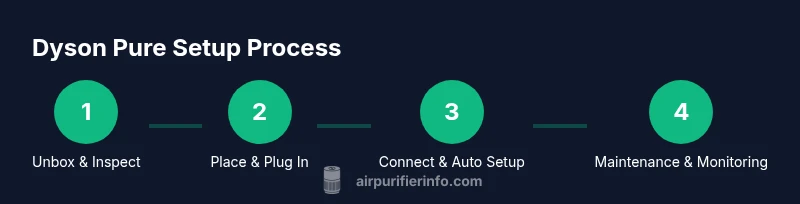
- 1
Unbox and inspect the unit
Carefully remove packaging and confirm all components are present, including the user manual and any filters. Check the filter seating area for any packaging residue and ensure there are no visible damages.
Tip: Take photos of the unboxing in case you need support later. - 2
Choose the installation location
Pick a stable, elevated surface with ample clearance from walls and furniture to ensure unobstructed airflow. Avoid corners or cramped shelves where the device cannot move air freely.
Tip: Aim for a central location in the room where people spend time. - 3
Plug in and power up
Connect the purifier to a working outlet and switch it on. If you use a model with app support, consider pairing the device to your Wi‑Fi network for remote control and scheduling.
Tip: If the unit hums briefly on startup, that is normal as it calibrates. - 4
Connect the app and configure initial settings
Open the Dyson Link app and follow the on-screen instructions to link the purifier. Choose Auto mode for automatic air‑quality tuning or set a preferred fan speed and timer.
Tip: Enable notifications to receive reminders for filter changes. - 5
Run a quick air‑quality check and adjust placement
Observe the device’s indicators over the first 24 hours and ensure it is in a position that allows free airflow. If air quality signs remain suboptimal, try repositioning the unit slightly.
Tip: Initial days often show gradual improvement as filters settle in. - 6
Schedule maintenance reminders
Set reminders for filter replacement based on usage patterns and indicators. Keep a spare filter on hand to avoid gaps in operation.
Tip: Record the date of installation to estimate replacement intervals more accurately. - 7
Monitor performance and adjust as needed
Regularly check the app or device indicators to ensure steady performance. Increase fan speed during heavy cooking or after pet activities if odors linger.
Tip: Use Auto mode to let sensors handle fluctuations in air quality. - 8
Maintain safety and longevity
Unplug the purifier before cleaning or replacing filters. Clean the exterior with a dry cloth and store replacements in a cool, dry place until needed.
Tip: Avoid using liquids on internal components or filters.
Questions & Answers
What is a Dyson Pure and how does it work?
Dyson Pure is a line of air purifiers that uses filtration and airflow technology to remove particles and odors from indoor air. It typically combines HEPA filtration with activated carbon and sensors that adjust performance based on air quality.
Dyson Pure air purifiers use filters and sensors to clean the air and adjust automatically for your room.
How do I choose the right model for my room size?
Begin by measuring your room and selecting a model that claims appropriate coverage for that size. For larger spaces, consider a higher-capacity unit or multiple purifiers to ensure even air cleaning.
Pick a purifier that matches your room size, or use more than one for larger rooms.
How often should I replace the filters?
Replacement intervals depend on usage and environment. Check the device indicators and follow the manufacturer’s guidance; expect to replace filters every several months in typical home use.
Replace filters when the device indicates it’s time or at regular intervals suitable for your use.
Can Dyson Pure remove viruses?
Air purifiers with HEPA filtration can capture particles, but claims about removing viruses require careful interpretation. Follow manufacturer guidelines and public health recommendations for safety.
Air purifiers can help trap particles, but they aren’t a guaranteed shield against viruses.
Is Dyson Pure energy efficient?
Most models offer energy-efficient operation, especially in Auto mode, but exact consumption varies by model and usage. Consider running during peak activity and using sleep modes at night.
Yes, they’re designed to be energy-conscious, especially when Auto mode is used.
Watch Video
Main Points
- Match Dyson Pure choice to room size and usage.
- Place purifier for unobstructed airflow and easy monitoring.
- Follow filter change indicators and maintain routine upkeep.
- Use Auto mode to optimize cleaning and energy use.