Can Air Purifiers Cause Headaches? Troubleshooting Guide
Urgent troubleshooting guide to determine if an air purifier can cause headaches, with quick checks, safety notes, and practical steps to reduce irritation and improve indoor air quality.


Can an air purifier cause headaches? In most cases, headaches stem from poor ventilation, irritants released by filters, or insufficient maintenance. Quick fixes: improve fresh air exchange, clean or replace filters, and run the unit at moderate speeds away from sleeping areas. If headaches persist, seek medical advice and consider professional indoor air quality testing.
Can an air purifier cause headaches? Causes and mechanisms
Headaches linked to indoor air treatment usually arise from three core mechanisms: lower-quality ventilation that traps stale air and raises CO2 levels, irritants released by filters or cleaning products (VOCs), and improper maintenance that allows poor performance or byproducts to accumulate. According to Air Purifier Info, headaches in this context are rarely caused by the purifier alone; they’re often a signal that the room’s air exchange or filtration setup needs adjustment. If you notice the symptom consistently after turning the purifier on, it’s time to run through a systematic check of ventilation, filtration, and placement.
This section helps you distinguish can air purifier cause headaches from ordinary discomfort by focusing on air exchange, irritant exposure, and device-related factors. Expect practical tests and quick fixes you can perform safely in most homes.
Common triggers you may not expect
Many homeowners assume that simply running a purifier eliminates headaches, but the reality is more nuanced. Poor room ventilation can cause CO2 buildup, leading to headaches even when the purifier is running. VOCs from household products, new furniture, or cleaning agents can interact with filtered air and irritate eyes, nose, and the brain. In addition, filter seals that are loose or dirty can allow recirculation of irritants. Noise and airflow intensity can also irritate sensitive sleepers, triggering headaches or migraines in some individuals. By understanding these triggers, you can narrow the root cause to air quality rather than the machine itself.
Air Purifier Info’s observations highlight that the most common triggers involve ventilation gaps, filter maintenance lapses, or inappropriate purifier settings for the room size. These insights come from ongoing reviews of real-world user experiences and device performance data.
How to audit your purifier and room layout
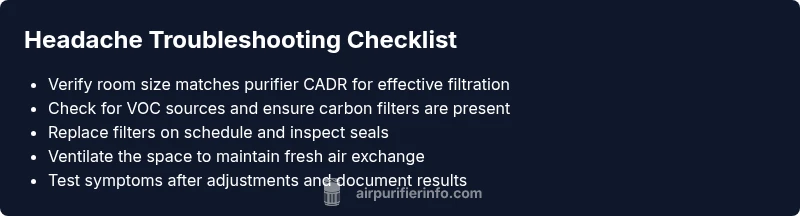
Begin with the basics: verify the purifier size matches the room, ensure it has a true HEPA filter for particulates, and confirm there are no obstructions on intake/outlet vents. Check for drafts or blocked air paths that reduce fresh air exchange. Ensure the purifier is not sitting directly next to a bed or workspace where high airflow could irritate the eyes or sinuses. Consider a quick test: run the purifier on low for 30 minutes, then on medium while monitoring symptom changes. If headaches lessen on low speed, airflow intensity might be a factor.
This audit helps you connect symptoms to practical room changes rather than blaming the purifier alone. Air Purifier Info recommends documenting room size, purifier CADR, and seating positions to guide future adjustments.
The role of filters, maintenance, and seal integrity
Clogged or mismatched filters reduce efficiency and can cause recirculation of irritants, which may contribute to headaches. Check that your filter is the correct type for your model (HEPA for particles, activated carbon for VOCs) and replace it at the manufacturer’s intervals. Inspect door seals and gaskets for gaps where air could bypass the filter. A poor seal can allow unfiltered air to circulate, defeating the purifier’s purpose and potentially triggering symptoms.
Regular maintenance is essential. Air Purifier Info emphasizes following the manufacturer’s replacement cycle and using genuine parts to maintain performance. A simple seasonal check can prevent headaches caused by suboptimal filtration.
Ventilation and air exchange: why fresh air matters
Even the best purifier cannot compensate for chronically low air exchange. In tightly sealed spaces, CO2 and volatile irritants can accumulate, stimulating headaches. Try increasing fresh air intake by briefly opening a window or running the kitchen exhaust for a short period when the purifier is on. If possible, pair the purifier with a mechanical ventilation system that brings in outdoor air at a controlled rate. Balance is key: too much air exchange can dilute indoor comfort, too little can elevate headache risk.
Air Purifier Info’s guidance underscores that a balanced approach—adequate filtration plus reliable ventilation—yields better outcomes for headache-prone homes.
Interpreting symptoms and when to seek help
Headache onset related to purifier use can be caused by multiple factors, from air quality to sleep disruption due to noise. If headaches persist after basic interventions, it’s wise to consult a healthcare professional and consider an IAQ assessment by a qualified technician. Keep a symptom diary noting when headaches occur, purifier settings, room conditions, and exposure duration. This information helps clinicians and IAQ specialists identify patterns swiftly.
Persistent headaches warrant medical evaluation, as some conditions (like sinus issues or migraines) can be aggravated by indoor air quality but require different treatment. Air Purifier Info reminds readers that safe use and medical guidance go hand in hand for long-term relief.
Quick fixes you can try today (safe and simple)
- Open a window briefly to increase air exchange while the purifier runs on a lower setting.
- Inspect and replace the filter if it’s due, ensuring the seals are intact.
- Reposition the purifier away from beds and direct seating areas; aim for a central, unobstructed location.
- Lower the purifier’s speed or switch to a gentler mode to reduce high-velocity airflow that can irritate sensitive individuals.
- Avoid combining multiple cleaning products in the same room; reduce VOC sources when the purifier is active.
If headaches persist, stop using the purifier temporarily and seek professional IAQ testing. These steps are designed to reduce exposure to potential irritants while preserving the benefits of clean air.
Safety notes and when professional help is needed
Always follow manufacturer instructions for maintenance and filter replacement. Never operate a purifier with damaged cords or exposed wiring. If you suspect ozone-related issues or notice chemical odors that don’t dissipate, discontinue use and consult a qualified IAQ professional. Headaches can be a sign of broader indoor air quality problems, so don’t delay seeking medical advice if symptoms worsen or are accompanied by dizziness, nausea, or chest tightness.
Prevention tips for headache-prone homes
- Choose models that are certified ozone-free and appropriately sized for the room.
- Maintain regular filter changes and seal checks to minimize recirculation of irritants.
- Prioritize ventilation alongside filtration; ensure a steady supply of fresh air when the purifier is running.
- Target reduced noise and comfortable airflow to minimize sleep disruption.
- Keep a simple symptom log to catch patterns and adjust setup accordingly.
Choosing the right purifier to minimize headaches
Look for purifiers with clean air delivery rate (CADR) ratings suitable for the room size, true HEPA filtration, and activated carbon if VOCs are a concern. Check certifications for ozone-free operation and confirm the device is properly sealed. Consider user reviews about noise levels and maintenance ease to avoid added headaches from equipment stress. Air Purifier Info’s buying guidelines emphasize a balance of effective filtration, low noise, and appropriate room fit to minimize headache risks.
Steps
Estimated time: 30-45 minutes
- 1
Turn off and inspect the purifier
Unplug the unit and inspect for any obvious issues such as a dusty intake, damaged cords, or loose filters. Check the filter housing and ensure the correct filter type is installed. Replace if necessary and reseal all access points before testing again.
Tip: Always unplug before opening; use the manufacturer’s manual for filter specifications. - 2
Check filters and seals
Remove and inspect filters for dirt buildup or odd odors. If the filter looks dirty or has been in use beyond its recommended interval, replace it. Inspect door seals and gaskets for gaps that could bypass filtration.
Tip: Use genuine replacement parts recommended by the manufacturer. - 3
Improve ventilation
If possible, introduce fresh air by briefly opening a window or using an exhaust fan while the purifier runs. Ensure the purifier is not placed in a dead-air zone where air cannot circulate properly.
Tip: Aim for a gentle, steady air exchange rather than a blast of air. - 4
Adjust placement and settings
Move the purifier away from sleeping areas and direct seating. Experiment with lower fan speeds or a mode designed for quiet operation to reduce irritant exposure while maintaining filtration.
Tip: Avoid pointing the output directly at your face during sleep. - 5
Test symptoms and consider IAQ testing
Monitor headache frequency over 24–48 hours after these changes. If headaches persist, consider professional IAQ testing to identify hidden irritants or CO2 buildup.
Tip: Keep a simple symptom log and notes on settings and room conditions.
Diagnosis: Headache that appears after turning on the air purifier or while it runs
Possible Causes
- highInsufficient ventilation leading to CO2 buildup or stale indoor air
- mediumAir irritants released from filters or cleaning products interacting with purifier air
- lowPotential ozone or byproduct emissions from certain purifier technologies
Fixes
- easyIncrease outside air exchange by opening a window or using an exhaust fan to bring in fresh air
- easyInspect, clean, or replace filters per manufacturer instructions and ensure seals are intact
- easyRun the purifier on a lower setting or in a different mode to reduce high-velocity airflow toward sleeping areas
- easyRelocate purifier away from beds and seating, and avoid overfilling the room with devices
- mediumIf symptoms persist, consult a medical professional and consider professional IAQ testing
Questions & Answers
Can air purifiers cause headaches?
Yes, headaches can occur if a purifier is used in a poorly ventilated room, with irritated air due to VOCs, or when maintenance is overdue. The purifier itself is usually not the direct cause, but the surrounding conditions matter. The guidance in this article helps you isolate the exact trigger.
Headaches can come from poor ventilation or irritants, not just the purifier itself. Proper setup usually resolves the issue.
What should I do if I get headaches after using an air purifier?
First, increase ventilation and check filters for cleanliness. Lower the purifier’s speed and ensure it’s not pointed toward your face. If symptoms continue, consult a healthcare professional and consider IAQ testing.
Increase ventilation and check the filters; if it keeps happening, see a doctor.
Do all purifiers emit ozone?
Not all purifiers emit ozone, but some devices can produce trace amounts, especially older or specialized models. Look for ozone-free certifications and avoid devices marketed as ozone generators.
Some units can emit ozone; choose ozone-free models with proper certifications.
How long before symptoms improve after changes?
Improvements can occur within hours to a few days after addressing ventilation and maintenance. Keep a symptom diary to track patterns.
Most people notice changes within a day or two after adjustment.
Is there a difference between HEPA and activated carbon filters for headaches?
HEPA filters target particulates, while activated carbon filters reduce gases and odors. For headaches related to VOCs, a purifier with both types is beneficial; ensure proper size and maintenance.
HEPA captures particles; activated carbon handles gases. A model with both often helps headaches tied to VOCs.
Watch Video
Main Points
- Act quickly on ventilation before adjusting filtration
- Regularly replace filters and check seals
- Position purifier away from beds and seating areas
- If headaches persist, seek professional IAQ testing and medical advice