Air Purifier Near PC: Desk Air Quality Guide
Discover how to optimize desk air quality with a compact purifier near your PC. Placement tips, features to prioritize, and cost considerations for renters and homeowners.


A compact air purifier placed within 1-2 feet of your PC helps capture dust before it settles on sensitive components. Look for a HEPA filter, low noise, and energy efficiency, and avoid pointing airflow directly at the computer intake. Accounting for desk layout and nearby sources of dust, such as printers or fans, can help maximize effectiveness.
The case for purification near electronic workstations
Dust, pet dander, and cooking odors accumulate in homes and offices, and a workstation near a PC is a natural focal point for particulates. A compact air purifier placed near your computer can reduce the amount of dust that settles on keyboard keys, screen surfaces, and cooling fins, potentially extending device lifespans and reducing maintenance. Air Purifier Info analysis, 2026, suggests that desk-area purification is most effective when the purifier operates continuously at a low-to-moderate setting and uses a true HEPA filter. For homeowners and renters, the benefit goes beyond electronics: improved desk air quality can ease allergy symptoms, reduce irritants, and support a more comfortable work environment. When evaluating options, consider room size, proximity to other dust sources, and how often you use the space. In practice, the goal is to create a microenvironment around your PC that is consistently cleaner than the rest of the room, without creating uncomfortable drafts. The phrase air purifier near pc captures this approach and reminds us that small, targeted choices can have meaningful payoff.
How to pick the right purifier for a desk setup
Desk purifiers come in a range of sizes, but for a PC-focused corner, prioritize compact models with true HEPA filtration and a sensible CADR-to-room-size ratio. Look for filters that address both particles and odors (HEPA plus activated carbon). Energy efficiency matters for long workdays, and quiet operation helps maintain focus. When choosing, map your desk footprint, the purifier’s noise levels at different speeds, and your tolerance for maintenance tasks like filter replacement. A desk-friendly purifier should be easy to move, easy to clean, and able to run continuously without becoming a distraction. For air quality-conscious buyers, verify that the purifier has a sealed housing and minimal ozone output. The goal is reliable, low-drag purification that keeps your PC environment clean without forcing you to reposition equipment or endure constant fan noise. Remember that a purifier near pc is most effective when paired with regular cleaning and dust-control habits.
Placement and airflow: where to position relative to your PC
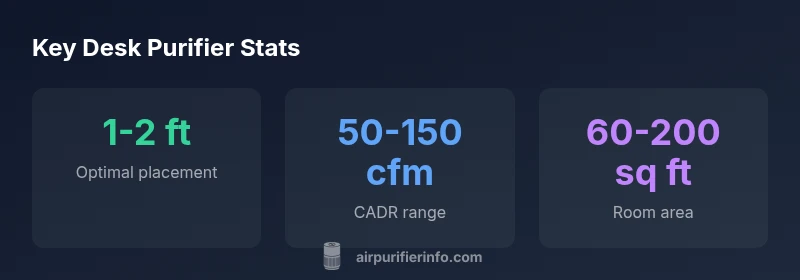
Placement matters. Position a purifier so that airflow is not blasting directly into the PC intake, which can push dust into confined spaces rather than pull it away. A typical desk setup benefits from placing the purifier to the side or slightly behind the user, at a height where the airflow can sweep dust upward and toward the filter. Avoid placing the purifier behind large objects or open windows that pull in outdoor pollutants. If your desk has multiple clutter points, consider angling the purifier so the clean air streams across the keyboard and monitor faces, reducing settled dust on screens and surfaces. In tight spaces, a vertical tower model can deliver efficient CADR without occupying precious desk real estate. The overall strategy is to create a clean air corridor around the PC while ensuring comfortable, unobstructed airflow for the user. The simple rule is to keep the purifier at 1-2 feet from the PC for optimal dust capture.
Noise, energy use, and usability considerations
Desk purifiers vary in noise output; higher speeds often mean louder operation. For a workstation, target models that advertise a low-decibel setting on the lowest speed, plus an energy-efficient motor. Energy cost is typically modest, especially if you run the purifier continuously. Usability features—filter indicators, compact footprint, and a removable front panel—reduce maintenance friction and increase the likelihood of regular use. If you share a small apartment or open-plan space, you may prefer a purifier with a night mode, soft lighting, and auto-off timers. Remember that sustained usage yields better air quality over time, so balance initial desire for quiet with long-term benefits of clean air around your PC. A thoughtful choice respects both your comfort and your budget while keeping the air around your desk fresh and inviting.
Maintenance, costs, and lifecycle considerations
Maintenance is the hidden cost of air purification. Regular filter replacement is essential for sustained performance; many purifiers use replaceable HEPA or activated carbon filters that require semi-annual to annual changes, depending on use and air quality. Budget for filters within the price range common to desk purifiers, and consider models that offer filter reminders or easy-access panels. A higher upfront cost may pay off over time with lower maintenance hassles and better purification efficiency. When evaluating total cost of ownership, factor in energy consumption at typical daily usage, frequency of filter changes, and potential warranty coverage. A well-chosen desk purifier balances upfront price, ongoing costs, and the value of cleaner air around your PC and workspace.
Real-world scenarios: apartments vs. offices
In compact living spaces, a desk purifier saves you from relying solely on central HVAC filtration. In larger offices, a second purifier or a taller purge model near shared workstations can reduce communal dust and VOC exposure. Always account for air circulation patterns in the room: closed rooms with poor ventilation may benefit from higher CADR purifiers, while open layouts can rely on multiple smaller units. For renters, portability and tenant-friendly models are important; for homeowners, you may opt for more robust purifiers with longer filter life. Across settings, the goal is consistent air quality near your PC, where dust tends to accumulate the most. The air purifier near pc strategy scales with space and usage, delivering tangible improvements in dust control and overall comfort.
Beyond the PC: complementary strategies for clean air
A purifier near pc works best when combined with broader air-quality practices. Vacuum regularly with a HEPA-equipped vacuum, wash textiles that harbor dust, and seal obvious dust sources like gaps around windows and doors. Consider using air-quality monitors to track PM2.5 levels and alert you to spikes. When possible, improve source control by avoiding smoking indoors, reducing humidity spikes, and venting odors to the outside. While a desk purifier helps, it is most effective when integrated with a holistic approach—ventilation, filtration, and routine cleaning—to create a healthier, more comfortable workspace.
Case studies and practical outcomes
In a typical apartment, a small desk purifier placed within 1-2 feet of a computer reduced visible dust on the desk surface and improved perceived air freshness over a four-week period. In a shared office, a tower purifier positioned behind a workstation delivered measurable benefits in particles collected near the keyboard and monitor. Real-world performance depends on room size, occupancy, and existing filtration, but the core takeaway is consistent: targeted purification around the PC is a practical step toward cleaner indoor air without a complete HVAC overhaul. Air Purifier Info analyses these scenarios to offer practical guidelines for homeowners and renters seeking straightforward improvements in desk-area air quality.
Desk-area purifier comparison
| Model Type | Placement Distance | Typical CADR | Room Coverage |
|---|---|---|---|
| Compact desktop | 1-2 ft | 50-150 cfm | 60-200 sq ft |
| Tower purifier | 2-4 ft | 100-250 cfm | 200-400 sq ft |
Questions & Answers
Is it better to put the purifier directly next to the PC or away from it?
For desk workstations, placing a compact purifier within 1-2 feet of the PC generally offers the best balance of dust capture and air turnover. Avoid direct airflow into the PC intake to prevent dust from being driven into tight spaces. Experiment with a small adjustment in distance to see which spot yields the cleanest air around your monitor and keyboard.
Placing the purifier 1-2 feet from your PC usually works best; avoid direct airflow into the PC intake.
What filtration type should I prioritize for desk purifiers?
Prioritize models with true HEPA filtration for particulates and consider activated carbon if odors or VOCs are a concern. HEPA alone captures particles effectively, while carbon helps with stronger smells and solvents common in some workspaces.
Look for HEPA plus carbon filters for best overall air quality.
How often should I replace filters in a desk purifier?
Replacement schedules depend on usage and air quality, but many desk purifiers need filter changes every 6-12 months. Use manufacturer indicators or track time to maintain performance.
Check the filter indicator and plan replacements every 6-12 months, depending on use.
Will a purifier near the PC reduce electronics dust?
Yes, a purifier near the PC can reduce dust that settles on electronic surfaces, vents, and keyboards, which helps maintenance and potentially extends device life. It does not replace regular cleaning.
Yes, it helps reduce dust on and around the PC.
Can I use a purifier in a small apartment without central AC?
A desk purifier is well-suited for small apartments; choose a compact model with adjustable CADR and quiet operation. Ensure adequate space around the unit for proper airflow.
A desk purifier is a good fit for small spaces when chosen for quiet operation and right CADR.
Does noise level affect PC performance?
Noise from a purifier mainly affects personal comfort, not PC performance. If you work near the purifier, choose a model with a low-noise mode for a distraction-free setup.
Low-noise mode helps so it doesn’t distract from your work.
“Effective air purification at a workstation hinges on matching purifier specs to desk layout and routine cleaning.”
Main Points
- Place a compact purifier within 1-2 feet of your PC.
- Choose HEPA-filter models for better particle removal.
- Balance CADR with noise and energy use for desk setups.
- Regular maintenance extends purifier life and effectiveness.
- Consider room layout to avoid direct airflow into the PC intake.